# Welcome to Dedot

Dedot is the next-generation JavaScript client for [Polkadot](https://polkadot.com) and [Polkadot SDK-based](https://polkadot.com/platform/sdk/) networks.

Designed to elevate the dapp development experience, Dedot is built & optimized to be lightweight and tree-shakable, offering precise Types & APIs suggestions for individual Polkadot SDK-based blockchains and ink! Smart Contracts. Dedot also helps dapps efficiently connect to multiple chains simultaneously as we head toward a seamless multi-chain future.

### Features

* Small bundle size, tree-shakable (no more `bn.js` or wasm blob)
* Typesafe APIs for [on-chain interactions](https://docs.dedot.dev/client-api) & [smart contracts](https://docs.dedot.dev/ink-smart-contracts)
* Build on top of both the [new](https://paritytech.github.io/json-rpc-interface-spec/introduction.html) & [legacy](https://github.com/w3f/PSPs/blob/master/PSPs/drafts/psp-6.md) (\*deprecated soon) JSON-RPC APIs
* Support light clients (e.g: [smoldot](https://github.com/smol-dot/smoldot))
* Using native TypeScript type system for [scale-codec](https://docs.substrate.io/reference/scale-codec/)
* Compatible with [`@polkadot/extension`](https://github.com/polkadot-js/extension)-based wallets (SubWallet, Talisman...)
* Fully-typed low-level JSON-RPC client for advanced usage
* Similar API-style with `@polkadot/api`, easy and fast migration
* Support Metadata V14, V15, V16 (latest)
* Metadata optimization (caching, compact mode 🔜)
* ... and a lot more 🔜

### How to get started

<table data-view="cards"><thead><tr><th></th><th></th><th data-hidden data-card-cover data-type="files"></th><th data-hidden></th><th data-hidden data-card-target data-type="content-ref"></th></tr></thead><tbody><tr><td><strong>Installation</strong></td><td>Install <code>dedot</code> packages &#x26; setup your projects</td><td></td><td></td><td><a href="getting-started/installation">installation</a></td></tr><tr><td><strong>Connecting to network</strong></td><td>Connect &#x26; interact with networks</td><td></td><td></td><td><a href="getting-started/connect-to-network">connect-to-network</a></td></tr><tr><td><strong>Clients &#x26; Providers</strong></td><td>Learn more about Clients &#x26; Providers API</td><td></td><td></td><td><a href="clients-and-providers">clients-and-providers</a></td></tr><tr><td><strong>ink! Smart Contracts</strong></td><td>Deploy &#x26; tnteract with ink! smart contracts</td><td></td><td></td><td><a href="ink-smart-contracts">ink-smart-contracts</a></td></tr><tr><td><strong>Runtime upgrades</strong></td><td>Prepare your dapps for the next runtime upgrades</td><td></td><td></td><td><a href="runtime-upgrades">runtime-upgrades</a></td></tr><tr><td><strong>Utilities</strong></td><td>Utility functions to work with hex, hash, Uint8Array...</td><td></td><td></td><td><a href="utilities">utilities</a></td></tr></tbody></table>

### Join the community

* Join [Dedot Telegram](https://t.me/JoinDedot) to get supports and project updates
* Follow the creator of Dedot - [@realsinzii](https://x.com/realsinzii) on X
* Github repository: [dedotdev/dedot](https://github.com/dedotdev/dedot)

### Acknowledgment

Dedot takes a lot of inspirations from project [`@polkadot/api`](https://github.com/polkadot-js/api). A big thank to all the maintainers/contributors of this awesome library.

Funded by [Web3 Foundation Grants Program](https://grants.web3.foundation/).


# Why Dedot?

The idea of building Dedot was conceived & motivated from our frustration of building Dapps in the Polkadot ecosystem using `@polkadot/api` (pjs). `@polkadot/api` is a good library and was built by the great minds behind it. But over the years, its limitations haven’t been addressed yet, and this hinders developers from creating optimal Dapps for the Polkadot ecosystem and makes it really hard to onboard new developers to the ecosystem.

{% hint style="info" %}
Please refer to the [original post](https://forum.polkadot.network/t/introducing-dedot-a-delightful-javascript-client-for-polkadot-substrate-based-blockchains/8956) to introduce Dedot on Polkadot forum for more detailed information on why we build Dedot.
{% endhint %}

### Limitations of [Polkadot.js API](https://github.com/polkadot-js/api) (@polkadot/api)

* Large bundle-size (`wasm` & `bn.js` & unused type defs)
* High memory consumption
* Limitations in Types & APIs suggestions for individual chains

### Dedot comes to address those issues

* Small bundle-size and tree-shakable
* Consume Less memory
* Types & APIs suggestion/auto-complete for individual Substrate-based chains

### Dedot also comes with more & more features

* Native TypeScript type system for scale-codec
* Adopted latest changes in metadata V14 & V15
* Build on top of new JSON-RPC specs (and the legacy as well but deprecated soon)
* Support light clients (smoldot)
* Typed APIs ink! smart contracts
* Fully typed low level JSON-RPC client
* A builtin mechanism to cache metadata
* Compact Metadata 🔜
* XCM utilities 🔜
* React Native supports 🔜

... and a lot more toolings around Dedot to come.


# Getting started


# Installation

Let's install Dedot to your project and start connecting to blockchain networks

### Install `dedot` package

Dedot provides an umbrella package named `dedot`, it's the only package you need to install to access to most of the primitives & APIs when you're working with Dedot.

{% tabs %}
{% tab title="npm" %}

```sh
npm i dedot
```

{% endtab %}

{% tab title="yarn" %}

```sh
yarn add dedot
```

{% endtab %}

{% tab title="pnpm" %}

```sh
pnpm add dedot
```

{% endtab %}
{% endtabs %}

### Enable auto-completion/IntelliSense

Each Substrate-based blockchain has their own set of Data Types & APIs to interact with, so being aware of those Types & APIs when working with a blockchain will greatly improve the overall development experience. Dedot exposes TypeScript's Types & APIs for each individual Substrate-based blockchain via [`ChainApi`](https://github.com/dedotdev/chaintypes/blob/main/packages/chaintypes/src/index.ts) interfaces, we recommend using TypeScript for your project to have the best experience.

Types & APIs for each known Substrate-based blockchains are defined in package [`@dedot/chaintypes`](https://github.com/dedotdev/chaintypes)

{% tabs %}
{% tab title="npm" %}

```sh
npm i -D @dedot/chaintypes
```

{% endtab %}

{% tab title="yarn" %}

```sh
yarn add -D @dedot/chaintypes
```

{% endtab %}

{% tab title="pnpm" %}

```sh
pnpm add -D @dedot/chaintypes
```

{% endtab %}
{% endtabs %}

Make sure to install `@dedot/chaintypes` as a `dev dependency`.

### Next

After setting up your project & installing all the necessary packages, let's start connecting to a blockchain network and have some fun!


# Connect to network

After setting up your project & installing `dedot` packages, let's connect to the network to make some on-chain interactions. You can connect to the network using a WebSocket (`wss://`) connection or via light client ([smoldot](https://www.npmjs.com/package/smoldot)).

#### Initializing `DedotClient` and interact with `Polkadot` network

{% tabs %}
{% tab title="WebSocket" %}

```typescript
import { DedotClient, WsProvider } from 'dedot';
import type { PolkadotApi } from '@dedot/chaintypes';

// Initialize providers & clients
const provider = new WsProvider('wss://rpc.polkadot.io');
const client = await DedotClient.new<PolkadotApi>(provider);

// Call rpc `state_getMetadata` to fetch raw scale-encoded metadata and decode it.
const metadata = await client.rpc.state_getMetadata();
console.log('Metadata:', metadata);

// Query on-chain storage
const balance = await client.query.system.account(<address>);
console.log('Balance:', balance);

// Subscribe to on-chain storage changes
const unsub = await client.query.system.number((blockNumber) => {
  console.log(`Current block number: ${blockNumber}`);
});

// Get pallet constants
const ss58Prefix = client.consts.system.ss58Prefix;
console.log('Polkadot ss58Prefix:', ss58Prefix);

// Call runtime api
const pendingRewards = await client.call.nominationPoolsApi.pendingRewards(<address>)
console.log('Pending rewards:', pendingRewards);

// Unsubcribe to storage changes & disconnect from the network
// await unsub();
// await client.disconnect();
```

{% endtab %}

{% tab title="Smoldot" %}
Preparing a `chainSpec.json` file for the network that you want to connect to, you can find the chain spec for well-known chains by installing `@dedot/chain-specs` package.

```sh
npm i @dedot/chain-specs # or via yarn, pnpm
```

Next, initialize `SmoldotProvider` and `DedotClient` instances to connect to network

<pre class="language-typescript"><code class="lang-typescript"><strong>import { DedotClient, SmoldotProvider } from 'dedot';
</strong>import type { PolkadotApi } from '@dedot/chaintypes';
import { start } from 'dedot/smoldot';

// import `polkadot` chain spec to connect to Polkadot
import { polkadot } from '@dedot/chain-specs'

// Start smoldot instance &#x26; initialize a chain
const smoldot = start();
const chain = await smoldot.addChain({ chainSpec: polkadot });

// Initialize providers &#x26; clients
const provider = new SmoldotProvider(chain);
const client = await DedotClient.new&#x3C;PolkadotApi>(provider);

<strong>// Call rpc `state_getMetadata` to fetch raw scale-encoded metadata and decode it.
</strong>const metadata = await client.rpc.state_getMetadata();
console.log('Metadata:', metadata);

// Query on-chain storage
const balance = await client.query.system.account(&#x3C;address>);
console.log('Balance:', balance);


// Subscribe to on-chain storage changes
const unsub = await client.query.system.number((blockNumber) => {
  console.log(`Current block number: ${blockNumber}`);
});

// Get pallet constants
const ss58Prefix = client.consts.system.ss58Prefix;
console.log('Polkadot ss58Prefix:', ss58Prefix);

// Call runtime api
const pendingRewards = await client.call.nominationPoolsApi.pendingRewards(&#x3C;address>)
console.log('Pending rewards:', pendingRewards);

// await unsub();
// await client.disconnect();
</code></pre>

{% endtab %}

{% tab title="Smoldot (via WebWorker)" %}
Preparing a `chainSpec.json` file for the network that you want to connect to, you can find the chain spec for well-known chains by installing `@dedot/chain-specs` package.

```sh
npm i @dedot/chain-specs # or via yarn, pnpm
```

Start a smoldot client within a WebWorker, then initialize `SmoldotProvider` & `DedotClient` to connect to the network

```typescript
import { DedotClient, SmoldotProvider } from 'dedot';
import { startWithWorker } from 'dedot/smoldot/with-worker';

// Import & initialize the smoldot worker
import SmoldotWorker from 'dedot/smoldot/worker?worker';

// Or initialize it the Worker constructor
// const SmoldotWorker = new Worker(
//   new URL('dedot/smoldot/worker', import.meta.url),
//   { type: 'module' }
// )

// Start smoldot instance within a WebWorker
const smoldot = startWithWorker(new SmoldotWorker());

// Dynamically import Polkadot chain spec
const { chainSpec } = await import('@dedot/chain-specs/polkadot');

// Initialize a chain
const chain = smoldot.addChain({ chainSpec });

// Initialize provider & client
const provider = new SmoldotProvider(chain);
const client = await DedotClient.new<PolkadotApi>(provider);

// Call rpc `state_getMetadata` to fetch raw scale-encoded metadata and decode it.
const metadata = await client.rpc.state_getMetadata();
console.log('Metadata:', metadata);

// Query on-chain storage
const balance = await client.query.system.account(<address>);
console.log('Balance:', balance);


// Subscribe to on-chain storage changes
const unsub = await client.query.system.number((blockNumber) => {
  console.log(`Current block number: ${blockNumber}`);
});

// Get pallet constants
const ss58Prefix = client.consts.system.ss58Prefix;
console.log('Polkadot ss58Prefix:', ss58Prefix);

// Call runtime api
const pendingRewards = await client.call.nominationPoolsApi.pendingRewards(<address>)
console.log('Pending rewards:', pendingRewards);

// await unsub();
// await client.disconnect();
```

{% endtab %}
{% endtabs %}

Note, for instruction on how to connect to a parachain, check out [this example](https://github.com/dedotdev/dedot/blob/main/examples/scripts/smoldot/connect-parachain.ts) on Dedot repository.

#### Pick `ChainApi` interface for the network you're working with

We recommend specifying the [`ChainApi`](https://github.com/dedotdev/chaintypes/blob/main/packages/chaintypes/src/index.ts) interface (e.g: [`PolkadotApi`](https://github.com/dedotdev/chaintypes/blob/main/packages/chaintypes/src/polkadot/index.d.ts) in the example above) of the chain that you want to interact with. This enable Types & APIs suggestion/autocompletion for that particular chain (via IntelliSense). If you don't specify a `ChainApi` interface, the default [`SubstrateApi`](https://github.com/dedotdev/dedot/blob/main/packages/api/src/chaintypes/substrate/index.ts) interface will be used.

```typescript
import { DedotClient, WsProvider } from 'dedot';
import type { PolkadotApi, KusamaApi, MoonbeamApi, AstarApi } from '@dedot/chaintypes';

const polkadotClient = await DedotClient.new<PolkadotApi>(new WsProvider('wss://rpc.polkadot.io'));
const kusamaClient = await DedotClient.new<KusamaApi>(new WsProvider('wss://kusama-rpc.polkadot.io'));
const moonbeamClient = await DedotClient.new<MoonbeamApi>(new WsProvider('wss://wss.api.moonbeam.network'));
const astarClient = await DedotClient.new<AstarApi>(new WsProvider('wss://rpc.astar.network'));
const genericClient = await DedotClient.new(new WsProvider('ws://localhost:9944'));
```

{% hint style="info" %}
If you don't find the `ChainApi` for the network that you're working with in [the list](https://github.com/dedotdev/chaintypes/blob/main/packages/chaintypes/src/index.ts), you generate the `ChainApi` (Types & APIs) for it using [`dedot` cli](https://docs.dedot.dev/cli).

```sh
# Generate ChainApi interface for Polkadot network via rpc endpoint: wss://rpc.polkadot.io
npx dedot chaintypes -w wss://rpc.polkadot.io
```

Or open a [pull request](https://github.com/dedotdev/chaintypes/pulls) to add your favorite Substrate-based network to the `@dedot/chaintypes` repo.
{% endhint %}

#### Caching metadata

In the bootstrapping/intialization process, clients have to download metadata from the network to prepare for on-chain interactions. Downloading a big metadata blob can take a large amount of time, depending on the JSON-RPC server that dapps are connecting to, it might potentially take longer if the connection is via a light client. For example, downloading Polkadot metadata (\~500 kB) can take up to 500ms or \~1s or even longer depends on the network conditions.

Clients have an option to cache the downloaded metadata and using it again next time the dapp is loaded without having to download again. By default, Dedot save the cached metadata to `localStorage` in browser environment.

Enable caching metadata when initialize Dedot's clients:

<pre class="language-typescript"><code class="lang-typescript"><strong>import { DedotClient, WsProvider } from 'dedot';
</strong>import type { PolkadotApi } from '@dedot/chaintypes';

// Initialize providers &#x26; clients
const provider = new WsProvider('wss://rpc.polkadot.io');
const client = await DedotClient.new&#x3C;PolkadotApi>({ provider, cacheMetadata: true });
</code></pre>

<details>

<summary>Add a custom caching storage?</summary>

You can also add a custom cache storage for different environments:

```typescript
import { DedotClient, WsProvider } from 'dedot';
import type { PolkadotApi } from '@dedot/chaintypes';
import type { IStorage } from '@dedot/storage';

// Implement CustomStorage
class CustomStorage implements IStorage {
   // implementation details
}

// Initialize providers & clients
const provider = new WsProvider('wss://rpc.polkadot.io');
const client = await DedotClient.new<PolkadotApi>({
   provider,
   cacheMetadata: true,
   cacheStorage: new CustomStorage()
});
```

</details>

#### Dedot supports CommonJS

Dedot supports `CommonJS`, so you can use `require` to import primitives & APIs.

```typescript
const { DedotClient, WsProvider } = require('dedot');

const provider = new WsProvider('wss://rpc.polkadot.io');
const client = await DedotClient.new(provider);
```

#### Connect to network via legacy JSON-RPC APIs

If the JSON-RPC server doesn't support [new JSON-RPC APIs](https://paritytech.github.io/json-rpc-interface-spec/introduction.html) yet, you can connect to the network using the legacy JSON-RPC APIs. Dedot provides a unified client interface for both new and legacy JSON-RPC specs.

```typescript
import { DedotClient, WsProvider } from 'dedot';
import type { PolkadotApi } from '@dedot/chaintypes';

const provider = new WsProvider('wss://rpc.polkadot.io');

// Option 1: Using DedotClient.legacy()
const client = await DedotClient.legacy<PolkadotApi>(provider);

// Option 2: Using DedotClient.new() with rpcVersion option
const client = await DedotClient.new<PolkadotApi>({
  provider,
  rpcVersion: 'legacy'
});
```

#### When to use JSON-RPC v2 or legacy?

{% hint style="info" %}
The [new JSON-RPC APIs](https://paritytech.github.io/json-rpc-interface-spec/introduction.html) are not well implemented/unstable for RPC Nodes using Polkadot-SDK version < `1.11.0`, so one should connect to the network using `DedotClient.legacy()` or `DedotClient.new({ rpcVersion: 'legacy' })` in such cases. For nodes using Polkadot-SDK version >= `1.11.0`, it's recommended to use `DedotClient.new()` to connect to the network (which uses JSON-RPC v2 by default).

You can easily check the current node's implementation version by calling RPC `system_version`

```typescript
const version = await client.rpc.system_version();
```

{% endhint %}

{% hint style="info" %}
It's recommended to use `DedotClient.new()` for better performance when you connect to the network using [smoldot](https://www.npmjs.com/package/smoldot) light client via [`SmoldotProvider`](https://github.com/dedotdev/dedot/blob/main/packages/providers/src/smoldot/SmoldotProvider.ts).
{% endhint %}


# @polkadot/api -> dedot

`dedot` is inspired by `@polkadot/api`, so both are sharing some common patterns and api styling (eg: api syntax `api.<type>.<module>.<section>`). Although we have experimented some other different api stylings but to our findings and development experience, we find that the api style of `@polkadot/api` is very intuiative and easy to use. We decide the use a similar api styling with `@polkadot/api`, this also helps the migration from `@polkadot/api` to `dedot` easier & faster.

While the api style are similar, but there're also some differences you might need to be aware of when switching to use `dedot`.

### Initialize clients

* `@polkadot/api`

```typescript
import { ApiPromise, WsProvider } from '@polkadot/api';

const provider = new WsProvider('wss://rpc.polkadot.io');
const client = await ApiPromise.create({ provider });
```

* `dedot`

```typescript
import { DedotClient, WsProvider } from 'dedot';
import type { PolkadotApi } from '@dedot/chaintypes';

const provider = new WsProvider('wss://rpc.polkadot.io');
const client = await DedotClient.new<PolkadotApi>(provider); // or DedotClient.create(...) if you prefer

// OR if you want to put additional api options when initialize the client
const client = await DedotClient.new<PolkadotApi>({ provider, cacheMetadata: true });
```

{% hint style="info" %}

1. `dedot` only supports provider can make subscription request (e.g: via WebSocket or light client).&#x20;
2. We recommend specifying the `ChainApi` interface (e.g: [`PolkadotApi`](https://github.com/dedotdev/chaintypes/blob/main/packages/chaintypes/src/polkadot/index.d.ts) in the example above) of the chain that you want to interact with. This enable apis & types suggestion/autocompletion for that particular chain (via IntelliSense). If you don't specify a`ChainApi` interface, the default [`SubstrateApi`](https://github.com/dedotdev/dedot/blob/a762faf8f6af40d3e4ef163bd538b270a5ca31e8/packages/chaintypes/src/substrate/index.d.ts) interface will be used.
3. `WsProvider` from `dedot` and `@polkadot/api` are different, they cannot be used interchangeable.
   {% endhint %}

### Type system

Unlike `@polkadot/api` where data are wrapped inside a [codec types](https://polkadot.js.org/docs/api/start/types.basics), so we always need to unwrap the data before using it (e.g: via `.unwrap()`, `.toNumber()`, `.toString()`, `.toJSON()` ...). `dedot` leverages the native TypeScript type system to represent scale-codec types, so you can use the data directly without extra handling/unwrapping.

{% hint style="info" %}
More information on how Dedot lerverage Typescript type system to represent [scale-codec](https://docs.substrate.io/reference/scale-codec/) (Rust) data types can be found [here](https://docs.dedot.dev/type-system).
{% endhint %}

Below is a few examples showing the differences between `dedot` & `@polkadot/api` when accessing the on-chain data/information.

Example 1:

```typescript
const runtimeVersion = client.consts.system.version;

// @polkadot/api
const specName: string = runtimeVersion.toJSON().specName; // OR runtimeVersion.specName.toString()

// dedot
const specName: string = runtimeVersion.specName;
```

Example 2:

```typescript
const balance = await client.query.system.account(<address>);

// @polkadot/api
const freeBalance: bigint = balance.data.free.toBigInt();

// dedot
const freeBalance: bigint = balance.data.free;
```

Example 3:

```typescript
// @polkadot/api
const proposalBondMaximum: bigint | undefined = client.consts.treasury.proposalBondMaximum.unwrapOr(undefined)?.toBigInt();

// dedot
const proposalBondMaximum: bigint | undefined = client.consts.treasury.proposalBondMaximum;
```


# Packages structure

Dedot's source code is splitted into multiple packages for different purposes, all of the packages and their purposes are listing in the table below.

### Packages

<table><thead><tr><th width="219">Name</th><th>Description</th></tr></thead><tbody><tr><td><a href="https://github.com/dedotdev/dedot/tree/main/packages/api">@dedot/api</a></td><td>High-level abstraction apis (clients, API executors...)</td></tr><tr><td><a href="https://github.com/dedotdev/dedot/tree/main/packages/providers">@dedot/providers</a></td><td>Providers for connection to JSON-RPC servers (WsProvider, SmoldotProvider)</td></tr><tr><td><a href="https://github.com/dedotdev/dedot/tree/main/packages/types">@dedot/types</a></td><td>Generic shared types across the packages</td></tr><tr><td><a href="https://github.com/dedotdev/dedot/tree/main/packages/runtime-specs">@dedot/runtime-specs</a></td><td>Explicit Runtime API definitions to use for chains only supports Metadata V14</td></tr><tr><td><a href="https://github.com/dedotdev/dedot/tree/main/packages/shape">@dedot/shape</a></td><td>Basic codecs/shapes for scale-codec encode/decode</td></tr><tr><td><a href="https://github.com/dedotdev/dedot/tree/main/packages/contracts">@dedot/contracts</a></td><td>APIs to interact with ink! smart contracts</td></tr><tr><td><a href="https://github.com/dedotdev/dedot/tree/main/packages/codecs">@dedot/codecs</a></td><td>Known codecs for generic purposes ($Metadata, $AccountId32, $Extrinsic ...)</td></tr><tr><td><a href="https://github.com/dedotdev/dedot/tree/main/packages/utils">@dedot/utils</a></td><td>Useful utility functions</td></tr><tr><td><a href="https://github.com/dedotdev/dedot/tree/main/packages/storage">@dedot/storage</a></td><td>Storage API for different purposes (caching, ...)</td></tr><tr><td><a href="https://github.com/dedotdev/dedot/tree/main/packages/codegen">@dedot/codegen</a></td><td>Types &#x26; APIs generation engine for chaintypes &#x26; ink! smart contracts</td></tr><tr><td><a href="https://github.com/dedotdev/dedot/tree/main/packages/cli">@dedot/cli</a></td><td>Dedot's CLI</td></tr><tr><td><a href="https://github.com/dedotdev/dedot/tree/main/packages/merkleized-metadata">@dedot/merkleized-metadata</a></td><td><a href="https://polkadot-fellows.github.io/RFCs/approved/0078-merkleized-metadata.html#rfc-0078-merkleized-metadata">RFC-0078</a> Implementation, with utilities to calculate metadata hash/digest &#x26; proof for extrinsic, extrinsic payload... </td></tr><tr><td><a href="https://github.com/dedotdev/dedot/tree/main/packages/dedot">dedot</a></td><td>Umbrella package re-exporting primitives &#x26; APIs from other packages, including subpath packages</td></tr></tbody></table>

### `dedot` subpath packages

By default `dedot` package only re-exports primitives from `@dedot/api`, `@dedot/providers`, `@dedot/shape`, giving you enough APIs to connect to the network & making on-chain interactions. It also comes with a few subpath packages giving access to APIs to working with ink! contracts, known-codecs, utility functions...

<table><thead><tr><th width="250">Name</th><th>Description</th></tr></thead><tbody><tr><td><code>dedot</code></td><td>Re-exports <code>@dedot/api</code>, <code>@dedot/providers</code> &#x26; <code>@dedot/shape</code> packages</td></tr><tr><td><code>dedot/contracts</code></td><td>Re-exports <code>@dedot/contracts</code> package</td></tr><tr><td><code>dedot/codecs</code></td><td>Re-exports <code>@dedot/codecs</code> package</td></tr><tr><td><code>dedot/utils</code></td><td>Re-exports <code>@dedot/utils</code> package</td></tr><tr><td><code>dedot/types</code></td><td>Re-exports <code>@dedot/types</code> package</td></tr><tr><td><code>dedot/types/json-rpc</code></td><td>Re-exports <code>@dedot/types/json-rpc</code> package for Substrate JSON-RPC API types information (both new &#x26; legacy)</td></tr><tr><td><code>dedot/runtime-specs</code></td><td>Re-exports <code>@dedot/runtime-specs</code> package</td></tr><tr><td><code>dedot/shape</code></td><td>Re-exports <code>@dedot/shape</code> package</td></tr><tr><td><code>dedot/merkleized-metadata</code></td><td>Re-exports <code>@dedot/merkleized-metadata</code> package</td></tr></tbody></table>


# Clients & Providers


# DedotClient

Dedot provides a unified client interface for interacting with Substrate-based blockchains. The main entry point is `DedotClient`, which offers powerful APIs that abstract over the complexities of on-chain interactions (queries, transactions, subscriptions) and supports both modern and legacy JSON-RPC specifications.

#### DedotClient

`DedotClient` is the unified client interface for interacting with Substrate-based blockchains. It provides a consistent API regardless of whether you're using the [new JSON-RPC v2 specification](https://paritytech.github.io/json-rpc-interface-spec/introduction.html) or the [legacy JSON-RPC specification](https://github.com/w3f/PSPs/blob/master/PSPs/drafts/psp-6.md).

**Interface Overview**

```typescript
interface DedotClient<ChainApi> {
  // Connection
  status: ConnectionStatus;              // Current connection status
  connect(): Promise<this>;              // Connect to the network
  disconnect(): Promise<void>;           // Disconnect from the network

  // Chain Information
  genesisHash: Hash;                     // Genesis hash of the connected chain
  runtimeVersion: SubstrateRuntimeVersion; // Current runtime version
  metadata: Metadata;                    // Chain metadata
  registry: PortableRegistry;            // Type registry for encoding/decoding

  // Chain Spec
  chainSpec: {
    chainName(): Promise<string>;        // Get chain name
    genesisHash(): Promise<HexString>;   // Get genesis hash
    properties(): Promise<Properties>;   // Get chain properties (token symbol, decimals, etc.)
  };

  // Block Explorer
  block: {
    best(): Promise<BlockInfo>;                            // Get current best block
    best(callback: (block: BlockInfo) => void): () => void; // Subscribe to best blocks
    finalized(): Promise<BlockInfo>;                       // Get current finalized block
    finalized(callback: (block: BlockInfo) => void): () => void; // Subscribe to finalized blocks
    header(hash: BlockHash): Promise<Header>;              // Get block header
    body(hash: BlockHash): Promise<HexString[]>;           // Get block body (extrinsics)
  };

  // On-chain Interactions
  rpc: ChainApi['rpc'];                  // Raw JSON-RPC method access
  query: ChainApi['query'];              // Storage queries
  consts: ChainApi['consts'];            // Pallet constants
  call: ChainApi['call'];                // Runtime API calls
  tx: ChainApi['tx'];                    // Transaction builder
  events: ChainApi['events'];            // Events API
  errors: ChainApi['errors'];            // Errors API
  view: ChainApi['view'];                // View functions (Metadata V16+)

  // Utilities
  at(hash: BlockHash): Promise<ISubstrateClientAt>;        // Get an instance at a specific block for querying historical state
  getRuntimeVersion(): Promise<SubstrateRuntimeVersion>;   // Get runtime version with metadata sync
  setSigner(signer?: InjectedSigner): void;                // Set transaction signer
  sendTx(tx: HexString | Extrinsic, callback?: Callback): TxUnsub; // Broadcast transaction
  queryMulti(queries: Query[], callback?: Callback): Promise<any[]>; // Query multiple storage items

  // Events
  on(event: ApiEvent, handler: EventHandlerFn): () => void;   // Subscribe to client events
  once(event: ApiEvent, handler: EventHandlerFn): () => void; // Subscribe once
  off(event: ApiEvent, handler?: EventHandlerFn): this;       // Unsubscribe
}
```

**Usage Example**

```typescript
import { DedotClient, WsProvider } from 'dedot';
import type { PolkadotApi } from '@dedot/chaintypes';

// Initialize provider
const provider = new WsProvider('wss://rpc.polkadot.io');

// JSON-RPC v2 (default, recommended for Polkadot-SDK >= 1.11.0)
const client = await DedotClient.new<PolkadotApi>(provider);

// Get current best runtime version
const currentBestRuntimeVersion = await client.getRuntimeVersion();

// Execute JSON-RPC methods
const metadata = await client.rpc.state_getMetadata();

// On-chain interactions
const balance = await client.query.system.account('<address>');
const transferTx = client.tx.balances.transferKeepAlive('<dest_address>', 2_000_000_000_000n);

// Fetch ChainSpec information
const chainName = await client.chainSpec.chainName();
const genesisHash = await client.chainSpec.genesisHash();
const chainProps = await client.chainSpec.properties();

// Access block data via BlockExplorer
const currentBestBlock = await client.block.best();
const currentFinalizedBlock = await client.block.finalized();

// Subscribe to finalized blocks
const unsub = client.block.finalized((block) => {
  console.log(`Finalized block: ${block.number}, hash: ${block.hash}`);
});

// Get block header and body
const header = await client.block.header(currentBestBlock.hash);
const body = await client.block.body(currentBestBlock.hash);

// Get pallet constants
const ss58Prefix = client.consts.system.ss58Prefix;

// Call runtime APIs
const pendingRewards = await client.call.nominationPoolsApi.pendingRewards('<address>');

// Disconnect when done
// await unsub();
// await client.disconnect();
```

#### Connect to network via legacy JSON-RPC APIs

If the JSON-RPC server doesn't support the new JSON-RPC v2 specification yet (nodes using Polkadot-SDK < 1.11.0), you can connect using legacy JSON-RPC APIs. The `DedotClient` provides a unified interface for both:

```typescript
import { DedotClient, WsProvider } from 'dedot';
import type { PolkadotApi } from '@dedot/chaintypes';

const provider = new WsProvider('wss://rpc.polkadot.io');

// Option 1: Using DedotClient.legacy()
const client = await DedotClient.legacy<PolkadotApi>(provider);

// Option 2: Using DedotClient.new() with rpcVersion option
const client = await DedotClient.new<PolkadotApi>({
  provider,
  rpcVersion: 'legacy'
});
```

{% hint style="info" %}
The same API is available regardless of which JSON-RPC version you use. The only difference is the underlying RPC calls made to the node.
{% endhint %}

For more details on when to use JSON-RPC v2 or legacy, see the Connect to network page.

#### JsonRpcClient (Advanced)

`JsonRpcClient` is a low-level JSON-RPC client for advanced use cases where you need direct access to raw JSON-RPC methods without the high-level abstractions. `DedotClient` extends `JsonRpcClient`, so all `JsonRpcClient` methods are also available on `DedotClient`.

{% hint style="warning" %}
For most use cases, we recommend using `DedotClient` instead of `JsonRpcClient` directly.
{% endhint %}

```typescript
import { JsonRpcClient, WsProvider } from 'dedot';
import type { PolkadotApi } from '@dedot/chaintypes';

// Initialize provider & client
const provider = new WsProvider('wss://rpc.polkadot.io');
const client = await JsonRpcClient.new<PolkadotApi>(provider);

// Check connection status
console.log('Connection status:', client.status);

// Execute JSON-RPC methods directly
const metadata = await client.rpc.state_getMetadata();
const chain = await client.rpc.system_chain();
const nodeVersion = await client.rpc.system_version();

// Submit raw transaction
const txHash = await client.rpc.author_submitExtrinsic('0x...');
```

***

#### Connection Status

Clients track the connection status, accessible via `client.status`:

```typescript
import { ConnectionStatus } from 'dedot';

const status: ConnectionStatus = client.status;
```

Available statuses:

<table><thead><tr><th width="191.50390625">Status</th><th>Description</th></tr></thead><tbody><tr><td><code>connected</code></td><td>The client is connected to the network</td></tr><tr><td><code>disconnected</code></td><td>The client is disconnected from the network</td></tr><tr><td><code>reconnecting</code></td><td>The client is attempting to reconnect to the network</td></tr></tbody></table>

#### Block Explorer API (`client.block`)

The Block Explorer API provides access to block data, allowing you to query and subscribe to best and finalized blocks.

```typescript
// Get current best block
const bestBlock = await client.block.best();
console.log('Best block:', bestBlock.number, bestBlock.hash);

// Get current finalized block
const finalizedBlock = await client.block.finalized();
console.log('Finalized block:', finalizedBlock.number, finalizedBlock.hash);

// Subscribe to best blocks
const unsub = client.block.best((block) => {
  console.log('New best block:', block.number, block.hash);
});

// Subscribe to finalized blocks
const unsub = client.block.finalized((block) => {
  console.log('New finalized block:', block.number, block.hash);
});

// Get block header by hash
const header = await client.block.header(blockHash);
console.log('Block header:', header);

// Get block body (extrinsics) by hash
const body = await client.block.body(blockHash);
console.log('Block extrinsics:', body);
```

The `BlockInfo` object returned contains:

| Property          | Type        | Description                                      |
| ----------------- | ----------- | ------------------------------------------------ |
| `hash`            | `BlockHash` | The block hash                                   |
| `number`          | `number`    | The block number                                 |
| `parent`          | `BlockHash` | The parent block hash                            |
| `runtimeUpgraded` | `boolean`   | Whether a runtime upgrade occurred in this block |

#### Chain Spec API (`client.chainSpec`)

The Chain Spec API provides access to chain information such as the chain name, genesis hash, and chain properties.

```typescript
// Get chain name
const chainName = await client.chainSpec.chainName();
console.log('Chain:', chainName); // e.g., "Polkadot"

// Get genesis hash
const genesisHash = await client.chainSpec.genesisHash();
console.log('Genesis hash:', genesisHash);

// Get chain properties (token symbol, decimals, etc.)
const properties = await client.chainSpec.properties();
console.log('Token symbol:', properties.tokenSymbol);   // e.g., "DOT"
console.log('Token decimals:', properties.tokenDecimals); // e.g., 10
console.log('SS58 prefix:', properties.ss58Format);     // e.g., 0
```

#### Broadcast Transaction API (`client.sendTx`)

The `sendTx` method broadcasts a signed transaction to the network and provides utilities to track its status.

```typescript
// Basic usage with status callback
const unsub = await client.sendTx(txHex, (result) => {
  console.log('Status:', result.status);

  if (result.dispatchError) {
    console.error('Transaction failed:', result.dispatchError);
  }

  if (result.ok) {
    console.log('Transaction successful!');
    console.log('Events:', result.events);
  }
});

// Later, to unsubscribe from status updates
unsub();

// Wait for transaction to be finalized
const result = await client.sendTx(txHex).untilFinalized();
console.log('Finalized at block:', result.blockHash);

// Wait for transaction to be included in best chain block
const result = await client.sendTx(txHex).untilBestChainBlockIncluded();
console.log('Included at block:', result.blockHash);
```

{% hint style="info" %}
For building and signing transactions, use `client.tx.<pallet>.<method>()` which provides a higher-level API with `.signAndSend()` method. The `sendTx` method is useful when you already have a signed transaction hex string.
{% endhint %}

#### Client Events

Clients emit events that you can listen to for handling connection state changes, errors, and runtime upgrades.

```typescript
type ApiEvent = 'connected' | 'disconnected' | 'reconnecting' | 'error' | 'ready' | 'runtimeUpgraded';
```

**Event Handlers**

Each event has a typed handler signature:

```typescript
import { SubstrateRuntimeVersion, BlockInfo } from 'dedot';

// Connection established
client.on('connected', (connectedEndpoint: string) => {
  console.log('Connected to:', connectedEndpoint);
});

// Connection lost
client.on('disconnected', () => {
  console.log('Disconnected from network');
});

// Attempting to reconnect
client.on('reconnecting', () => {
  console.log('Reconnecting...');
});

// Connection error occurred
client.on('error', (error?: Error) => {
  console.error('Connection error:', error);
});

// Client initialization complete
client.on('ready', () => {
  console.log('Client is ready for on-chain interactions');
});

// Runtime upgrade detected
client.on('runtimeUpgraded', (newRuntimeVersion: SubstrateRuntimeVersion, at: BlockInfo) => {
  console.log('Runtime upgraded to:', newRuntimeVersion.specVersion, 'at block:', at.number);
});
```

**Event Methods**

```typescript
// Subscribe to an event
const unsub = client.on('connected', (endpoint) => { /* ... */ });

// Subscribe once (auto-unsubscribes after first emission)
client.once('ready', () => { /* ... */ });

// Unsubscribe from an event
client.off('connected', handler);

// Unsubscribe (using returned function)
unsub();
```

#### DedotClientOptions

When creating a `DedotClient`, you can pass configuration options to customize the client behavior.

| Option                    | Type                                 | Default        | Description                                             |
| ------------------------- | ------------------------------------ | -------------- | ------------------------------------------------------- |
| `provider`                | `JsonRpcProvider`                    | *required*     | The JSON-RPC provider (WsProvider or SmoldotProvider)   |
| `rpcVersion`              | `'v2' \| 'legacy'`                   | `'v2'`         | The JSON-RPC specification version to use               |
| `cacheMetadata`           | `boolean`                            | `false`        | Enable metadata caching to localStorage (browser)       |
| `cacheStorage`            | `IStorage`                           | `localStorage` | Custom storage implementation for metadata caching      |
| `metadata`                | `Record<string, HexString>`          | -              | Pre-loaded metadata to skip download step               |
| `signedExtensions`        | `Record<string, AnySignedExtension>` | -              | Custom signed extensions for the chain                  |
| `runtimeApis`             | `Record<string, RuntimeApiSpec[]>`   | -              | Runtime API specifications (for Metadata V14 chains)    |
| `throwOnUnknownApi`       | `boolean`                            | `true`         | Throw error when accessing unknown APIs                 |
| `hasher`                  | `HashFn`                             | `blake2_256`   | Custom hashing function                                 |
| `signer`                  | `InjectedSigner`                     | -              | Transaction signer instance                             |
| `stalingDetectionTimeout` | `number`                             | `30000`        | Stale connection detection timeout in ms (0 to disable) |

**Example**

```typescript
import { DedotClient, WsProvider } from 'dedot';
import type { PolkadotApi } from '@dedot/chaintypes';

const client = await DedotClient.new<PolkadotApi>({
  provider: new WsProvider('wss://rpc.polkadot.io'),
  rpcVersion: 'v2',
  cacheMetadata: true,
  throwOnUnknownApi: false,
  stalingDetectionTimeout: 60000,  // 60 seconds
});
```


# Providers

Providers are means to provide connection to the network, Dedot comes by default with providers for connection via [WebSocket](https://developer.mozilla.org/en-US/docs/Web/API/WebSockets_API) (`wss://`) and [smoldot](https://www.npmjs.com/package/smoldot) light client. But you can implement your own provider for your own needs.

#### WsProvider

**Initialize from single Websocket endpoint**

```typescript
import { WsProvider } from 'dedot';

// Initialize the provider & connect to the network
const provider = new WsProvider('wss://rpc.polkadot.io');
await provider.connect();

// Fetch the genesis hash
const genesisHash = await provider.send('chain_getBlockHash', [0]);
console.log(genesisHash);

// Subscribe to runtimeVersion changes
await provider.subscribe({
  subname: 'chain_newHead', // subscription name for notification
  subscribe: 'chain_subscribeNewHeads', // subscribe method
  params: [], // params for subscribe method
  unsubscribe: 'chain_unsubscribeNewHeads', // unsubscribe method
}, (error, newHead, subscription) => {
  console.log('newHead', newHead);
});

// Disconnect from the network
await provider.disconnect();
```

**Initialize from a list of endpoints**

`WsProvider` can accept an array of WebSocket endpoints for automatic failover. Endpoints are randomly selected on initial connection, and reconnection attempts exclude previously failed endpoints when possible.

```typescript
import { WsProvider } from 'dedot';

const provider = new WsProvider([
  'wss://rpc.polkadot.io',
  'wss://polkadot-rpc.dwellir.com',
  'wss://polkadot.api.onfinality.io/public-ws'
]);
```

**Initialize from a customized endpoint selector method**

For advanced use-cases, WebSocket endpoint to use can also control by an external endpoint selector method, e.g: a wallet might want to selectively pick a RPC to switch to and display the selected RPC to the UI.

```typescript
import { WsProvider, WsConnectionState } from 'dedot';

const provider = new WsProvider((info: WsConnectionState) => {
  console.log(`Connection attempt ${info.attempt}`);

  return info.attempt >= 3
     ? 'wss://backup.rpc'
     : 'wss://primary.rpc';
});
```

**Disconnect and switch endpoint**

The `disconnect` method accepts an optional `switchEndpoint` flag that allows you to disconnect from the current endpoint and automatically reconnect to a different one.

```typescript
import { WsProvider } from 'dedot';

const provider = new WsProvider([
  'wss://rpc.polkadot.io',
  'wss://polkadot-rpc.dwellir.com',
]);

await provider.connect();

// Normal disconnect - closes connection and cleans up
await provider.disconnect();

// Disconnect and switch endpoint - automatically reconnects to a different endpoint
await provider.disconnect(true); // Provider will auto-reconnect to another endpoint
```

{% hint style="info" %}
When `switchEndpoint` is `true`, the provider automatically reconnects to a different endpoint from the list. When `false` or not provided, the provider performs a normal disconnection with cleanup.
{% endhint %}

#### SmoldotProvider

`SmoldotProvider` take in a parameter of type [`Chain`](https://github.com/smol-dot/smoldot/blob/cde274e628e3f34cf05e1a73a46cf323b6702a94/wasm-node/javascript/src/public-types.ts#L127) from `smoldot`, so before initialize a `SmoldotProvider`, one should install `smoldot` package and following the [instruction](https://github.com/smol-dot/smoldot/tree/main/wasm-node/javascript#example) to instanciate a `Chain` connection to the network.

If you're building a browser dapp, it's highly recommended to setup a [worker](https://github.com/smol-dot/smoldot/tree/main/wasm-node/javascript#usage-with-a-worker) for `smoldot`

1. Install `smoldot`

```sh
npm i smoldot
```

2. Initialize `SmoldotProvider`

```typescript
import { SmoldotProvider } from 'dedot';
import * as smoldot from 'smoldot';
import chainSpec from './polkadot-chainspec.json';

// Start smoldot instance & initialize a chain
const client = smoldot.start();
const chain = await client.addChain({ chainSpec });

// Initialize providers & connect to the network
const provider = new SmoldotProvider(chain);

await provider.connect();

// Fetch the genesis hash
const genesisHash = await provider.send('chain_getBlockHash', [0]);
console.log(genesisHash);

// Subscribe to runtimeVersion changes
await provider.subscribe({
  subname: 'chain_newHead', // subscription name for notification
  subscribe: 'chain_subscribeNewHeads', // subscribe method
  params: [], // params for subscribe method
  unsubscribe: 'chain_unsubscribeNewHeads', // unsubscribe method
}, (error, newHead, subscription) => {
  console.log('newHead', newHead);
});

// Disconnect from the network
await provider.disconnect();
```

#### Add your own custom provider?

Every provider must implement the `JsonRpcProvider` interface, defined as below:

```typescript
type ConnectionStatus = 'connected' | 'disconnected' | 'reconnecting';
type ProviderEvent = ConnectionStatus | 'error'; // | 'timeout';

interface JsonRpcProvider extends IEventEmitter<ProviderEvent> {
  /**
   * The current connection status
   */
  status: ConnectionStatus;

  /**
   * Send a JSON-RPC request,
   * make sure to connect to the provider first before sending requests
   *
   * @param method
   * @param params
   */
  send<T = any>(method: string, params: any[]): Promise<T>;

  /**
   * Make a subscription request,
   * make sure to connect to the provider first before sending requests
   *
   * @param input
   * @param callback
   */
  subscribe<T = any>(
    input: JsonRpcSubscriptionInput,
    callback: JsonRpcSubscriptionCallback<T>,
  ): Promise<JsonRpcSubscription>;

  /**
   * Connect to the provider
   */
  connect(): Promise<this>;

  /**
   * Disconnect from the provider
   */
  disconnect(): Promise<void>;
}
```

One can easily add a custom provider by implementing this interface:

```typescript
// custom-provider.ts
import { JsonRpcProvider } from 'dedot';

export class MyCustomProvider implements JsonRpcProvider {
  // ... implementation details
}

// main.ts
import { DedotClient } from 'dedot';
import { MyCustomProvider } from './custom-provider';

const client = await DedotClient(new MyCustomProvider());
const chain: string = await client.rpc.system_chain();
```

More detailed information about the `JsonRpcProvider` and related types can be found in the [source code](https://github.com/dedotdev/dedot/blob/48d6bec5cfd0e663558b4b1ba02a4ed826e2abb3/packages/providers/src/types.ts#L38).


# Client API


# ChainApi

`ChainApi` interface is a concept that allows Dedot to enable Types & APIs suggestions for any Substrated-based blockchains. Each Substrate-based blockchain has its own `ChainApi` interface that exposes all of its Types & APIs to interact with the node & runtime.

A `ChainApi` interface has the following structure:

```typescript
export interface ChainApi {
  rpc: ChainJsonRpcApis; // json-rpc methods
  consts: ChainConsts; // runtime constants
  query: ChainStorage; // on-chain storage queries
  errors: ChainErrors; // on-chain errors
  events: ChainEvents; // on-chain events
  call: RuntimeApis; // runtime apis
  tx: ChainTx<ChainKnownTypes>; // transactions
  
  types: ChainKnownTypes; // known chain types from the runtime (Address, Signature, AssetId ...)
}
```

### Access `ChainApi` interfaces

Dedot offers 2 different ways to access `ChainApi` interfaces for different Substrate-based blockchains.

#### Known `ChainApi` interfaces defined in `@dedot/chaintypes` package

Install package `@dedot/chaintypes` to get access to a [list of known `ChainApi` interfaces](https://github.com/dedotdev/chaintypes/blob/main/packages/chaintypes/src/index.ts). For example:

* [`PolkadotApi`](https://github.com/dedotdev/chaintypes/blob/main/packages/chaintypes/src/polkadot/index.d.ts)
* [`KusamaApi`](https://github.com/dedotdev/chaintypes/blob/main/packages/chaintypes/src/kusama/index.d.ts)
* [`PolkadotAssetHubApi`](https://github.com/dedotdev/chaintypes/blob/main/packages/chaintypes/src/polkadot-asset-hub/index.d.ts)
* [`KusamaAssetHubApi`](https://github.com/dedotdev/chaintypes/blob/main/packages/chaintypes/src/kusama-asset-hub/index.d.ts)
* ...

{% hint style="info" %}
We're welcome everyone to open a [pull request](https://github.com/dedotdev/chaintypes/pulls) to add your favorite Substrate-based network to the [existing list](https://github.com/dedotdev/chaintypes/blob/main/scripts/networks.ts) of supported networks in[`@dedot/chaintypes`](https://github.com/dedotdev/chaintypes) repo.
{% endhint %}

{% hint style="info" %}
There is a job running twice a day to check for any runtime upgrades in the existing supported networks list and regenerate the `ChainApi` interface (Types & APIs) accordingly for these changes.&#x20;

It's important to keep up with changes from the network that you're working with and prepare for any breaking upgrades coming up. Please refer to the [Runtime upgrades](https://docs.dedot.dev/runtime-upgrades) page for more information.
{% endhint %}

#### Generate `ChainApi` interface using Dedot's CLI

You can also generate `ChainApi` interface for any Substrate-based blockchains using `dedot`' CLI.

Generate `ChainApi` interface for a local substrate-based blockchains running on `ws://127.0.0.1:9944`:

```sh
npx dedot chaintypes -w ws://127.0.0.1:9944
```

You can also generate `ChainApi` interface using a raw metadata file (.scale) or runtime wasm file (.wasm). More information about this can be found in the [CLI page](https://docs.dedot.dev/cli#dedot-chaintypes).

### Using `ChainApi` interface

`ChainApi` interface is the generic parameter for Dedot's clients, so when intialize a Dedot client, make sure to pick the right `ChainApi` interface of the chain you're working with to enable Types & APIs suggestions for that particular chains.

<figure><img src="https://2890540792-files.gitbook.io/~/files/v0/b/gitbook-x-prod.appspot.com/o/spaces%2FqKeV2eaKHEVsK7HH0Fbt%2Fuploads%2FtfNnor8izvb9s3zErZxS%2Ftypesafe-apis.gif?alt=media&#x26;token=1517c780-1815-4d7f-ae11-6f37a71b71ea" alt=""><figcaption></figcaption></figure>

Example working with Polkadot Asset Hub:

<pre class="language-typescript"><code class="lang-typescript"><strong>import { DedotClient, WsProvider } from 'dedot';
</strong>import type { PolkadotAssetHubApi } from '@dedot/chaintypes';

// Initialize providers &#x26; clients
const provider = new WsProvider('wss://polkadot-asset-hub-rpc.polkadot.io');
const client = await DedotClient.new&#x3C;PolkadotAssetHubApi>(provider);
</code></pre>


# Constants

Runtime constants (parameter types) are defined in metadata, and can be inspected via `client.consts` entry point with format: `client.consts.<pallet>.<constantName>`

All available constants are also exposed in the `ChainApi` interface. E.g: Available constants for Polkadot network is defined [here](https://github.com/dedotdev/chaintypes/blob/main/packages/chaintypes/src/polkadot/consts.d.ts), similarly for other networks.

```typescript
// Get runtime version
const runtimeVersion = client.consts.system.version;

// Get existential deposit in pallet balances
const existentialDeposit = client.consts.balances.existentialDeposit;
```


# Runtime APIs

### Metadata `>= v15`

The latest stable Metadata v15 now includes all the runtime apis type information. For chains that are supported Metadata V15, we can now execute all available runtime apis with syntax `client.call.<runtimeApi>.<methodName>`, those apis are exposed in `ChainApi` interface. E.g: Runtime Apis for Polkadot network is defined [here](https://github.com/dedotdev/chaintypes/blob/main/packages/chaintypes/src/polkadot/runtime.d.ts), similarly for other networks as well.

```typescript
// Get account nonce
const nonce = await client.call.accountNonceApi.accountNonce(<address>);

// Query transaction payment info
const tx = client.tx.balances.transferKeepAlive(<address>, 2_000_000_000_000n);
const queryInfo = await client.call.transactionPaymentApi.queryInfo(tx.toU8a(), tx.length);

// Get runtime version
const runtimeVersion = await client.call.core.version();
```

### Metadata `v14`

For chains that only support Metadata v14, we need to bring in the Runtime Api definitions when initializing the DedotClient instance to encode & decode the calls. You can find all supported Runtime Api definitions in [`dedot/runtime-specs`](https://github.com/dedotdev/dedot/blob/fefe71cf4a04d1433841f5cfc8400a1e2a8db112/packages/runtime-specs/src/all.ts#L21-L39) package.

```typescript
import { RuntimeApis } from 'dedot/runtime-specs';

const client = await DedotClient.new({ 
  provider: new WsProvider('wss://rpc.mynetwork.com'), 
  runtimeApis: RuntimeApis 
});

// Or bring in only the Runtime Api definition that you want to interact with
import { AccountNonceApi } from 'dedot/runtime-specs';
const client = await DedotClient.new({ 
  provider: new WsProvider('wss://rpc.mynetwork.com'), 
  runtimeApis: { AccountNonceApi } 
});

// Get account nonce
const nonce = await client.call.accountNonceApi.accountNonce(<address>);
```

You absolutely can define your own Runtime Api definition if you don't find it in the [supported list](https://github.com/dedotdev/dedot/blob/fefe71cf4a04d1433841f5cfc8400a1e2a8db112/packages/runtime-specs/src/all.ts#L21-L39).


# Storage Queries

### Query on-chain storage

On-chain storage can be queried via `client.query` entry point. All the available storage entries for a chain are exposed in the `ChainApi` interface for that chain and can be executed with format: `client.query.<pallet>.<storgeEntry>`. E.g: You can find all the available storage queries of Polkadot network [here](https://github.com/dedotdev/chaintypes/blob/main/packages/chaintypes/src/polkadot/query.d.ts), similarly for other networks as well.

```typescript
// Query account balance
const balance = await client.query.system.account(<address>);

// Get all events of current block
const events = await client.query.system.events();
```

### Subscribe to on-chain storage

You can also subscribe to on-chain storage changes by passing callback as the last argument to the storage query.

<pre class="language-typescript"><code class="lang-typescript">// Subscribe to account balance changes
const unsub = await client.query.system.account(&#x3C;address>, (balance) => {
<strong>  console.log('New free balance', balance.data.free);
</strong>
  unsub(); // unsubsribe from the subscription
});

// Subscribe to events of current best block
const unsub = await client.query.system.events((records) => {
  const transferEvent = client.events.balances.Transfer.find(records);
  
  if (transferEvent) {
    console.log('New transfer event: ', transferEvent);
    
    unsub(); // unsubsribe from the subscription
  }
});
</code></pre>

### Multi queries

#### Same storage types

Each [StorageMap](https://paritytech.github.io/polkadot-sdk/master/frame_support/storage/types/struct.StorageMap.html) query expose a `.multi` method provides a way to query multiple keys of the same type in a single RPC call. You can either make a direct query or pass a callback to subscribe to changes as they occur.

Direct one-time query

```typescript
const balances = await client.query.system.account.multi([ALICE, BOB]);

const [aliceBalance, bobBalance] = balances;
```

Subscription

```typescript
const unsub = await client.query.system.account.multi([ALICE, BOB], (balances) => {
  // Trigger when there're changes in alice or bob balances
  const [aliceBalance, bobBalance] = balances;
});
```

#### Different storage types

When you need to retrieve multiple storage values of different types/storage keys in a single call, you can use the `queryMulti` method. This is more efficient than making multiple individual queries as it batches the requests into a single RPC call.

Direct one-time query

```typescript
const [accountBalance, blockNumber] = await client.queryMulti([
  { fn: client.query.system.account, args: [ALICE] },
  { fn: client.query.system.number }
]),

// The return results are fully-typed
//  - accountBalance: FrameSystemAccountInfo
//  - blockNumber: number
```

Subscription

```typescript
const unsub = await client.queryMulti([
  { fn: client.query.system.account, args: [ALICE] },
  { fn: client.query.system.number }
], ([accountBalance, blockNumber]) => {
  // Trigger every time there're changes in accountBalance or block number
})
    
await unsub() // unsub later when done
```


# Transactions

Transaction apis are designed to be compatible with [`IKeyringPair`](https://github.com/polkadot-js/api/blob/3bdf49b0428a62f16b3222b9a31bfefa43c1ca55/packages/types/src/types/interfaces.ts#L15-L21) and [`Signer`](https://github.com/polkadot-js/api/blob/3bdf49b0428a62f16b3222b9a31bfefa43c1ca55/packages/types/src/types/extrinsic.ts#L135-L150) interfaces, so you can sign the transactions with accounts created by a [`Keyring`](https://github.com/polkadot-js/common/blob/22aab4a4e62944a2cf8c885f50be2c1b842813ec/packages/keyring/src/keyring.ts#L41-L40) or from any [Polkadot{.js}-based](https://github.com/polkadot-js/extension?tab=readme-ov-file#api-interface) wallet extensions.

All transaction apis are exposed in `ChainApi` interface and can be access with syntax: `client.tx.<pallet>.<transactionName>`. E.g: Available transaction apis for Polkadot network are defined [here](https://github.com/dedotdev/chaintypes/blob/main/packages/chaintypes/src/polkadot/tx.d.ts), similarly for other networks as well.

### Sign & send a transaction

#### Example 1: Sign transaction with a `Keying` account

<pre class="language-typescript"><code class="lang-typescript">import { cryptoWaitReady } from '@polkadot/util-crypto';
import { Keyring } from '@polkadot/keyring';

// ...

await cryptoWaitReady();
const keyring = new Keyring({ type: 'sr25519' });
const alice = keyring.addFromUri('//Alice');

const { status } = await client.tx.balances
<strong>    .transferKeepAlive(&#x3C;destAddress>, 2_000_000_000_000n)
</strong>    .signAndSend(alice, ({ status }) => {
        console.log('Transaction status', status.type);
    })
    .untilFinalized();
  
console.log(`Transaction finalized at block hash ${status.value.blockHash}`);
</code></pre>

#### Example 2: Sign transaction using `Signer` from Polkadot{.js} wallet extension

```typescript
const injected = await window.injectedWeb3['polkadot-js'].enable('A cool dapp');
const account = (await injected.accounts.get())[0];
const signer = injected.signer;

const { status } = await client.tx.balances
    .transferKeepAlive(<destAddress>, 2_000_000_000_000n)
    .signAndSend(account.address, { signer }, ({ status }) => {
        console.log('Transaction status', status.type);
    })
    .untilFinalized();
    
console.log(`Transaction finalized at block hash ${status.value.blockHash}`);
```

<details>

<summary>Example 3: Submit a batch transaction</summary>

<pre class="language-typescript"><code class="lang-typescript"><strong>import type { PolkadotRuntimeRuntimeCallLike } from '@dedot/chaintypes/polkadot';
</strong>
// Omit the detail for simplicity
const account = ...;
const signer = ...;

const transferTx = client.tx.balances.transferKeepAlive(&#x3C;destAddress>, 2_000_000_000_000n);
const remarkCall: PolkadotRuntimeRuntimeCallLike = {
  pallet: 'System',
  palletCall: {
    name: 'RemarkWithEvent',
    params: {
      remark: 'Hello Dedot!',
    },
  },
};

const { status } = client.tx.utility.batch([transferTx.call, remarkCall])
    .signAndSend(account.address, { signer }, ({ status }) => {
      console.log('Transaction status', status.type);
    })
    .untilFinalized();
    
console.log(`Transaction finalized at block hash ${status.value.blockHash}`);
</code></pre>

</details>

<details>

<summary>Example 4: Teleport WND from Westend Asset Hub to Westend via XCM</summary>

```typescript
import { WestendAssetHubApi, XcmVersionedLocation, XcmVersionedAssets, XcmV3WeightLimit } from '@dedot/chaintypes/westendAssetHub';
import { AccountId32 } from 'dedot/codecs';

const TWO_TOKENS = 2_000_000_000_000n;
const destAddress = <bobAddress>;
const client = await DedotClient.new<WestendAssetHubApi>('...westend-assethub-rpc...');

const dest: XcmVersionedLocation = {
  type: 'V3',
  value: { parents: 1, interior: { type: 'Here' } },
};

const beneficiary: XcmVersionedLocation = {
  type: 'V3',
  value: {
    parents: 0,
    interior: {
      type: 'X1',
      value: {
        type: 'AccountId32',
        value: { id: new AccountId32(destAddress).raw },
      },
    },
  },
};

const assets: XcmVersionedAssets = {
  type: 'V3',
  value: [
    {
      id: {
        type: 'Concrete',
        value: {
          parents: 1,
          interior: { type: 'Here' },
        },
      },
      fun: {
        type: 'Fungible',
        value: TWO_TOKENS,
      },
    },
  ],
};

const weight: XcmV3WeightLimit = { type: 'Unlimited' };

client.tx.polkadotXcm
  .limitedTeleportAssets(dest, beneficiary, assets, 0, weight)
  .signAndSend(alice, { signer, tip: 1_000_000n })
  .untilFinalized();
```

</details>

### SubmittableExtrinsic

`SubmittableExtrinsic` is an extrinsic instance that's ready to sign and send to the network for inclusion. A `SubmittableExtrinsic` will be created after you execute a tx method with required arguments.

```typescript
const extrinsic: SubmittableExtrinsic = client.tx.balances.transferKeepAlive(<destAddress>, 2_000_000_000_000n)
```

#### `sign`

Sign the extrinsic using the [`IKeyringPair` or `Signer`](https://docs.dedot.dev/keyring-and-signer)

```typescript
client.tx.balances
    .transferKeepAlive(<destAddress>, 2_000_000_000_000n)
    .sign(<signer_address>);
```

You can also customize the transaction by using signer options as the second parameter:

```typescript

import { SignerOptions } from 'dedot/types';
const options: SignerOptions = {
    nonce: 10,
    tip: 1_000n,
    metadataHash: '0x...',
    assetId: { ... },
    signer: CustomSignerInstance,
}

client.tx.balances
    .transferKeepAlive(<destAddress>, 2_000_000_000_000n)
    .sign(<signer_address>, options);
```

#### `send`

Send the extrinsic to the network

```typescript
const txHash = await client.tx.balances
                  .transferKeepAlive(<destAddress>, 2_000_000_000_000n)
                  .sign(<signer_address>) // we need to sign the tx before sending it
                  .send();
```

And watch its status as needed

```typescript
const unsubFn = await client.tx.balances
                  .transferKeepAlive(<destAddress>, 2_000_000_000_000n)
                  .sign(<signer_address>) // we need to sign the tx before sending it
                  .send(({ status }) => { console.log(status) }); // ref: TxStatus
```

#### `signAndSend`

Sign and send the extrinsic to the network. This method's simply a combination of `sign` & `send` methods.

```typescript
const txHash = await client.tx.balances
                  .transferKeepAlive(<destAddress>, 2_000_000_000_000n)
                  .signAndSend(<signer_address>);

// Or keep watching the tx status
const unsubFn = await client.tx.balances
                  .transferKeepAlive(<destAddress>, 2_000_000_000_000n)
                  .signAndSend(<signer_address>, (result) => {
                     const { status } = result;
                     console.log(status);
                  });
```

Or pass in an options object to customize the transaction parameters

```typescript
import { SignerOptions } from 'dedot/types';
const options: SignerOptions = {
    nonce: 10,
    tip: 1_000n,
    metadataHash: '0x...',
    assetId: { ... },
    signer: CustomSignerInstance,
}

const unsubFn = await client.tx.balances
                  .transferKeepAlive(<destAddress>, 2_000_000_000_000n)
                  .signAndSend(<signer_address>, options, (result) => {
                     const { status } = result;
                     console.log(status);
                  });
```

#### `paymentInfo`

Estimate gas fee for a transaction

```typescript
const { partialFee } = client.tx.balances
    .transferKeepAlive(<destAddress>, 2_000_000_000_000n)
    .paymentInfo(<signer_address>);
    
console.log('Estimated gas fee', partialFee);
```

### Tx Resolver Methods

`untilBestChainBlockIncluded`

Wait until the transaction is **included in best chain block** and resolve to return the result (`SubmittableResult`) with access to on-chain events, status, and dispatchInfo ...

```typescript
const result = await client.tx.balances
                  .transferKeepAlive(<destAddress>, 2_000_000_000_000n)
                  .signAndSend(<signer_address>) // or .send(...)
                  .untilBestChainBlockIncluded();
                  
const { status, events, ... } = result; // status.type = 'BestChainBlockIncluded'
```

{% hint style="warning" %}
Please note that the `BestChainBlockIncluded` event might occurred multiple times during a transaction life-cycle due to forks. This method will resolve when it receives the first `BestChainBlockIncluded` event.  So please use this with caution.
{% endhint %}

`untilFinalized`

Similarly, wait until the transaction is included in a **finalized block** and resolve.

```typescript
const result = await client.tx.balances
                  .transferKeepAlive(<destAddress>, 2_000_000_000_000n)
                  .signAndSend(<signer_address>) // or .send(...)
                  .untilFinalized();
                  
const { status, events, ... } = result; // status.type = 'Finalized'
```

### SubmittableResult

`TODO`

### TxStatus

Available statuses of a transaction:

```typescript
export type TxStatus =
  // emits after we validate the transaction via `call.taggedTransactionQueue.validateTransaction`
  | { type: 'Validated' } 
  // emits after we submit the transaction via TxBroadcaster
  | { type: 'Broadcasting' } 
  // emits when the tx is included in the best block of the chain
  | { type: 'BestChainBlockIncluded'; value: { blockHash: HexString; blockNumber: number; txIndex: number } }
  // emits when the tx was retracted from the chain for various reasons
  | { type: 'NoLongerInBestChain' } 
  // emits when the tx is finalized
  | { type: 'Finalized'; value: { blockHash: HexString; blockNumber: number; txIndex: number } }
  // emits when the tx is invalid for some reasons: invalid nonce ...
  | { type: 'Invalid'; value: { error: string } }
  // emits when the client cannot keep track of the tx
  | { type: 'Drop'; value: { error: string } };
```

### SignerOptions

```typescript
export interface PayloadOptions {
  nonce?: number; // customize the nonce
  tip?: bigint; // add a tip for the block producer
  assetId?: number | object; // customize asset to pay for fee
  metadataHash?: HexString; // submit metadata hash for validation
}

export interface SignerOptions extends PayloadOptions {
  signer?: Signer; // customize the signer instance to sign the transaction
}
```


# Events

Events for each pallet emit during runtime operations and are defined in the medata. Available events are also exposed in `ChainApi` interface so we can get information of an event through syntax `client.events.<pallet>.<eventName>`. E.g: Events for Polkadot network can be found [here](https://github.com/dedotdev/chaintypes/blob/main/packages/chaintypes/src/polkadot/events.d.ts), similarly for other network as well.

This `client.events` is helpful when we want quickly check if an event matches with an event that we're expecting in a list of events, the API also comes with type narrowing for the matched event, so event name & related data of the event are fully typed.

### Working with on-chain events

Example to list new accounts created in each block:

```typescript
// ...
const ss58Prefix = client.consts.system.ss58Prefix;
await client.query.system.events(async (records) => {
  const newAccountEvents = client.events.system.NewAccount.filter(records); // or find, is

  console.log(newAccountEvents.length, 'account(s) was created in block', await client.query.system.number());

  newAccountEvents.forEach((event, index) => {
    console.log(`New Account ${index + 1}:`, event.palletEvent.data.account.address(ss58Prefix));
  });
});
// ...
```

### Event API

#### is

Check for a specific on-chain event or event record.

```typescript
const records = await client.query.system.events();

const instantiatedEvent = records.map(({ event }) => event)
                                .find(client.events.contracts.Instantiated.is); // narrow down the type for type suggestions
                                
// OR
const instantiatedEventRecord = records.find(client.events.contracts.Instantiated.is);
```

#### find

Find an on-chain event from a list of system event records.

```typescript
const records = await client.query.system.events();

const instantiatedEvent = client.events.contracts.Instantiated.find(records);
```

#### filter

Return a list of a specific on-chain event from a list of system event records.

```typescript
const records = await client.query.system.events();

const instantiatedEvents = client.events.contracts.Instantiated.filter(records);
```

**watch**

```tsx
const unsub = await client.events.system.NewAccount.watch((events) => {
  console.log('New Account Created', events)
})
```


# Errors

Pallet errors are thrown out when things go wrong in the runtime, those are defined in the metadata. Available errors for each pallet are also exposed in `ChainApi` interface, so we can get information an error through this syntax: `client.errors.<pallet>.<errorName>`. E.g: Available errors for Polkadot network can be found [here](https://github.com/dedotdev/chaintypes/blob/main/packages/chaintypes/src/polkadot/errors.d.ts).

Similar to Event API, this API is helpful when we want to check if an error maches with an error that we're expecting.

Example to check if an error is `AlreadyExists` from `Assets` pallet:

```typescript
// From system events
await client.query.system.events(async (records) => {
  for (const tx of records) {
    if (client.events.system.ExtrinsicFailed.is(tx.event)) {
      const { dispatchError } = tx.event.palletEvent.data;
      if (client.errors.assets.AlreadyExists.is(dispatchError)) {
        console.log('Assets.AlreadyExists error occurred!');
      } else {
        console.log('Other error occurred', dispatchError);
      }
    }
  }
});
```

Example checking for error details in transaction callback:

```typescript
// Or from events in transaction callback
client.tx.balances.transferKeepAlive('<BOB_ADDRESS>', 1_000n)
  .signAndSend(aliceAddressOrKeyPair, ({ dispatchError, events }) => {
    if (dispatchError) { // DispatchError extracted from ExtrinsicFailed event if any
      // Check for specific error
      if (client.errors.balances.InsufficientBalance.is(dispatchError)) {
        console.log('Balance too low to send value!');
      } else {
        console.log('Other error occurred', dispatchError);
      }
      
      // Check by finding error metadata
      const errorMeta = client.registry.findErrorMeta(dispatchError);
      if (errorMeta) {
        const { pallet, name, docs } = errorMeta;
        console.log(`Error: [${pallet}][${name}] - ${docs.join(',')}`);
      }
    }
  });
```


# View Functions

View functions are new features available for chains using Runtime Metaada V16. It's available as part of the `ChainApi` interface through syntax: `client.view.<pallet>.<methodName>` similar to [runtime apis](https://docs.dedot.dev/client-api/runtime-apis).&#x20;

```typescript
const provider = new WsProvider('wss://westend-rpc.polkadot.io');
const dedotClient = await DedotClient.create<WestendApi>(provider);

const shouldBeTrue: boolean = await client.view.proxy.isSuperset('Any', 'Governance');
```


# Smart Contracts


# Introduction

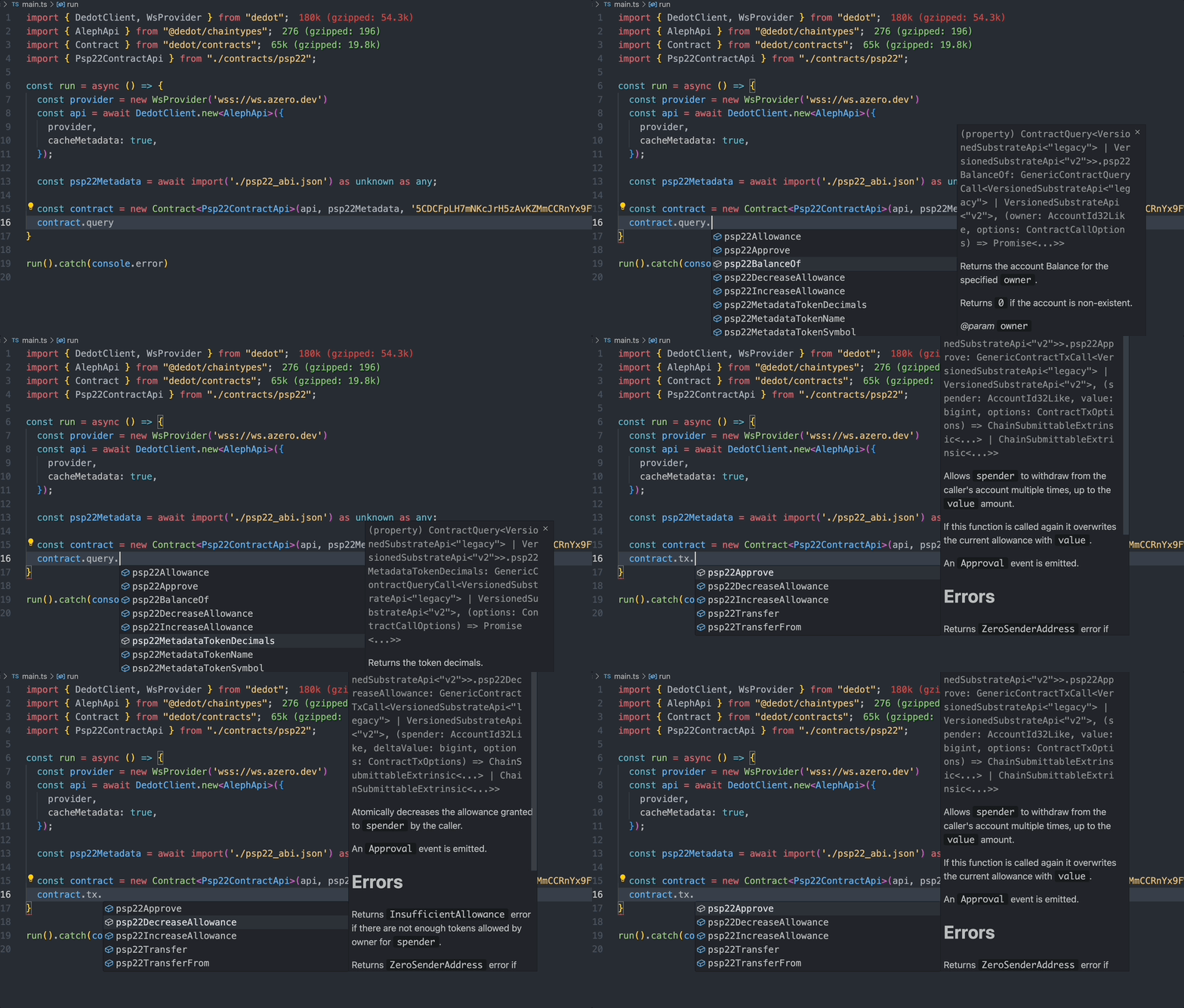
Dedot offers type-safe APIs to interact with **ink!** **& solidity contracts** on PolkaVM (pallet-revive) using unified interfaces. Primitives to work with contracts are exposed in `dedot/contract` package.

<figure><img src="https://2890540792-files.gitbook.io/~/files/v0/b/gitbook-x-prod.appspot.com/o/spaces%2FqKeV2eaKHEVsK7HH0Fbt%2Fuploads%2FU0o8D1kkgJQlpqmHrDBT%2Finkcontractapi.gif?alt=media&#x26;token=ce817317-5333-4594-8fd1-676e40666012" alt=""><figcaption><p>Interact with a PSP22 contracts using Dedot's type-safe APIs</p></figcaption></figure>

### Supported versions

{% hint style="info" %}
Current Dedot only supports ink! versions `v4` , `v5` and `v6` (experimental). We do not have plans to support older versions, but let us know your thoughts if we should reconsider this.
{% endhint %}

{% hint style="warning" %}
Support for [ink! v6](https://use.ink/docs/v6/) and [solidity contracts](https://docs.soliditylang.org/en/latest/contracts.html) are currently **experimental**. Please [let us know](https://t.me/JoinDedot) if you run into any issues or have any feedback while trying it out!
{% endhint %}

### Getting started

1. [Generate Types & APIs](https://docs.dedot.dev/ink-smart-contracts/generate-types-and-apis) for your contracts
2. [Deploy contracts](https://docs.dedot.dev/ink-smart-contracts/deploy) using `ContractDeployer` interface
3. Interact with contracts using `Contract` interface ([queries](https://docs.dedot.dev/ink-smart-contracts/queries), [submit transactions](https://docs.dedot.dev/ink-smart-contracts/transactions), ...)
4. Working with [fully-typed contract events](https://docs.dedot.dev/ink-smart-contracts/events)
5. Retrieve contract storage with [Storage API](https://docs.dedot.dev/ink-smart-contracts/storage) (only for ink! contracts using ink! ABI)
6. [Handling errors](https://docs.dedot.dev/ink-smart-contracts/handle-errors)

{% hint style="warning" %}
If you're connecting to a local [`substrate-contracts-node`](https://github.com/paritytech/substrate-contracts-node/releases) for development, you might want to connect to the network using `LegacyClient` since the latest version of `substrate-contracts-node` ([`v0.41.0`](https://github.com/paritytech/substrate-contracts-node/releases/tag/v0.41.0)) does not working fine/comply with the latest updates for [new JSON-RPC specs](https://paritytech.github.io/json-rpc-interface-spec/introduction.html) for `DedotClient` to work properly.

Following [this instruction](https://docs.dedot.dev/getting-started/connect-to-network#using-legacyclient-to-connect-via-legacy-json-rpc-apis) to connect to the network via `LegacyClient`.
{% endhint %}

{% hint style="info" %}
To deploy and interact with ink! and solidity contracts on PolkaVM (pallet-revive) in development mode, we recommend using local [ink\_node](https://github.com/use-ink/ink-node), you can download and run the binary directly or launch it easily via [POP CLI](https://learn.onpop.io/contracts/guides/deploy#local-deployment-default).
{% endhint %}


# Generate Types & APIs

Before interacting with a contract, you need to generate Types & APIs from the contract metadata to interact with. You can do that using `dedot` cli, this works with both [ink! ABI](https://use.ink/docs/v6/basics/abi/ink) or [Solidity ABI](https://use.ink/docs/v6/basics/abi/solidity).

```sh
dedot typink -m ./path/to/metadata.json # or metadata.contract, storage.abi

# use option -o to customize folder to put generated types
dedot typink -m ./path/to/metadata.json -o ./where/to-put/generated-types
```

After running the command, Types & APIs of the contract will be generated. E.g: if the contract's name is `flipper`, the Types & APIs will be put in a folder named `flipper`, the entry-point interface for the contract will be `FlipperContractApi` in `flipper/index.d.ts` file. An example of Types & APIs for flipper contract can be found [here](https://github.com/dedotdev/dedot/blob/main/examples/scripts/inkv5/flipper/index.d.ts).

### `ContractApi` interface

The generated `ContractApi` interface has the following structure, illustrated with an example of `FlipperContractApi` using ink! contracts using ink! ABI.

```typescript
/**
 * @name: FlipperContractApi
 * @contractName: flipper
 * @contractVersion: 6.0.0
 * @authors: Parity Technologies <admin@parity.io>
 * @language: ink! 6.0.0-alpha.3
 **/
export interface FlipperContractApi<
  ChainApi extends GenericSubstrateApi = SubstrateApi,
> extends InkGenericContractApi<ChainApi> {
  metadataType: 'ink';
  query: ContractQuery<'ink'>;
  tx: ContractTx<'ink'>;
  constructorQuery: ConstructorQuery<'ink'>;
  constructorTx: ConstructorTx<FlipperContractApi, 'ink'>;
  events: ContractEvents<'ink'>;
  storage: {
    root(): Promise<Flipper>;
    lazy(): WithLazyStorage<Flipper>;
  };

  types: {
    ChainApi: ChainApi;
    RootStorage: Flipper;
    LazyStorage: WithLazyStorage<Flipper>;
    LangError: InkPrimitivesLangError;
  };
}

```

For ink! or Solidity contracts using Sol ABI, the structure will be a bit different with some APIs are disabled. Below is an example of `ContractApi` for flipper contract using Sol ABI.

```typescript
export interface FlipperContractApi<
  ChainApi extends GenericSubstrateApi = SubstrateApi,
> extends SolGenericContractApi<Rv, ChainApi> {
  metadataType: 'sol';
  query: ContractQuery<'sol'>;
  tx: ContractTx<'sol'>;
  constructorQuery: ConstructorQuery<'sol'>;
  events: ContractEvents<'sol'>;
  constructorTx: ConstructorTx<FlipperContractApi, 'sol'>;

  types: {
    ChainApi: ChainApi;
  };
}

```


# Deploy contracts

Whether it's to deploy a contract from a wasm/polkavm code or using an existing code hash. You can do it using the `ContractDeployer`.

### Initialize `ContractDeployer`

```typescript
import { DedotClient, WsProvider } from 'dedot';
import { ContractDeployer } from 'dedot/contract';
import { stringToHex } from 'dedot/utils'
import { FlipperContractApi } from './flipper';
import flipperMetadata from './flipper.json' assert { type: 'json' };

// instanciate an api client
const client = await DedotClient.new(new WsProvider('...'));

// load contract wasm or prepare a codeHash
const code = '0x...'; // wasm or polkavm (from .wasm or .polkavm files)
const existingCodeHash = '0x...' // uploaded wasm/polkavm

// create a ContractDeployer instance
const deployer = new ContractDeployer<FlipperContractApi>(client, flipperMetadata, code);

// OR from existingCodeHash
// const deployer = new ContractDeployer<FlipperContractApi>(client, flipperMetadata, existingCodeHash);
```

### \[`ink! v6 & solidity`] Map the account before interacting with `pallet-revive`

Pallet revive is designed to work with evm address/account (20 bytes / H160) by default. So before interact with contracts deployed on pallet revive via a Substrate address (32 bytes / H256), one need to map their Substrate address to a corresponding EVM address first.&#x20;

Simply submit a transaction (`tx.revive.mapAccount`) to map the account:

```typescript
import { toEvmAddress } from 'dedot/contracts';

// Check if the account is mapped yet
const mappedAccount = await client.query.revive.originalAccount(toEvmAddress(CALLER));
if (mappedAccount) {
  console.log('Address has already been mapped!');
} else {
  console.log('Address not mapped yet, map it now!');
  
  await client.tx.revive
    .mapAccount()
    .signAndSend(CALLER, ({ status }) => console.log(status.type))
    .untilFinalized();
}

```

### Dry-run the contract instantiation

{% hint style="info" %}
Starting from `dedot@0.14.0`, dry-runs will be automatically performed internally to validate the transaction and estimate gas fees and storage deposit limits. You no longer need to run a dry-run manually unless you have advanced or custom use cases.&#x20;
{% endhint %}

Dry run the constructor call to help validate the contract instantiation and estimate gas-fee for the transaction.

```typescript
import { generateRandomHex } from 'dedot/utils';

const CALLER = '5GrwvaEF5zXb26Fz9rcQpDWS57CtERHpNehXCPcNoHGKutQY'; // Alice

// Some random salt to prevent duplication issue
// Salt is optional, you can skip this to use an empty salt 
const salt = generateRandomHex(); // for inkv6, salt need to be a 32-byte hex

// Dry run the constructor call for validation and gas estimation
// An Error will be thrown out if there's a DispatchError or LangError (contract level error)
// More on this in the handling error section below
const dryRun = await deployer.query.new(true, { caller: CALLER, salt })
const { raw: { gasRequired, storageDeposit } } = dryRun;
```

#### Error handling if contract constructor returning a `Result<Self, Error>`

In case the contract constructor returning a `Result<Self, Error>`, you can also check the see if the instantiation get any errors before submitting the transaction.

```typescript
const { data, raw } = await deployer.query.new(true, { caller: ALICE, salt })
if (data.isErr) {
  console.log('Contract instantiation returning an error:', data.err);
} else {
  // submitting the transaction
}
```

### Submit contract instantiation transaction

After dry-run the transaction to make sure there will be no errors. Now let's submit the transaction to instantiate the contract and listen for events to extract contract address.

```typescript
// Generate a random salt
const salt = generateRandomHex();

// Submitting the transaction to instanciate the contract
const deploymentResult = await deployer.tx
  .new(true, { salt }) // `new` is the constructor defined in the contract
  .signAndSend(alice, ({ status }) => {
    console.log(`📊 Transaction status: ${status.type}`);
  })
  .untilFinalized(); // or .untilBestChainBlockIncluded();
```

### Retrieve contract address & contract instance after deployment

Once the contract deployment transaction is included in the best chain block or finalized, you can easily retrieve the contract address or initialize the contract instance directly from the deployment result.

```typescript
// Calculate contract address
const contractAddress = await deploymentResult.contractAddress()

// Initialize fully-typed contract instance 
const contract = await deploymentResult.contract();

// You can now interact with the contract via contract instance
const { data: value } = await contract.query.get();
console.log('Flipper value:', value)
```

#### Calculate contract address manually

The instructions below show how to manually calculate the contract address after deployment. This is intended for advanced use cases only — we recommend using the unified API to retrieve the contract address from the deployment result as shown above.

<details>

<summary>[ink! v4 &#x26; v5] Retrieve contract address from deployment events</summary>

#### Extract from `Contract.Instantiated` event

```typescript
const { events } = deploymentResult;

const instantiatedEvent = client.events.contracts.Instantiated.find(events);
const contractAddress = instantiatedEvent.palletEvent.data.contract.address();
console.log(contractAddress);
```

#### Listen for `Contract.Instantiated` event from system events

```typescript
await client.query.system.events(async (records) => {
  const instantiatedEvent = client.events.contracts.Instantiated.filter(events)
                  .find((e) => e.palletEvent.data.deployer.address() === CALLER);

  if (instantiatedEvent) {
    const contractAddress = instantiatedEvent.palletEvent.data.contract.address();
    console.log(contractAddress);
  }
});
```

</details>

<details>

<summary>[ink! v6 &#x26; solidity] Calculate contract address deterministically</summary>

#### Calculate contract address via deployment salt (`CREATE2`)

If one deploy the contract using a deployment salt (32 bytes), one can deterministically calculate the contract address even before deploying it using the `CREATE2` method.

```typescript
import { toEvmAddress, CREATE2 } from 'dedot/contracts';
import { generateRandomHex } from 'dedot/utils';

const client = ... // initialize DedotClient
const CALLER = '5GrwvaEF5zXb26Fz9rcQpDWS57CtERHpNehXCPcNoHGKutQY'; // Alice
const polkavmCode = '0x...' // polkavm contract code

// Initialize ContractDeployer
const deployer = new ContractDeployer<FlipperContractApi>(client, flipperMetadata, polkavmCode);

// Initialize deployment salt. For inkv6, the salt need to be a 32-byte hex
const salt = generateRandomHex(); 

const dryRun = await deployer.query.new(true, { caller: CALLER, salt })

const contractAddress = CREATE2(
  toEvmAddress(CALLER),
  polkavmCode,
  dryRun.inputData, // encoded contract call data (selector + encoded arguments)
  salt,
);
```

#### Calculate contract address via deployer's `nonce`  (`CREATE1`)

If one deploy the contract without a deployment salt, one can calculate the contract address using the deployer's `nonce` before submitting the contract deployment transaction using the `CREATE1` method

```typescript
import { toEvmAddress, CREATE1 } from 'dedot/contracts';

const client = ... // initialize DedotClient
const CALLER = '5GrwvaEF5zXb26Fz9rcQpDWS57CtERHpNehXCPcNoHGKutQY'; // Alice

const dryRun = await deployer.query.new(true, { caller: CALLER });

const nonce = await client.call.accountNonceApi.accountNonce(CALLER);
const contractAddress = CREATE1(toEvmAddress(CALLER), nonce);

// deploying the contract
```

</details>


# Queries

The `Contract` interface will be using to interact with a contract using syntax: `contract.query.<message>`.

```typescript
import { Contract } from 'dedot/contract';
import { FlipperContractApi } from './flipper';
import flipperMetadata from './flipper.json' assert { type: 'json' };

// ... initializing DedotClient

const ALICE = '5GrwvaEF5zXb26Fz9rcQpDWS57CtERHpNehXCPcNoHGKutQY'; // Alice
const contractAddress = '...'; // substrate address or evm address

// create a contract instace from its metadata & address
const contract = new Contract<FlipperContractApi>(client, flipperMetadata, contractAddress, { defaultCaller: ALICE });

// Making call to get the current value of the flipper contract
const result = await contract.query.get();

// Typescipt can inspect the type of value as `boolean` with the support of FlipperContractApi interface
const value: boolean = result.data;

// You can also have access to the detailed/raw result of the call
const rawResult = result.raw;
```


# Transactions

Similarly to query contracts, the `Contract` interface will also be using to submitting transactions with syntax: `contract.tx.<message>`.

{% hint style="info" %}
Starting from `dedot@0.14.0`, dry-runs will be automatically performed internally to validate the transaction and estimate gas fees and storage deposit limits. You no longer need to run a dry-run manually unless you have advanced or custom use cases.&#x20;
{% endhint %}

```typescript
import { Contract } from 'dedot/contract';
import { FlipperContractApi } from './flipper';
import flipperMetadata from './flipper.json' assert { type: 'json' };

// ... initializing DedotClient

const ALICE = '5GrwvaEF5zXb26Fz9rcQpDWS57CtERHpNehXCPcNoHGKutQY'; // Alice
const contractAddress = '...';

// create a contract instace from its metadata & address
const contract = new Contract<FlipperContractApi>(client, flipperMetadata, contractAddress, { defaultCaller: ALICE });

// Submitting the transaction
const { events } = await contract.tx.flip()
  .signAndSend(ALICE, ({ status }) => {
    console.log(status.type)
  })
  .untilFinalized(); // or .untilBestChainBlockIncluded();
  
  // fully-typed event
const flippedEvent = contract.events.Flipped.find(events);
console.log('Old value', flippedEvent.data.old);
console.log('New value', flippedEvent.data.new);
```

### Dry-run the transaction explicitly

If the contract message (transaction) returns a Result\<Data, Error>, you can explicitly perform a dry-run to verify the result before submitting the transaction.

```typescript
// Dry-run the call for validation and gas estimation
const result = await contract.query.flip();

// Check if the message return a `Result<Data, Error>`
// Skip this check if the message returning raw Data
if (result.data.isErr) {
  console.log('Cannot make transaction due to error:', data.err);
} else {
  // Submit the transaction via contract.tx.flip()
}
```


# Storage

Storage API to retrieve contract storage directly.

{% hint style="info" %}
Contract Storage API's currently only available for ink! v5 and v6 using ink! ABI, and not available on ink! v6 or solidity contracts using Sol ABI.
{% endhint %}

Contract Storage API provides efficient access to smart contract storage data. This API allows developers to read contract storage without executing contract methods, enabling efficient data retrieval.

Dedot provides two distinct approaches to accessing contract storage, each optimized for different use cases

* **RootStorage**: Fetch and decode the entire root storage of the contract including API to retrieve data from lazy storage/fields like [Lazy](https://docs.rs/ink_storage/5.1.1/ink_storage/struct.Lazy.html), [Mapping](https://docs.rs/ink_storage/5.1.1/ink_storage/struct.Mapping.html), [StorageVec](https://docs.rs/ink_storage/5.1.1/ink_storage/struct.StorageVec.html). For lazy storage, you will have to make a separate call to fetch the data since they're using a different storage layout.
* **LazyStorage** (or [Non-Packed Storage](https://use.ink/docs/v5/datastructures/storage-layout#packed-vs-non-packed-layout)): Provide access to only lazy/non-packed storage/fields like [Lazy](https://docs.rs/ink_storage/5.1.1/ink_storage/struct.Lazy.html), [Mapping](https://docs.rs/ink_storage/5.1.1/ink_storage/struct.Mapping.html), [StorageVec](https://docs.rs/ink_storage/5.1.1/ink_storage/struct.StorageVec.html) if you just want to fetch data from these fields separately without having to fetch the whole root storage first.

### Root Storage

Example Root Storage for Flipper contract

```typescript
import { FlipperContractApi, Flipper } from './flipper/index.ts'; // Generated types for flipper contract

const contract = new Contract<FlipperContractApi>(api, metadata, contractAddress);

/**
 * Generated RootStorage type for Flipper contract
 *
 * interface Flipper {
 *   value: boolean
 * }
 */
const root: Flipper = await contract.storage.root();

const value: boolean = root.value;
```

Example Root Storage for PSP22 contract

```typescript
import { Psp22ContractApi, Psp22Token } from './psp22/index.ts'; // Generated types for psp22 contract 

const contract = new Contract<Psp22ContractApi>(api, metadata, contractAddress);

/**
 * Generated RootStorage type for PSP22 contract
 * 
 * export type Psp22Token = {
 *   data: Psp22DataPsp22Data;
 *   name?: string | undefined;
 *   symbol?: string | undefined;
 *   decimals: number;
 * };
 *
 * export type Psp22DataPsp22Data = {
 *   totalSupply: bigint;
 *   balances: { get(arg: AccountId32Like): Promise<bigint | undefined> };
 *   allowances: { get(arg: [AccountId32Like, AccountId32Like]): Promise<bigint | undefined> };
 * };
 */
const root: Psp22Token = await contract.storage.root();

const { name, symbol, decimals } = root;
const totalSupply = root.data.totalSupply;

const ALICE = '5GrwvaEF5zXb26Fz9rcQpDWS57CtERHpNehXCPcNoHGKutQY';
const aliceBalance: bigint | undefined = await root.data.balances.get(ALICE);

```

### Lazy Storage

Example Lazy Storage for PSP22 contract

```typescript
import { Psp22ContractApi } from './psp22/index.ts'; // Generated types for psp22 contract 

const contract = new Contract<Psp22ContractApi>(api, metadata, contractAddress);

/**
 * Generated LazyStorage type for PSP22 contract
 * 
 * export type Psp22Token = {
 *   data: Psp22DataPsp22Data;
 * };
 *
 * export type Psp22DataPsp22Data = {
 *   balances: { get(arg: AccountId32Like): Promise<bigint | undefined> };
 *   allowances: { get(arg: [AccountId32Like, AccountId32Like]): Promise<bigint | undefined> };
 * };
 */
const lazyStorage = contract.storage.lazy();

const ALICE = '5GrwvaEF5zXb26Fz9rcQpDWS57CtERHpNehXCPcNoHGKutQY';
const aliceBalance: bigint | undefined = await root.data.balances.get(ALICE);

```


# Events

The `Contract` interface also have APIs to help you work with fully-typed contract events easily and smoothly.

### Decode contract events from transaction events

```typescript
import { ContractEvent } from 'dedot/contract';

// Initialize Contract instance
const contract = new Contract<FlipperContractApi>(client, flipperMetadata, contractAddress, { defaultCaller: ALICE });

// Extracting contract events from transaction events
const { events } = await contract.tx.flip()
    .signAndSend(ALICE)
    .untilFinalized();
  
const flippedEvent = contract.events.Flipped.find(events);
console.log('Old value', flippedEvent.data.old);
console.log('New value', flippedEvent.data.new);

// an array of Flipped event
const flippedEvents = contract.events.Flipped.filter(events);

// Get all contract events from current transactions
const contractEvents: ContractEvent[] = contract.decodeEvents(events);

// Another way to get the Flipper event
const flippedEvent2 = contractEvents.find(contract.events.Flipped.is);
```

### Decode contract events from system events

```typescript
// Extracting contract events from system events
await client.query.system.events((events) => {
  // fully-typed event
  const flippedEvent = contract.events.Flipped.find(events); // or filter, is
  
  // get all events of this contract from current block
  const contractEvents: ContractEvent[] = contract.decodeEvents(events);
})
```

### Contract Event API

#### find

Find the first target event from the provided events.

```typescript
const { events } = await contract.tx.flip({ ... })..untilFinalized();

const flippedEvent = contract.events.Flipped.find(events);
```

#### filter

Filter the target event from the provided events.

```typescript
const flippedEvents = contract.events.Flipped.filter(events);
```


# Handle errors

Interacting with a contract often resulting in errors at runtime level ([DispatchError](https://docs.rs/frame-support/latest/frame_support/pallet_prelude/enum.DispatchError.html)) or contract-level ([LangError](https://use.ink/4.x/faq/migrating-from-ink-3-to-4#add-support-for-language-level-errors-langerror)). Whenever running into these errors, Dedot will throw an Error containing specific context about the problem so developers can handle this accordingly.

### Handle errors when deploying contracts

```typescript
import {
  isContractInstantiateDispatchError, isContractInstantiateLangError
} from "dedot/contracts";
import { FlipperContractApi } from "./flipper";

const ALICE = '...';

try {
  // Dry-run contract construction
  const dryRun = await deployer.query.new(true, { caller: ALICE })

  // ...
} catch (e: any) {
  if (isContractInstantiateDispatchError<FlipperContractApi>(e)) {
    // Getting a runtime level error (e.g: Module error, Overflow error ...)
    const { dispatchError, raw } = e;
    const errorMeta = client.registy.findErrorMeta(dispatchError);
    // ...
  }

  if (isContractInstantiateLangError<FlipperContractApi>(e)) {
    const { langError, raw } = e;
    console.log('LangError', langError);
  }

  // Other errors ...
}
```

### Handle errors when interacting with contracts

```typescript
import {
  isContractDispatchError, isContractLangError
} from "dedot/contracts";
import { FlipperContractApi } from "./flipper";

const ALICE = '...';

try {
  // Dry-run mutable contract message
  const dryRun = await contract.query.flip({ caller: ALICE })

  // ...
} catch (e: any) {
  if (isContractDispatchError<FlipperContractApi>(e)) {
    // Getting a runtime level error (e.g: Module error, Overflow error ...)
    const { dispatchError, raw } = e;
    const errorMeta = client.registy.findErrorMeta(dispatchError);
    // ...
  }

  if (isContractLangError<FlipperContractApi>(e)) {
    const { langError, raw } = e;
    console.log('LangError', langError);
  }

  // Other errors ...
}
```


# Utilities

### toEvmAddress

Convert a Substrate address (32 bytes / H256) to an EVM address (20 bytes / H160).

```typescript
import { toEvmAddress } from 'dedot/contracts'

const ALICE = "5GrwvaEF5zXb26Fz9rcQpDWS57CtERHpNehXCPcNoHGKutQY";
const ALICE_EVM = toEvmAddress(ALICE); // 0x9621dde636de098b43efb0fa9b61facfe328f99d
```

### generateRandomHex

Generate a random hex as deployment salt, by default a 32-byte hex will be generated.

```typescript
import { generateRandomHex } from 'dedot/utils'

const salt = generateRandomHex(); // 32 bytes
const salt64 = generateRandomHex(64); // 64 bytes
```

More utilities can be found in [utilities page](https://docs.dedot.dev/utilities) e.g: [formatBalance](https://docs.dedot.dev/utilities/balances#formatbalance), [isEvmAddress](https://docs.dedot.dev/utilities/address#evm-address), [hash functions](https://docs.dedot.dev/utilities/hash-functions), ...


# CLI

Dedot's Command line interface

Dedot comes by default with a cli when you install [`dedot`](https://www.npmjs.com/package/dedot) package, you can access the cli typing `dedot` (or `djs`) in the terminal. `dedot` cli helps you generate Types & APIs to any Substrate-based chains or ink! smart contracts that you're working with. This enable Types & APIs suggetions/auto-completion via IntelliSense for any on-chain interactions.

#### `dedot chaintypes`

Generate Types & APIs for a Substrated-based blockchain given its metadata. The cli can fetch metadata from a WebSocket endpoint, a wasm runtime file or a raw metadata (.scale) file.

Usage:

```bash
npx dedot chaintypes -w wss://rpc.polkadot.io
```

Options:

* `-w, --wsUrl`: Fetch metadata from a WebSocket endpoint
* `-r, --wasm`: Fetch metadata from a runtime wasm file (.wasm)
* `-m, --metadata`: Fetch metadata from [a raw metadata file](https://github.com/paritytech/subxt?tab=readme-ov-file#downloading-metadata-from-a-substrate-node) (.scale)
* `-o, --output`: Folder to put generated files
* `-c, --chain`: Customize the chain name to generate, default to [`runtimeVersion.specName`](https://github.com/paritytech/polkadot-sdk/blob/002d9260f9a0f844f87eefd0abce8bd95aae351b/substrate/primitives/version/src/lib.rs#L165)
* `-d, --dts`: Generate `.d.ts` files instead of `.ts`, default: `true`
* `-s, --subpath`: Using subpath packages (e.g: `dedot/types` instead of `@dedot/types`), default: `true`
* `-a, --at`: Block hash or block number to generate chaintypes at (requires `--wsUrl`)
* `-x, --specVersion`: Spec version to generate chaintypes at (requires `--wsUrl`)

**Generate chaintypes at a specific block**

You can generate chain types at a specific point in the chain history using the `--at` or `--specVersion` options. This is useful when you need types for a specific runtime version.

```bash
# Generate at a specific block hash
npx dedot chaintypes -w wss://rpc.polkadot.io -a 0x91b171bb158e2d3848fa23a9f1c25182fb8e20313b2c1eb49219da7a70ce90c3

# Generate at a specific block number
npx dedot chaintypes -w wss://rpc.polkadot.io -a 12345678

# Generate at a specific spec version
npx dedot chaintypes -w wss://rpc.polkadot.io -x 1003000
```

{% hint style="info" %}
The `--at` and `--specVersion` options can only be used with `--wsUrl` and cannot be used together.
{% endhint %}

#### `dedot typink`

Generate Types & APIs for an [ink!](https://use.ink/) or [Solidity](https://docs.soliditylang.org/en/latest/contracts.html) smart contract given its metadata/ABI.

Usage:

```bash
npx dedot typink -m ./path/to/metadata.json # or metadata.contract
```

Options:

* `-m, --metadata`: Path to contract metadata file (`.json`, `.contract`)
* `-o, --output`: Folder to put generated files
* `-c, --contract`: Custom contract name, default is contract name from metadata
* `-d, --dts`: Generate `.d.ts` files instead of `.ts`, default: `true`
* `-s, --subpath`: Using subpath packages (e.g: `dedot/types` instead of `@dedot/types`), default: `true`


# Keyring & Signer

### Keyring

Currently Dedot do not have any official package for creating & managing keys, we recommend using `@polkadot/keyring` package for this purpose.

Please refer to the [official documentation](https://polkadot.js.org/docs/keyring) of `@polkadot/keyring` for more details on how to install, create & manage keys.

{% hint style="warning" %}
Please note that `@polkadot/keyring` is currently using `bn.js` and `wasm` blob for some cryptographic implementations, this might increase the overall bundle-size of dapps.
{% endhint %}

### Signer

Dedot APIs are designed to be compatible with [`IKeyringPair`](https://github.com/polkadot-js/api/blob/3bdf49b0428a62f16b3222b9a31bfefa43c1ca55/packages/types/src/types/interfaces.ts#L15-L21) and [`Signer`](https://github.com/polkadot-js/api/blob/3bdf49b0428a62f16b3222b9a31bfefa43c1ca55/packages/types/src/types/extrinsic.ts#L135-L150) interfaces, so you can sign the transactions with accounts/keys created by a [`Keyring`](https://github.com/polkadot-js/common/blob/22aab4a4e62944a2cf8c885f50be2c1b842813ec/packages/keyring/src/keyring.ts#L41-L40) from `@polkadot/keyring` or signers exposed from any [Polkadot{.js}-extensions-based](https://github.com/polkadot-js/extension?tab=readme-ov-file#api-interface) wallets (SubWallet, Talisman, ...).

#### Signing transactions using `IKeyringPair`

```typescript
import { cryptoWaitReady } from '@polkadot/util-crypto';
import { Keyring } from '@polkadot/keyring';

// Setup Keyring & create a KeyringPair
await cryptoWaitReady();
const keyring = new Keyring({ type: 'sr25519' });
const aliceKeyringPair = keyring.addFromUri('//Alice');

// Sign & send transaction
const unsub = await client.tx.balances
    .transferKeepAlive(<destAddress>, 2_000_000_000_000n)
    .signAndSend(aliceKeyringPair, async ({ status }) => {
      console.log('Transaction status', status.type);
      if (status.type === 'BestChainBlockIncluded') { // or status.type === 'Finalized'
        console.log(`Transaction completed at block hash ${status.value.blockHash}`);
        await unsub();
      }
    });
```

#### Signing transactions using `Signer`

```typescript
// Retrieve signer from SubWallet extension
const injected = await window.injectedWeb3['subwallet-js'].enable('A cool dapp');
const account = (await injected.accounts.get())[0]; // get the first account
const signer = injected.signer;

// Setup global signer
client.setSigner(signer);

// Sign & send transaction
const unsub = await client.tx.balances
    .transferKeepAlive(<destAddress>, 2_000_000_000_000n)
    .signAndSend(account.address, async ({ status }) => {
      console.log('Transaction status', status.type);
      if (status.type === 'BestChainBlockIncluded') { // or status.type === 'Finalized'
        console.log(`Transaction completed at block hash ${status.value.blockHash}`);
        await unsub();
      }
    });
```


# Runtime upgrades

With [forkless upgrade](https://wiki.polkadot.network/docs/learn-runtime-upgrades#forkless-upgrades) as a feature, it's important for dapps to keep up with the changes from runtime and have a better preparation when there're breaking upgrades coming up on-chain.

### Listen to runtime upgrades

Clients will emit a `runtimeUpgraded` event whenever there is a new runtime upgrade happens. Dapps can listen to this event and react accordingly (e.g: show/hide ui components, notifications ...)

```typescript
client.on('runtimeUpgraded', (runtimeVersion: SubstrateRuntimeVersion, at: BlockInfo) => {
  console.log('New runtime spec version:', runtimeVersion.specVersion, 'at block: ', at.number);
});
```

### Prepare for breaking runtime upgrades

Breaking changes from runtime upgrades happen all the time, and it's really crutial to prepare your dapps to run smoothly and not breaking before and after runtime upgrades.

If you have access to metadata or wasm runtime of the next runtime upgrades, you can generate the `ChainApi` interface (Types & APIs) for the next runtime upgrade using [`dedot`'s CLI](https://docs.dedot.dev/cli#dedot-chaintypes) and adapt accordingly.

```typescript
import { DedotClient, WsProvider } from 'dedot';
import type { PolkadotApi } from '@dedot/chaintypes';
import type { PolkadotNextApi } from './polkadot-next';

// Initialize providers & clients
const provider = new WsProvider('wss://rpc.polkadot.io');
const client = await DedotClient.new<PolkadotApi>(provider);

// Check the spec version of the next runtime upgrade 
// in the comment on top of the ChainApi interface definition
// E.g: https://github.com/dedotdev/chaintypes/blob/1d728e5cd5027c3768c79f6c6f230682337c997e/packages/chaintypes/src/polkadot/index.d.ts#L26
const NEXT_UPGRADE_SPEC_VERSION = 1003000; // SpecVersion of PolkadotNextApi

// Get the current runtime version
const runtimeVersion = await client.getRuntimeVersion();

// Check if we're on the next runtime version, 
// then use the new transferKeepAliveWithRemark tx
if (runtimeVersion.specVersion >= NEXT_UPGRADE_SPEC_VERSION) {
  // Casting the client to using the new ChainApi interface: PolkadotNextApi
  const nextClient = client as unknown as DedotClient<PolkadotNextApi>;
  await nextClient.tx.balances
    .transferKeepAliveWithRemark(<destAddress>, 2_000_000_000_000n, 'Remark!')
    .signAndSend(<address>);    
} else {
  // else using the old transferKeepAlive tx
  await client.tx.balances
    .transferKeepAlive(<destAddress>, 2_000_000_000_000n)
    .signAndSend(<address>);
}
```


# Type system

The table below is a mapping between [scale-codec](https://docs.substrate.io/reference/scale-codec/) types (Rust) and TypeScript types that we're using for Dedot:

| Scale Codec (Rust)                                                                                                                                                    | TypeScript (dedot)                                                                                                                      |                                                                                                                                          |                                                                           |
| --------------------------------------------------------------------------------------------------------------------------------------------------------------------- | --------------------------------------------------------------------------------------------------------------------------------------- | ---------------------------------------------------------------------------------------------------------------------------------------- | ------------------------------------------------------------------------- |
| <p><code>u8</code>, <code>u16</code>, <code>u32</code>,</p><p><code>i8</code>, <code>i16</code>, <code>i32</code></p>                                                 | `number`                                                                                                                                |                                                                                                                                          |                                                                           |
| <p><code>u64</code>, <code>u128</code>, <code>u256</code>,</p><p><code>i64</code>, <code>i128</code>, <code>i256</code></p>                                           | `bigint` (native [BigInt](https://developer.mozilla.org/en-US/docs/Web/JavaScript/Reference/Global_Objects/BigInt), not bn.js)          |                                                                                                                                          |                                                                           |
| `bool`                                                                                                                                                                | `boolean` (true, false)                                                                                                                 |                                                                                                                                          |                                                                           |
| `Option<T>`                                                                                                                                                           | `T \| undefined`                                                                                                                        |                                                                                                                                          |                                                                           |
| `Result<Ok, Err>`                                                                                                                                                     | <p><code>{</code> </p><p>  <code>isOk: true;</code> </p><p>  <code>isErr?: false;</code> </p><p>  <code>value: Ok</code> </p><p><code>} | {</code> </p><p>  <code>isOk?: false;</code> </p><p>  <code>isErr: true;</code> </p><p>  <code>err: Err</code> </p><p><code>}</code></p> |                                                                           |
| `Vec<T>`                                                                                                                                                              | `Array<T>`                                                                                                                              |                                                                                                                                          |                                                                           |
| `str`                                                                                                                                                                 | `string`                                                                                                                                |                                                                                                                                          |                                                                           |
| Tuple: `(A, B)`, `()`                                                                                                                                                 | `[A, B]`, `[]`                                                                                                                          |                                                                                                                                          |                                                                           |
| <p>Struct:</p><p><code>struct {</code> </p><p>  <code>field\_1: u8,</code> </p><p>  <code>field\_2: str</code> </p><p><code>}</code></p>                              | <p><code>{</code> </p><p>  <code>field\_1: number,</code> </p><p>  <code>field\_2: string</code></p><p><code>}</code></p>               |                                                                                                                                          |                                                                           |
| <p>Enum:</p><p><code>enum {</code> </p><p>  <code>Variant1(u8),</code> </p><p>  <code>Variant2(bool),</code> </p><p>  <code>Variant3</code> </p><p><code>}</code></p> | <p><code>{</code> </p><p>  <code>type: 'Variant1',</code> </p><p>  <code>value: number</code> </p><p><code>}                            | {</code> </p><p>  <code>type: 'Variant2',</code> </p><p>  <code>value: boolean</code> </p><p><code>}                                     | {</code> </p><p>  <code>type: 'Variant3'</code> </p><p><code>}</code></p> |
| <p>FlatEnum:</p><p><code>enum {</code> </p><p>  <code>Variant1,</code> </p><p>  <code>Variant2</code> </p><p><code>}</code></p>                                       | `'Variant1' \| 'Variant2'`                                                                                                              |                                                                                                                                          |                                                                           |


# Utilities


# HexString

### `hexToU8a`

Converts a hex string to a Uint8Array

```typescript
import { hexToU8a } from 'dedot/utils';

hexToU8a('0x1234') // new Uint8Array([0x12, 0x34])
```

### `hexToString`

Converts a hex to a string

```typescript
import { hexToString } from 'dedot/utils';

hexToString('0x616263') // 'abc'
```

### `isZeroHex`

Check if a hex is zero

```typescript
import { isZeroHex } from 'dedot/utils';

isZeroHex('0x00000000') // true
isZeroHex('0x00000001') // false
```

### `hexAddPrefix` & `hexStripPrefix`

Add/remove the '0x' prefix to/from a hex string

```typescript
import { hexAddPrefix, hexStripPrefix } from 'dedot/utils';

hexAddPrefix('00000000') // '0x00000000'
hexAddPrefix('0x00000001') // '0x00000001'

hexStripPrefix('00000000') // '00000000'
hexStripPrefix('0x00000001') // '00000001'
```

### `toHex`

Converts the input to a hex string, input can be in different types: `string | number | Uint8Array | HexString`

```typescript
import { toHex } from 'dedot/utils';

toHex(new Uint8Array([0x12, 0x34])) // '0x1234'
toHex(4660) // '0x1234'
toHex('0x1234') // '0x1234'
toHex('abc') // '0x1234'
```


# Uint8Array (U8a)

### `u8aToHex`

Convert a Uint8Array to a hex string

```typescript
import { u8aToHex } from 'dedot/utils';

u8aToHex(new Uint8Array([128, 0, 10])) // '0x80000a'
```

### `u8aToString`

Convert a Uint8Array to a string

```typescript
import { u8aToString } from 'dedot/utils';

const sampleU8a = new Uint8Array([0x68, 0x65, 0x6c, 0x6c, 0x6f, 0x20, 0x77, 0x6f, 0x72, 0x6c, 0x64]);
u8aToString(sampleU8a) // 'hello world'
```

### `u8aEq`

Compare two Uint8Arrays for equality

```typescript
import { u8aEq } from 'dedot/utils';

u8aEq(new Uint8Array([1, 2, 3]), new Uint8Array([1, 2, 3])) // true
u8aEq(new Uint8Array([1, 2, 3]), new Uint8Array([4, 5, 6])) // false
```

### `toU8a`

Converts the input to a hex string, input can be in different types: `string | number | Uint8Array | HexString`

```typescript
import { toU8a } from 'dedot/utils';

toU8a(new Uint8Array([0x12, 0x34])) // new Uint8Array([0x12, 0x34]);
toU8a(4660)) // new Uint8Array([0x12, 0x34])
toU8a('0x1234')) // new Uint8Array([0x12, 0x34])
toU8a('abc')) // new Uint8Array([0x61, 0x62, 0x63])
```

### `concatU8a`

Concat multiple Uint8Array instances into a single Uint8Array.

```typescript
import { concatU8a } from 'dedot/utils';

concatU8a(new Uint8Array([1, 2]), new Uint8Array([3, 4])) // new Uint8Array([1, 2, 3, 4])
```


# String

### `stringToU8a`

Converts a string to Uint8Array.

```typescript
import { stringToU8a } from 'dedot/utils';

stringToU8a('hello world') // new Uint8Array([0x68, 0x65, 0x6c, 0x6c, 0x6f, 0x20, 0x77, 0x6f, 0x72, 0x6c, 0x64])
```

### `stringToHex`

Converts a string to hex format

```typescript
import { stringToHex } from 'dedot/utils';

stringToHex('hello world') // '0x68656c6c6f20776f726c64'
```

### `stringCamelCase`

Converts a string to `camelCase`

```typescript
import { stringCamelCase } from 'dedot/utils';

stringCamelCase('hello world') // helloWorld
stringCamelCase('HelloWorld') // helloWorld
stringCamelCase('helloWorld') // helloWorld
stringCamelCase('hello_world') // helloWorld
stringCamelCase('hello-world') // helloWorld
```

### `stringPascalCase`

Converts a string to `PascalCase`

```typescript
import { stringPascalCase } from 'dedot/utils';

stringPascalCase('hello world') // HelloWorld
stringPascalCase('HelloWorld') // HelloWorld
stringPascalCase('helloWorld') // HelloWorld
stringPascalCase('hello_world') // HelloWorld
stringPascalCase('hello-world') // HelloWorld
```

### `stringSnakeCase`

Converts a string to `snake_case`

```typescript
import { stringSnakeCase } from 'dedot/utils';

stringSnakeCase('hello world') // hello_world
stringSnakeCase('HelloWorld') // hello_world
stringSnakeCase('helloWorld') // hello_world
stringSnakeCase('hello_world') // hello_world
stringSnakeCase('hello-world') // hello_world
```

### `stringDashCase`

Converts a string to `dash-case`

```typescript
import { stringDashCase } from 'dedot/utils';

stringDashCase('hello world') // hello-world
stringDashCase('HelloWorld') // hello-world
stringDashCase('helloWorld') // hello-world
stringDashCase('hello_world') // hello-world
stringDashCase('hello-world') // hello-world
```

### `stringLowerFirst`

Converts to first letter of a string to lower case

```typescript
import { stringLowerFirst } from 'dedot/utils';

stringLowerFirst('ABC') // aBC
stringLowerFirst('abc') // abc
```

### `stringUpperFirst`

Converts to first letter of a string to upper case

```typescript
import { stringUpperFirst } from 'dedot/utils';

stringLowerFirst('ABC') // ABC
stringLowerFirst('abc') // Abc
```


# Hash functions

### `blake2AsHex`

```typescript
import { blake2AsHex } from 'dedot/utils';

blake2AsHex('abc') // 256 bits, 0xbddd813c634239723171ef3fee98579b94964e3bb1cb3e427262c8c068d52319
blake2AsHex('abc', 64) // 0xd8bb14d833d59559
blake2AsHex('abc', 128) // 0xcf4ab791c62b8d2b2109c90275287816
blake2AsHex('abc', 512) // 0xba80a53f981c4d0d6a2797b69f12f6e94c212f14685ac4b74b12bb6fdbffa2d17d87c5392aab792dc252d5de4533cc9518d38aa8dbf1925ab92386edd4009923
```

### `blake2AsU8a`

```typescript
import { blake2AsU8a } from 'dedot/utils';

blake2AsU8a('abc') // 256 bits, Uint8Array(32) [ 189, 221, 129,  60,  99,  66, 57, 114, 49, 113, 239,  63, 238, 152, 87, 155, 148, 150,  78,  59, 177, 203, 62,  66, 114,  98, 200, 192, 104, 213, 35,  25 ]
blake2AsU8a('abc', 64) // Uint8Array(8) [ 216, 187,  20, 216, 51, 213, 149,  89 ]
blake2AsU8a('abc', 128) // Uint8Array(16) [ 207, 74, 183, 145, 198, 43, 141, 43,  33,   9, 201,  2, 117, 40, 120,  22 ]
blake2AsU8a('abc', 512) // Uint8Array(64) [ 186, 128, 165,  63, 152,  28,  77,  13, 106,  39, 151, 182, 159,  18, 246, 233,  76,  33,  47,  20, 104,  90, 196, 183,  75,  18, 187, 111, 219, 255, 162, 209, 125, 135, 197,  57,  42, 171, 121,  45, 194,  82, 213, 222, 69,  51, 204, 149,  24, 211, 138, 168, 219, 241, 146, 90, 185,  35, 134, 237, 212,   0, 153,  35 ]
```

### `keccakAsHex`

```typescript
import { keccakAsHex } from 'dedot/utils';

keccakAsHex('test') // 256 bits, 0x9c22ff5f21f0b81b113e63f7db6da94fedef11b2119b4088b89664fb9a3cb658
keccakAsHex('test', 512) // 0x1e2e9fc2002b002d75198b7503210c05a1baac4560916a3c6d93bcce3a50d7f00fd395bf1647b9abb8d1afcc9c76c289b0c9383ba386a956da4b38934417789e
```

### `keccakAsU8a`

```typescript
import { keccakAsU8a } from 'dedot/utils';

keccakAsU8a('test') // 256 bits, Uint8Array(32) [ 156,  34, 255,  95,  33, 240, 184,  27, 17,  62,  99, 247, 219, 109, 169,  79, 237, 239,  17, 178,  17, 155,  64, 136, 184, 150, 100, 251, 154,  60, 182,  88 ]
keccakAsU8a('test', 512) // Uint8Array(64) [ 30,  46, 159, 194,   0,  43,   0,  45, 117,  25, 139, 117,   3,  33,  12,   5, 161, 186, 172,  69,  96, 145, 106,  60, 109, 147, 188, 206,  58,  80, 215, 240,  15, 211, 149, 191,  22,  71, 185, 171, 184, 209, 175, 204, 156, 118, 194, 137, 176, 201,  56,  59, 163, 134, 169, 86, 218,  75,  56, 147,  68,  23, 120, 158 ]
```

### `xxhashAsHex`

```typescript
import { xxhashAsHex } from 'dedot/utils';

xxhashAsHex('abc') // 64 bits, 0x990977adf52cbc44
xxhashAsHex('abc', 128) // 0x990977adf52cbc440889329981caa9be
xxhashAsHex('abc', 256) // 0x990977adf52cbc440889329981caa9bef7da5770b2b8a05303b75d95360dd62b
```

### `xxhashAsU8a`

```typescript
import { xxhashAsU8a } from 'dedot/utils';

xxhashAsHex('abc') // 64 bits, Uint8Array(8) [ 153,  9, 119, 173, 245, 44, 188,  68 ]
xxhashAsHex('abc', 128) // Uint8Array(16) [ 153,   9, 119, 173, 245, 44, 188,  68,   8, 137, 50, 153, 129, 202, 169, 190 ]
xxhashAsHex('abc', 256) // Uint8Array(32) [ 153,   9, 119, 173, 245,  44, 188,  68, 8, 137,  50, 153, 129, 202, 169, 190, 247, 218,  87, 112, 178, 184, 160,  83, 3, 183,  93, 149,  54,  13, 214,  43 ]
```


# Address

### SS58 Address

#### `decodeAddress`

```typescript
import { decodeAddress } from 'dedot/utils';

decodeAddress('5GrwvaEF5zXb26Fz9rcQpDWS57CtERHpNehXCPcNoHGKutQY') // return alice raw public key
```

#### `encodeAddress`

```typescript
import { encodeAddress } from 'dedot/utils';

encodeAddress('5GrwvaEF5zXb26Fz9rcQpDWS57CtERHpNehXCPcNoHGKutQY', 2) // convert to Kusama address (prefix: 2)

const ALICE_PUBLIC_KEY = new Uint8Array([...]);
encodeAddress(ALICE_PUBLIC_KEY) // 5GrwvaEF5zXb26Fz9rcQpDWS57CtERHpNehXCPcNoHGKutQY
```

### EVM Address

#### `isEvmAddress`

```typescript
import { isEvmAddress } from 'dedot/utils';

isEvmAddress('0x00a329c0648769A73afAc7F9381E08FB43dBEA72') // true
isEvmAddress('0xInvalidAddress') // false
```


# BigInt & number

### `bnToHex`

Convert bigint to hex

```typescript
import { bnToHex } from 'dedot/utils';
```

### `bnToU8a`

Convert bigint to Uint8Array

```typescript
import { bnToU8a } from 'dedot/utils';
```

### `bnMax`

Return the bigger bigint value

```typescript
import { bnMax } from 'dedot/utils';
```

### `bnMin`

Return the smaller bigint value

```typescript
import { bnMin } from 'dedot/utils';
```

### `bnAbs`

Return the absolute value of a bigint

```typescript
import { bnAbs } from 'dedot/utils';
```

### `numberToHex`

Convert a number to a hex string

```typescript
import { numberToHex } from 'dedot/utils';
```

### `numberToU8a`

Convert a number to a Uint8Array

```typescript
import { numberToU8a } from 'dedot/utils';
```


# Balances

## formatBalance

Format a balance value to a human-readable string

```typescript
import { formatBalance } from 'dedot/utils';

const options = { decimals: 12, symbol: 'UNIT' };
formatBalance('12023172837123', options) // 12.0231 UNIT;
formatBalance(12_023_172_837_123n, options) // 12.0231 UNIT;
formatBalance(BigInt(12_023_172_837_123), options // 12.0231 UNIT;
```


# Merkleized Metadata

RFC-0078: Merkleized Metadata Implementation

### Calculating Metadata Hash/Digest

```typescript
import { DedotClient, WsProvider } from 'dedot';
import { MerkleizedMetadata } from 'dedot/merkleized-metadata';

// Create a client
const provider = new WsProvider('wss://rpc.polkadot.io');
const client = await DedotClient.new(provider);

// Get metadata from the client
const metadata = client.metadata;

// - Or refetch it directly via runtime apis
// const metadata = await client.call.metadata.metadataAtVersion(15);

// Define chain-specific information
const chainInfo = {
  // These can be omitted as they'll be fetched from metadata
  // specVersion: client.runtimeVersion.specVersion,
  // specName: client.runtimeVersion.specName,
  // ss58Prefix: 0, // Polkadot

  // These are required
  tokenSymbol: 'DOT'
  decimals: 10,
};

// Create a merkleizer instance
const merkleizer = new MerkleizedMetadata(metadata, chainInfo);

// Calculate metadata hash
const hash = merkleizer.digest();

console.log('Metadata Hash:', hash);
```

### Generating Proofs

#### Proof for extrinsic

```typescript
import { MerkleizedMetadata } from 'dedot/merkleized-metadata';

// Create a merkleizer instance
const merkleizer = new MerkleizedMetadata(metadata, chainInfo);

// Setup tx
const remarkTx = client.tx.system.remark('Hello World');
// await remarkTx.sign(alice, { tip: 1000_000n }); - sign with signer/keypair

// Generate proof for an extrinsic
const txHex = remarkTx.toHex(); // Hex-encoded extrinsic
const proof = merkleizer.proofForExtrinsic(txHex);

```

#### Proof for extrinsic payload

```typescript
import { ExtraSignedExtension } from 'dedot';
import { MerkleizedMetadata } from 'dedot/merkleized-metadata';
import { HexString } from 'dedot/utils';

// Initialize client ...

// Create a merkleizer instance
const merkleizer = new MerkleizedMetadata(client.metadata, chainInfo);

// Calculate raw tx payload
const extra = new ExtraSignedExtension(client, { signerAddress: 'PUT_ADDRESS' });
await extra.init();

const remarkTx = client.tx.system.remark('Hello World');

const txRawPayload = extra.toRawPayload(remarkTx.callHex).data as HexString;

// Generate proof for extrinsic payload
const proof = merkleizer.proofForExtrinsicPayload(txRawPayload);

```

#### Proof for extrinsic parts

This is equivalent to `proofForExtrinsicPayload`, except that each part of the transaction’s raw payload is calculated individually.

```typescript
import { ExtraSignedExtension } from 'dedot';
import { MerkleizedMetadata } from 'dedot/merkleized-metadata';
import { HexString } from 'dedot/utils';

// Initialize client ...

// Create a merkleizer instance
const merkleizer = new MerkleizedMetadata(client.metadata, chainInfo);

// Calculate raw tx payload
const extra = new ExtraSignedExtension(client, { signerAddress: 'PUT_ADDRESS' });
await extra.init();

const remarkTx = client.tx.system.remark('Hello World');

// Generate proof for extrinsic parts
const callData = remarkTx.callHex; // Hex-encoded call data
const includedInExtrinsic = extra.$Data.tryEncode(extra.data);
const includedInSignedData = extra.$AdditionalSigned.tryEncode(extra.additionalSigned);

const proof = merkleizer.proofForExtrinsicParts(
    callData, includedInExtrinsic, includedInSignedData
);

```


# Built with Dedot

### Real-World Projects Powered by Dedot

* [Polkadot Live App](https://polkadot-live.github.io/) ([Github](https://github.com/polkadot-live/polkadot-live-app))
* [Polkadot Staking Dashboard](https://staking.polkadot.cloud/) ([Github](https://github.com/polkadot-cloud/polkadot-staking-dashboard))
* [Typink](https://typink.dev) ([Github](https://github.com/dedotdev/typink))
* [Allfeat SDK](https://www.allfeat.com/) ([Github](https://github.com/Allfeat/allfeat-js))
* [Polkadot UI](https://dot-ui.com/) ([Github](https://github.com/Polkadot-UI-Initiative/dot-ui))
* [Create Dot App](https://github.com/preschian/create-dot-app)
* [LunoKit - Wallet Developer Tools](https://www.lunolab.xyz/) ([Github](https://github.com/Luno-lab/LunoKit))
* ... add yours? PRs are more than welcome!

### Example Dapps

* [Try Dedot](https://try.dedot.dev) - [Source Code](https://github.com/dedotdev/trydedot)
* [Tiny Url](https://link.dedot.dev) - [Source Code](https://github.com/dedotdev/link)
* [React hooks for ink! smart contracts](https://typink.netlify.app/) - [Source Code](https://github.com/dedotdev/typink-app)
* [LunoKit Demo](https://demo.lunolab.xyz/) - [Source Code](https://github.com/Luno-lab/LunoKit/tree/main/examples/with-vite)
* ... add yours?

### Open Hack from [OpenGuild](https://openguild.wtf/)

* [open-hack-dedot](https://github.com/openguild-labs/open-hack-dedot): Building decentralized applications on Polkadot
* [open-hack-ink-starter](https://github.com/openguild-labs/open-hack-ink-starter): Getting started with ink! smart contract development

### Playground Scripts

* [Quick start with Dedot's API](https://stackblitz.com/edit/try-dedot?file=main.ts\&view=editor)
* [Interact with a PSP22 ink! contract](https://stackblitz.com/edit/psp22-dedot?file=main.ts\&view=editor)


# Forum Posts

Polkadot forum posts about Dedot's updates & progress

{% embed url="<https://forum.polkadot.network/t/introducing-dedot-a-delightful-javascript-client-for-polkadot-substrate-based-blockchains/8956>" %}

{% embed url="<https://forum.polkadot.network/t/type-safe-apis-to-interact-with-ink-smart-contracts-dedot/9485>" %}


# Welcome to Typink

Typink is a fully type-safe React hooks library for seamless ink! and Solidity smart contract interactions. Powered by [Dedot](https://dedot.dev), it supports both WASM (pallet-contracts) and PolkaVM (pallet-revive) on Polkadot, delivering robust, efficient, and developer-friendly dapps development.

### Why Typink?

* **Unified Type-Safe Hooks** - Same React hooks work seamlessly across ink! v5, ink! v6, and Solidity contracts.
* **Instant Project Scaffolding** - Launch new projects in seconds with `create-typink` CLI and pre-configured Next.js templates
* **Flexible Wallet Connector Integration** - Supports external wallet connectors like [SubConnect](https://github.com/Koniverse/SubConnect-v2) and [Talisman Connect](https://github.com/TalismanSociety/talisman-connect) or built your own using Typink's hooks & API.
* **Multi-Network Support** - Connect to multiple networks simultaneously with lazy initialization and seamless network switching

## Getting Started

<table data-view="cards"><thead><tr><th></th><th></th><th data-hidden data-card-target data-type="content-ref"></th></tr></thead><tbody><tr><td><strong>Start new project</strong></td><td>How to start a new dapp project</td><td><a href="getting-started/start-a-new-dapp">start-a-new-dapp</a></td></tr><tr><td><strong>Migration</strong></td><td>Migrate existing dapp to use Typink</td><td><a href="getting-started/migrate-from-existing-dapp">migrate-from-existing-dapp</a></td></tr><tr><td><strong>Hooks &#x26; Providers</strong></td><td>Hooks &#x26; Providers references</td><td><a href="hooks-and-providers">hooks-and-providers</a></td></tr><tr><td><strong>Utilities</strong></td><td>formatBalance, txToaster ...</td><td><a href="utilities">utilities</a></td></tr><tr><td><strong><code>create-typink</code> CLI</strong></td><td>More details on the CLI</td><td><a href="create-typink-cli">create-typink-cli</a></td></tr><tr><td><strong>Tutorials</strong></td><td>Building with Typink &#x26; Dedot</td><td><a href="help-and-faq/tutorials">tutorials</a></td></tr></tbody></table>

## Join the Community

* [GitHub Repository](https://github.com/dedotdev/typink)
* [Official Documentation](https://docs.dedot.dev/typink)
* [Telegram Community](https://t.me/JoinDedot)

### Ready to build?

Start your journey with Typink today and build the next-generation Polkadot applications with confidence!

## Acknowledgment

Funded by [Web3 Foundation Grants Program](https://grants.web3.foundation/).


# Getting started


# Start a new dapp

## Getting Started with Typink

Typink is a React hooks library for building dApps that interact with ink! and Solidity smart contracts on Polkadot blockchains. With Typink, you get a **unified developer experience** - the same hooks and APIs work seamlessly across ink! v5 (WASM), ink! v6 (PolkaVM), and Solidity contracts.

### Create a New Project

Start by creating a new Typink project using the interactive CLI:

{% tabs %}
{% tab title="pnpm" %}

```sh
pnpm create typink@latest
```

{% endtab %}

{% tab title="yarn" %}

```sh
yarn create typink@latest
```

{% endtab %}

{% tab title="bun" %}

```sh
bunx create typink@latest
```

{% endtab %}

{% tab title="npm" %}

```sh
npm create typink@latest
```

{% endtab %}

{% tab title="npx" %}

```sh
npx create-typink@latest
```

{% endtab %}
{% endtabs %}

The CLI will guide you through an interactive setup:

#### 1. Enter Project Name

```
? Project name: my-typink-dapp
```

#### 2. Select Contract Type

Choose the type of contracts you'll be working with:

```
? Select contract type:
❯ Ink! v6 (PolkaVM, pallet-revive)
  Ink! v6 using Sol ABI (PolkaVM, pallet-revive)
  Solidity (PolkaVM, pallet-revive)
  Ink! v5 (WASM, pallet-contracts)
```

**Contract Types:**

* **Ink! v6** - Latest ink! version on PolkaVM (pallet-revive)
* **Ink! v6 Sol ABI** - ink! v6 with Solidity-style ABI
* **Solidity** - Solidity smart contracts on PolkaVM
* **Ink! v5** - Legacy ink! on WASM (pallet-contracts)

#### 3. Select Networks

Choose one or more networks for your dApp:

```
? Select supported networks: (Press <space> to select)
❯◉ Pop Testnet
 ◯ Passet Hub
```

Available networks depend on your contract type:

* **pallet-contracts** (Ink! v5): Pop Testnet, Aleph Zero Testnet, Aleph Zero, Astar
* **pallet-revive** (Ink! v6/Solidity): Pop Testnet, Passet Hub

### Start Development

Navigate to your project and start the development server:

```bash
cd my-typink-dapp

# npm
npm run dev

# pnpm
pnpm dev

# yarn
yarn dev

# bun
bun dev
```

Open <http://localhost:3000> to see your dApp running!

### Project Structure

Your project follows Next.js 15 App Router structure:

```
my-typink-dapp/
├── src/
│   ├── app/                    # Next.js app directory
│   │   ├── layout.tsx         # Root layout
│   │   ├── page.tsx           # Home page
│   │   └── globals.css        # Global styles
│   ├── components/            # React components
│   │   ├── shared/           # Shared UI components
│   │   └── [contract]-board.tsx  # Contract interaction components
│   ├── contracts/            # Contract-related files
│   │   ├── deployments.ts    # Contract deployment addresses
│   │   └── types/           # Generated TypeScript bindings
│   ├── lib/                  # Utility functions
│   │   └── utils.ts
│   └── providers/            # React providers
│       └── app-provider.tsx  # TypinkProvider configuration
├── public/                   # Static assets
├── package.json
├── tsconfig.json
└── next.config.ts
```

#### Key Files

**`src/providers/app-provider.tsx`** - Configures TypinkProvider with networks, wallets, and contracts:

```tsx
import { TypinkProvider, setupTxToaster, SonnerAdapter } from 'typink';
import { deployments } from '@/contracts/deployments';

setupTxToaster({
  adapter: new SonnerAdapter(toast),
});

export function AppProvider({ children }) {
  return (
    <TypinkProvider
      appName="My Typink dApp"
      deployments={deployments}
      supportedNetworks={[popTestnet]}
      defaultNetworkId={popTestnet.id}
      wallets={[subwallet, talisman, polkadotjs]}>
      {children}
    </TypinkProvider>
  );
}
```

**`src/contracts/deployments.ts`** - Registers contract deployments:

```tsx
export enum ContractId {
  FLIPPER = 'flipper',
}

export const deployments: ContractDeployment[] = [
  {
    id: ContractId.FLIPPER,
    metadata: flipperMetadata,
    address: '0x3ddc397c0350cbfb89d4f28d476073d6051067c4',
    network: popTestnet.id,
  },
];
```

### Explore the Example

Your project includes a pre-deployed example contract with working interactions:

1. **Connect Wallet** - Click "Connect Wallet" and select SubWallet, Talisman, or PolkadotJS
2. **View State** - See the current contract state (e.g., Flipper value, Storage value)
3. **Send Transactions** - Interact with the contract (e.g., flip the boolean, set storage)
4. **Watch Progress** - Transaction toasts show real-time progress

#### Example Contracts

* **Ink! v5**: Greeter contract (set and get messages)
* **Ink! v6**: Flipper contract (flip boolean value)
* **Ink! v6 Sol ABI**: Flipper contract with Solidity-style ABI
* **Solidity**: Storage contract (set and get uint256 value)

### Add Your Own Contracts

#### 1. Deploy Your Contract

Deploy your contract to a supported network using:

* [POP CLI](https://learn.onpop.io/contracts/guides/deploy) - Command-line tool for deploying to Pop Network
* [Contracts UI](https://ui.use.ink/) - User-friendly web interface
* [cargo-contract](https://github.com/paritytech/cargo-contract) - CLI tool
* [Remix IDE](https://remix.polkadot.io/) - For Solidity contracts on PolkaVM

You'll receive a contract address after successful deployment.

#### 2. Generate TypeScript Bindings

The project includes a pre-configured typegen script (`./scripts/typegen.ts`) that generates type-safe bindings for all contracts in `src/contracts/artifacts/`.

First, place your contract metadata/ABI files in `src/contracts/artifacts/`, then run:

```bash
# npm
npm run typegen

# pnpm
pnpm typegen

# yarn
yarn typegen

# bun
bun typegen
```

This script automatically processes all metadata/ABI files in `src/contracts/artifacts/` and generates TypeScript bindings to `src/contracts/types/`. The generated TypeScript API (e.g., `MyContractApi`) will be available in `src/contracts/types/my_contract/`.

#### 3. Register Contract Deployment

Add your contract to `src/contracts/deployments.ts`:

```tsx
import myContractMetadata from './artifacts/my_contract/metadata.json';

export enum ContractId {
  FLIPPER = 'flipper',
  MY_CONTRACT = 'my-contract', // Add your contract
}

export const deployments: ContractDeployment[] = [
  // ... existing deployments
  {
    id: ContractId.MY_CONTRACT,
    metadata: myContractMetadata,
    address: 'YOUR_CONTRACT_ADDRESS',
    network: popTestnet.id,
  },
];
```

### Unified Hooks - Works with All Contract Types

Typink's hooks provide a **unified API** that works identically across ink! v5, ink! v6, and Solidity contracts.

#### useContract - Initialize Contract Instance

Get a typed contract instance:

```tsx
import { useContract } from 'typink';
import { MyContractApi } from '@/contracts/types/my_contract';

function MyComponent() {
  const { contract } = useContract<MyContractApi>(ContractId.MY_CONTRACT);

  // contract is now fully typed based on your contract ABI
}
```

#### useContractQuery - Query Contract State

Read contract state with automatic type inference:

**Ink! v6 Flipper Example:**

```tsx
import { useContract, useContractQuery } from 'typink';
import { FlipperContractApi } from '@/contracts/types/flipper';

function FlipperQuery() {
  const { contract } = useContract<FlipperContractApi>(ContractId.FLIPPER);

  const { data: value, isLoading, refresh } = useContractQuery({
    contract,
    fn: 'get', // ✅ Fully typed - autocomplete works!
  });

  if (isLoading) return <div>Loading...</div>;

  return (
    <div>
      <p>Current value: {value?.toString()}</p>
      <button onClick={refresh}>Refresh</button>
    </div>
  );
}
```

**Solidity Storage Example:**

```tsx
import { useContract, useContractQuery } from 'typink';
import { StorageContractApi } from '@/contracts/types/storage';

function StorageQuery() {
  const { contract } = useContract<StorageContractApi>(ContractId.STORAGE);

  const { data: value, isLoading } = useContractQuery({
    contract,
    fn: 'retrieve', // ✅ Same API, different contract!
  });

  return <div>Stored value: {value?.toString()}</div>;
}
```

**💡 The hooks are identical!** Only the contract type and method names change.

#### useContractTx - Send Transactions

Execute contract transactions with the same API:

**Ink! v6 Flipper Example:**

```tsx
import { useContract, useContractTx, txToaster } from 'typink';

function FlipperTx() {
  const { contract } = useContract<FlipperContractApi>(ContractId.FLIPPER);
  const flipTx = useContractTx(contract, 'flip');

  const handleFlip = async () => {
    const toaster = txToaster('Flipping value...');

    try {
      await flipTx.signAndSend({
        callback: (result) => {
          toaster.onTxProgress(result);
        },
      });
    } catch (error) {
      toaster.onTxError(error);
    }
  };

  return (
    <button
      onClick={handleFlip}
      disabled={flipTx.inBestBlockProgress}>
      {flipTx.inBestBlockProgress ? 'Flipping...' : 'Flip'}
    </button>
  );
}
```

**Solidity Storage Example:**

```tsx
import { useContract, useContractTx, txToaster } from 'typink';

function StorageTx() {
  const { contract } = useContract<StorageContractApi>(ContractId.STORAGE);
  const storeTx = useContractTx(contract, 'store');
  const [value, setValue] = useState('');

  const handleStore = async () => {
    const toaster = txToaster('Storing value...');

    try {
      await storeTx.signAndSend({
        args: [BigInt(value)], // ✅ Type-safe args!
        callback: (result) => {
          toaster.onTxProgress(result);
        },
      });
    } catch (error) {
      toaster.onTxError(error);
    }
  };

  return (
    <>
      <input
        value={value}
        onChange={(e) => setValue(e.target.value)}
        type="number"
      />
      <button onClick={handleStore}>Store</button>
    </>
  );
}
```

**💡 Identical hook usage!** The only difference is the contract type and arguments.

#### useWatchContractEvent - Listen to Events

Watch for contract events with type-safe event data:

**Ink! v6 Example:**

```tsx
import { useContract, useWatchContractEvent } from 'typink';

function FlipperEvents() {
  const { contract } = useContract<FlipperContractApi>(ContractId.FLIPPER);
  const [events, setEvents] = useState([]);

  useWatchContractEvent(
    contract,
    'Flipped', // ✅ Event name is typed!
    useCallback((newEvents) => {
      newEvents.forEach((event) => {
        const { name, data } = event;
        console.log(`${name} event:`, data); // ✅ data is typed!
        setEvents((prev) => [...prev, event]);
      });
    }, [])
  );

  return (
    <div>
      <h3>Recent Events:</h3>
      {events.map((event, i) => (
        <div key={i}>{event.name}</div>
      ))}
    </div>
  );
}
```

**💡 Works the same for Solidity contracts!** Just use your Solidity contract's event names.

#### useDeployerTx - Deploy New Contracts

Deploy new contract instances:

```tsx
import { useDeployer, useDeployerTx, txToaster } from 'typink';
import { generateRandomHex } from 'dedot/utils';
import metadata from '@/contracts/types/flipper/metadata.json';

function DeployFlipper() {
  const wasm = metadata.source.wasm; // or metadata.source.hash
  const { deployer } = useDeployer<FlipperContractApi>(metadata, wasm);
  const newFlipperTx = useDeployerTx(deployer, 'new');

  const handleDeploy = async () => {
    const toaster = txToaster('Deploying contract...');

    try {
      await newFlipperTx.signAndSend({
        args: [false], // Initial value
        txOptions: { salt: generateRandomHex() },
        callback: (result, deployedAddress) => {
          toaster.onTxProgress(result);

          if (deployedAddress) {
            console.log('Deployed at:', deployedAddress);
          }
        },
      });
    } catch (error) {
      toaster.onTxError(error);
    }
  };

  return <button onClick={handleDeploy}>Deploy New Flipper</button>;
}
```

### Setup Transaction Toaster

Before using `txToaster()`, configure the global adapter in your app provider:

```tsx
import { setupTxToaster, SonnerAdapter } from 'typink';
import { toast } from 'sonner';

// Setup once at app initialization
setupTxToaster({
  adapter: new SonnerAdapter(toast),
  initialMessage: 'Signing transaction...',
  autoCloseDelay: 5000,
});
```

**Supported toast libraries:**

* **Sonner** (recommended) - `SonnerAdapter`
* **React-Toastify** - `ReactToastifyAdapter`
* **React-Hot-Toast** - `ReactHotToastAdapter`

See the txToaster documentation for more details.

### Complete Example

Here's a complete component showing query, transaction, and events:

```tsx
'use client';

import { useCallback, useState } from 'react';
import { useContract, useContractQuery, useContractTx, useWatchContractEvent, txToaster } from 'typink';
import { FlipperContractApi } from '@/contracts/types/flipper';

export function FlipperBoard() {
  const { contract } = useContract<FlipperContractApi>(ContractId.FLIPPER);
  const [events, setEvents] = useState<string[]>([]);

  // Query current value
  const { data: value, isLoading, refresh } = useContractQuery({
    contract,
    fn: 'get',
  });

  // Transaction to flip value
  const flipTx = useContractTx(contract, 'flip');

  // Watch for Flipped events
  useWatchContractEvent(
    contract,
    'Flipped',
    useCallback((newEvents) => {
      newEvents.forEach((event) => {
        setEvents((prev) => [...prev, `Flipped to: ${event.data.newValue}`]);
      });
    }, [])
  );

  const handleFlip = async () => {
    const toaster = txToaster('Flipping value...');

    try {
      await flipTx.signAndSend({
        callback: (result) => {
          toaster.onTxProgress(result);

          if (result.status.type === 'BestChainBlockIncluded' && !result.dispatchError) {
            refresh(); // Refresh query after success
          }
        },
      });
    } catch (error) {
      toaster.onTxError(error);
    }
  };

  return (
    <div>
      <h2>Flipper Contract</h2>

      {/* Display current value */}
      <div>
        <p>Current Value:</p>
        {isLoading ? (
          <span>Loading...</span>
        ) : (
          <span>{value?.toString()}</span>
        )}
      </div>

      {/* Flip button */}
      <button
        onClick={handleFlip}
        disabled={flipTx.inBestBlockProgress}>
        {flipTx.inBestBlockProgress ? 'Flipping...' : 'Flip Value'}
      </button>

      {/* Recent events */}
      <div>
        <h3>Recent Events:</h3>
        {events.map((event, i) => (
          <div key={i}>{event}</div>
        ))}
      </div>
    </div>
  );
}
```

**💡 This exact same pattern works for Solidity contracts!** Just change the contract type and method names.

***

**Happy building with Typink! 🎉**


# Migrate from existing dapp

This guide will walk you through integrating Typink into your dapp. Typink is designed to be flexible, making it easy to integrate whether you're building a new project or migrating an existing one—especially if your dapp already relies on external wallet connectors like SubConnect or Talisman Connect.

### Installation

First, install the required packages:

```bash
npm install typink dedot
# or
yarn add typink dedot
# or
pnpm add typink dedot
```

### Setup TypinkProvider

`TypinkProvider` is the main provider component that wraps your application and provides access to Typink's hooks and functionality.

#### Basic Setup

Wrap your application with `TypinkProvider` in your main entry point (e.g., `main.tsx` or `index.tsx`):

```tsx
import ReactDOM from 'react-dom/client';
import App from './App';
import { TypinkProvider, popTestnet, alephZeroTestnet } from 'typink';
import { deployments } from './contracts/deployments'; // Your contract deployments

const SUPPORTED_NETWORKS = [popTestnet, alephZeroTestnet];

function Root() {
  return (
    <TypinkProvider
      appName="My DApp"
      deployments={deployments}
      supportedNetworks={SUPPORTED_NETWORKS}
      defaultNetworkId={popTestnet.id}
      cacheMetadata={true}>
      <App />
    </TypinkProvider>
  );
}

const root = ReactDOM.createRoot(document.getElementById('root')!);
root.render(<Root />);
```

#### Key Props

* **`appName`**: The name of your dApp (used when connecting to wallets)
* **`deployments`**: Array of your contract deployments.
* **`supportedNetworks`**: Array of networks your dApp supports
* **`defaultNetworkId`**: The default network to connect to, or **`defaultNetworkIds`** if you want to connect to multiple networks at once
* **`cacheMetadata`**: Whether to cache network metadata (recommended: `true`)

For a complete list of props and advanced configuration (multi-network, light client, etc.), see the [TypinkProvider documentation](https://docs.dedot.dev/hooks-and-providers/typinkprovider).

### Setup Wallet Connector

Typink offers flexibility in wallet integration with two main approaches:

#### Option 1: Built-in Typink Wallet Connector (Recommended for New Projects)

The built-in wallet connector manages wallet connections, signers, and accounts internally. It supports SubWallet, Talisman, and PolkadotJS by default.

```tsx
import {
  TypinkProvider,
  subwallet,
  talisman,
  polkadotjs,
  popTestnet
} from 'typink';

<TypinkProvider
  appName="My DApp"
  supportedNetworks={[popTestnet]}
  defaultNetworkId={popTestnet.id}
  wallets={[subwallet, talisman, polkadotjs]}> {/* Default wallets */}
  <App />
</TypinkProvider>
```

**Adding Custom Wallets**

You can also add custom wallet extensions:

```tsx
import { TypinkProvider, ExtensionWallet, subwallet, talisman } from 'typink';

const enkrypt = new ExtensionWallet({
  name: 'Enkrypt',
  id: 'enkrypt',
  logo: 'https://example.com/enkrypt-logo.png',
  installUrl: 'https://www.enkrypt.com',
  websiteUrl: 'https://www.enkrypt.com',
});

<TypinkProvider
  appName="My DApp"
  supportedNetworks={[popTestnet]}
  defaultNetworkId={popTestnet.id}
  wallets={[subwallet, talisman, enkrypt]}>
  <App />
</TypinkProvider>
```

**Using the useTypink Hook**

Once you've set up the built-in wallet connector, use the `useTypink` hook to access wallet state and actions in your components.

**Available Properties:**

```tsx
import { useTypink } from 'typink';

function MyComponent() {
  const {
    // Wallet & Account State
    wallets,              // Wallet[] - All available/configured wallets
    connectedWalletIds,   // string[] - Currently connected wallet IDs
    accounts,             // TypinkAccount[] - All accounts from connected wallets
    connectedAccount,     // TypinkAccount - Currently selected account
    signer,               // Signer - For signing transactions

    // Actions
    connectWallet,        // (id: string) => Promise<void>
    disconnect,           // (walletId?: string) => void
    setConnectedAccount,  // (account: TypinkAccount) => void
  } = useTypink();
}
```

**Example: Connect Wallet Button**

```tsx
import { useTypink } from 'typink';

function WalletConnect() {
  const { wallets, connectWallet, connectedWalletIds } = useTypink();

  return (
    <div>
      {wallets.map((wallet) => (
        <button
          key={wallet.id}
          onClick={() => connectWallet(wallet.id)}
          disabled={!wallet.installed}>
          <img src={wallet.logo} alt={wallet.name} width={24} />
          {wallet.name}
        </button>
      ))}
    </div>
  );
}
```

**Example: Account Selection & Disconnect**

```tsx
import { useTypink } from 'typink';

function AccountSelector() {
  const {
    accounts,
    connectedAccount,
    setConnectedAccount,
    disconnect
  } = useTypink();

  if (!connectedAccount) {
    return <WalletConnect />;
  }

  return (
    <div>
      <h3>Connected: {connectedAccount.name}</h3>
      <p>Address: {connectedAccount.address}</p>

      {/* Switch between accounts */}
      <select
        value={connectedAccount.address}
        onChange={(e) => {
          const account = accounts.find(a => a.address === e.target.value);
          if (account) setConnectedAccount(account);
        }}>
        {accounts.map((account) => (
          <option key={account.address} value={account.address}>
            {account.name} - {account.address.slice(0, 6)}...
          </option>
        ))}
      </select>

      {/* Disconnect */}
      <button onClick={() => disconnect()}>Disconnect</button>
    </div>
  );
}
```

**Key Points:**

* Call `connectWallet(id)` with a wallet's `id` property to connect
* `accounts` includes all accounts from all connected wallets
* Use `setConnectedAccount()` to switch between accounts
* Call `disconnect()` without arguments to disconnect all wallets, or pass a `walletId` to disconnect a specific wallet
* `connectedAccount` and `signer` are automatically managed and available for contract interactions

#### Option 2: External Wallet Connector (For Existing DApps)

If your dApp already uses SubConnect or Talisman Connect, you can easily integrate Typink by passing `signer` and `connectedAccount` props.

**SubConnect Integration**

```tsx
import { TypinkProvider } from 'typink';
import { useConnectWallet, Web3OnboardProvider } from '@subwallet-connect/react';
import { onboardWallets } from './onboard-wallets'; // Your SubConnect config

function TypinkApp() {
  const [{ wallet }] = useConnectWallet();
  // Get connectedAccount from your app state (e.g., localStorage, context)
  const { connectedAccount } = useYourAppState();

  return (
    <TypinkProvider
      supportedNetworks={[popTestnet]}
      defaultNetworkId={popTestnet.id}
      signer={wallet?.signer}
      connectedAccount={connectedAccount}>
      <App />
    </TypinkProvider>
  );
}

// Wrap with Web3OnboardProvider
<Web3OnboardProvider web3Onboard={onboardWallets}>
  <TypinkApp />
</Web3OnboardProvider>
```

**Talisman Connect Integration**

```tsx
import { TypinkProvider } from 'typink';
import { getWalletBySource } from '@talismn/connect-wallets';

function TypinkApp() {
  // Manage wallet connection in your app (e.g., via custom provider/context)
  const { wallet, connectedAccount } = useYourWalletState();

  return (
    <TypinkProvider
      supportedNetworks={[popTestnet]}
      defaultNetworkId={popTestnet.id}
      signer={wallet?.signer}
      connectedAccount={connectedAccount}>
      <App />
    </TypinkProvider>
  );
}

// Wrap with your wallet provider
<YourWalletProvider>
  <TypinkApp />
</YourWalletProvider>
```


# Supported networks

## Supported Networks

Typink comes with built-in support for many well-known Substrate networks, ready to use out of the box. You can also define and register your own custom networks.

Typink supports two types of smart contract platforms:

* **ink! v4/v5 (WASM)** - Contracts running on `pallet-contracts` using WebAssembly
* **ink! v6/Solidity (PolkaVM)** - Contracts running on `pallet-revive` using PolkaVM

### Smart Contract Support Overview

<table><thead><tr><th width="194.78125">Contract Type</th><th width="218.97265625">Technology</th><th>Networks</th></tr></thead><tbody><tr><td><strong>ink! v4/v5</strong></td><td>WASM (pallet-contracts)</td><td>alephZero, astar, shiden, popTestnet, alephZeroTestnet, shibuyaTestnet</td></tr><tr><td><strong>ink! v6 / Solidity</strong></td><td>PolkaVM (pallet-revive)</td><td>popTestnet, passetHub, westendAssetHub, kusamaAssetHub</td></tr></tbody></table>

**Note:** `popTestnet` supports both contract types.

### Well-Known Supported Networks

#### Mainnet

Typink provides built-in support for the following mainnet networks:

**ink! v4/v5 Networks (WASM, pallet-contracts)**

* `alephZero` - Aleph Zero
* `astar` - Astar
* `shiden` - Shiden

**ink! v6/Solidity Networks (PolkaVM, pallet-revive)**

* `kusamaAssetHub` - Kusama Asset Hub

**Polkadot**

* `polkadot` - Polkadot Relay Chain
* `polkadotAssetHub` - Polkadot Asset Hub
* `polkadotPeople` - Polkadot People Chain

**Kusama**

* `kusama` - Kusama Relay Chain
* `kusamaPeople` - Kusama People Chain

**Other Networks**

* `hydration` - Hydration
* `basilisk` - Basilisk
* `vara` - Vara Network

**Example Usage:**

```tsx
import {
  alephZero,
  astar,
  kusamaAssetHub,
  polkadot,
  kusama
} from 'typink';

// Example 1: Mix of contract and general Substrate networks
<TypinkProvider
  supportedNetworks={[alephZero, astar, polkadot, kusama]}
  defaultNetworkId={alephZero.id}>
  <MyAppComponent />
</TypinkProvider>

// Example 2: PolkaVM contract network with general Substrate
<TypinkProvider
  supportedNetworks={[kusamaAssetHub, kusama]}
  defaultNetworkId={kusamaAssetHub.id}>
  <MyAppComponent />
</TypinkProvider>
```

#### Testnet

Typink provides built-in support for the following testnet networks:

**ink! v4/v5 Testnets (WASM, pallet-contracts)**

* `popTestnet` - POP Network Testnet (supports both WASM and PolkaVM)
* `alephZeroTestnet` - Aleph Zero Testnet
* `shibuyaTestnet` - Shibuya Testnet

**ink! v6/Solidity Testnets (PolkaVM, pallet-revive)**

* `popTestnet` - POP Network Testnet (supports both WASM and PolkaVM)
* `passetHub` - Passet Hub
* `westendAssetHub` - Westend Asset Hub

**Westend**

* `westend` - Westend Testnet
* `westendPeople` - Westend People Chain

**Paseo**

* `paseo` - Paseo Testnet
* `paseoPeople` - Paseo People Chain
* `paseoAssetHub` - Paseo Asset Hub
* `paseoHydration` - Paseo Hydration

**Example Usage:**

```tsx
import {
  popTestnet,
  alephZeroTestnet,
  shibuyaTestnet,
  passetHub,
  westendAssetHub,
  westend,
  paseo
} from 'typink';

// Example 1: ink! v4/v5 (WASM) contract networks
<TypinkProvider
  supportedNetworks={[popTestnet, alephZeroTestnet, shibuyaTestnet]}
  defaultNetworkId={popTestnet.id}>
  <MyAppComponent />
</TypinkProvider>

// Example 2: ink! v6/Solidity (PolkaVM) contract networks
<TypinkProvider
  supportedNetworks={[popTestnet, passetHub, westendAssetHub]}
  defaultNetworkId={popTestnet.id}>
  <MyAppComponent />
</TypinkProvider>

// Example 3: Mix of contract and general Substrate networks
<TypinkProvider
  supportedNetworks={[popTestnet, westend, paseo]}
  defaultNetworkId={popTestnet.id}>
  <MyAppComponent />
</TypinkProvider>
```

#### Development

For local development with a Substrate node:

* `development` - Local Development Network (ws\://127.0.0.1:9944)

**Example Usage:**

```tsx
import { development } from 'typink';

<TypinkProvider
  supportedNetworks={[development]}
  defaultNetworkId={development.id}>
  <MyAppComponent />
</TypinkProvider>
```

### Define & Register Custom Network Info

You can define a new network info following the `NetworkInfo` interface:

```typescript
type NetworkId = string;

enum NetworkType {
  DEVNET = 'devnet',
  TESTNET = 'testnet',
  MAINNET = 'mainnet',
}

enum JsonRpcApi {
  LEGACY = 'legacy',
  NEW = 'new',
}

interface NetworkInfo {
  id: NetworkId;
  type?: NetworkType;                    // default to mainnet
  name: string;
  logo: string;
  providers: string[];
  symbol: string;
  decimals: number;
  subscanUrl?: string;
  pjsUrl?: string;
  faucetUrl?: string;
  jsonRpcApi?: JsonRpcApi;              // default to new
  chainSpec?: () => Promise<string>;     // for light client support
  relayChain?: NetworkInfo;              // for parachains using light client
}
```

#### Basic Custom Network Example

For a basic custom network:

```typescript
import { NetworkInfo, NetworkType } from 'typink';

const myNetwork: NetworkInfo = {
  id: 'my_network',
  type: NetworkType.MAINNET,
  name: 'My Network',
  logo: 'https://path/to/your/network/logo.png',
  providers: ['wss://mynetwork.dev'],
  symbol: 'MYN',
  decimals: 12,
};
```

#### Custom Network with Light Client Support

To add light client support to your custom network:

```typescript
import { NetworkInfo, NetworkType } from 'typink';

const myNetwork: NetworkInfo = {
  id: 'my_network',
  type: NetworkType.MAINNET,
  name: 'My Network',
  logo: 'https://path/to/your/network/logo.png',
  providers: ['wss://mynetwork.dev'],
  symbol: 'MYN',
  decimals: 12,
  chainSpec: async () => {
    // Option 1: Use known chain from @substrate/connect-known-chains
    return (await import('@substrate/connect-known-chains/polkadot')).chainSpec;

    // Option 2: Fetch from URL
    // const response = await fetch('https://example.com/chainspec.json');
    // return await response.text();

    // Option 3: Inline chain spec
    // return '{"name":"MyChain","id":"my_chain",...}';
  },
};
```

#### Custom Parachain with Light Client Support

For parachains, you must specify the relay chain:

```typescript
import { NetworkInfo, NetworkType, polkadot } from 'typink';

const myParachain: NetworkInfo = {
  id: 'my_parachain',
  type: NetworkType.MAINNET,
  name: 'My Parachain',
  logo: 'https://path/to/your/parachain/logo.png',
  providers: ['wss://myparachain.dev'],
  symbol: 'MPC',
  decimals: 12,
  chainSpec: async () => {
    const response = await fetch('https://myparachain.dev/chainspec.json');
    return await response.text();
  },
  relayChain: polkadot, // Reference to the relay chain NetworkInfo
};
```

#### Register Custom Network

Once defined, register your custom network with Typink:

```tsx
<TypinkProvider
  supportedNetworks={[myNetwork]}
  defaultNetworkId={myNetwork.id}>
  <MyAppComponent />
</TypinkProvider>
```

You can also combine custom networks with built-in networks:

```tsx
import { popTestnet, alephZero } from 'typink';

<TypinkProvider
  supportedNetworks={[myNetwork, popTestnet, alephZero]}
  defaultNetworkId={myNetwork.id}>
  <MyAppComponent />
</TypinkProvider>
```

### Network Properties

#### Required Properties

* `id` - Unique network identifier
* `name` - Human-readable network name
* `logo` - URL to network logo
* `providers` - Array of RPC endpoint URLs
* `symbol` - Native token symbol
* `decimals` - Native token decimals

#### Optional Properties

* `type` - Network type (mainnet, testnet, devnet)
* `subscanUrl` - Subscan explorer URL
* `pjsUrl` - Polkadot.js Apps URL
* `faucetUrl` - Faucet URL for testnets
* `jsonRpcApi` - RPC API version (new or legacy)
* `chainSpec` - Chain specification for light client support
* `relayChain` - Parent relay chain for parachains (required for parachain light clients)


# create-typink CLI

## create-typink CLI

The `create-typink` CLI tool helps developers quickly scaffold a new ink! or Solidity dApp project using Typink & Dedot. It provides an interactive experience to select contract types, templates, and networks, automatically setting up a complete Next.js application with pre-deployed example contracts.

### Quick Start

```bash
# npm
npx create-typink@latest

# pnpm
pnpm create typink@latest

# yarn
yarn create typink@latest

# bun
bunx create-typink@latest
```

The CLI will guide you through an interactive setup process to configure your project.

### Contract Types & Templates

create-typink supports four contract types across two different pallets:

| Contract Type         | Pallet           | Technology | Template           | Example Contract |
| --------------------- | ---------------- | ---------- | ------------------ | ---------------- |
| **Ink! v6**           | pallet-revive    | PolkaVM    | `inkv6-nextjs`     | Flipper          |
| **Ink! v6 (Sol ABI)** | pallet-revive    | PolkaVM    | `inkv6-sol-nextjs` | Flipper          |
| **Solidity**          | pallet-revive    | PolkaVM    | `sol-nextjs`       | Storage          |
| **Ink! v5**           | pallet-contracts | WASM       | `inkv5-nextjs`     | Greeter          |

#### Template Features

All templates are built with Next.js and include:

* **TypinkProvider** configuration with wallet connector
* **Pre-deployed example contract** with working interactions
* **TypeScript bindings** for the example contract
* **UI components** demonstrating contract queries and transactions
* **Ready-to-use setup** for immediate development

### Options

<table><thead><tr><th width="238.16015625">Option</th><th width="127.62890625">Alias</th><th>Type</th><th>Description</th></tr></thead><tbody><tr><td><code>--name &#x3C;project-name></code></td><td><code>-n</code></td><td>String</td><td>Specify the project name. Must be a valid npm package name.</td></tr><tr><td><code>--template &#x3C;template-name></code></td><td><code>-t</code></td><td>String</td><td>Choose a template: <code>inkv6-nextjs</code>, <code>inkv6-sol-nextjs</code>, <code>sol-nextjs</code>, <code>inkv5-nextjs</code>.</td></tr><tr><td><code>--networks &#x3C;network-names></code></td><td><code>-N</code></td><td>String[]</td><td>Select supported networks (multiple values allowed). Networks must match the template's pallet type.</td></tr><tr><td><code>--skip-install</code></td><td><code>--skip</code></td><td>Boolean</td><td>Skip automatic package installation.</td></tr><tr><td><code>--no-git</code></td><td></td><td>Boolean</td><td>Skip git initialization.</td></tr><tr><td><code>--help</code></td><td><code>-h</code></td><td>Boolean</td><td>Show help message.</td></tr></tbody></table>

#### Notes

* **Project Name Validation**: The project name must be a valid npm package name (lowercase, no spaces, etc.)
* **Network Compatibility**: Selected networks must be compatible with the chosen template:
  * `inkv5-nextjs` → pallet-contracts networks only
  * `inkv6-nextjs`, `inkv6-sol-nextjs`, `sol-nextjs` → pallet-revive networks only
* **Multiple Networks**: You can select multiple networks using multiple `-N` flags or by selecting multiple in interactive mode

### Interactive Mode

When you run `npx create-typink@latest` without options, the CLI guides you through an interactive setup:

#### 1. Project Name

```
? Project name: (my-typink-app)
```

Enter a valid npm package name for your project.

#### 2. Contract Type Selection

```
? Select contract type:
❯ Ink! v6 (PolkaVM, pallet-revive)
  Ink! v6 using Sol ABI (PolkaVM, pallet-revive)
  Solidity (PolkaVM, pallet-revive)
  Ink! v5 (WASM, pallet-contracts)
```

Choose the contract type you want to work with. This determines which template and networks are available.

#### 3. Network Selection

```
? Select supported networks: (Press <space> to select, <a> to toggle all)
❯◉ Pop Testnet
 ◯ Aleph Zero Testnet
 ◯ Aleph Zero
 ◯ Astar
```

Select one or more networks for your dApp. Available networks depend on the chosen contract type.

### Generated Project Structure

After running the CLI, your project will have the following structure:

```
my-typink-app/
├── src/
│   ├── app/                   # Next.js app directory
│   ├── components/            # React components
│   │   ├── shared/           # Shared UI components
│   │   └── [example]-board.tsx  # Example contract interactions
│   ├── contracts/            # Contract-related files
│   │   ├── deployments.ts    # Contract deployment addresses
│   │   └── types/           # Generated TypeScript bindings
│   ├── lib/                  # Utility functions
│   └── providers/            # React context providers
├── public/                   # Static assets
├── .gitignore
├── package.json
├── tsconfig.json
├── next.config.ts
└── README.md
```

#### Key Files

* **`src/contracts/deployments.ts`**: Contains contract deployment information for selected networks
* **`src/contracts/types/`**: TypeScript bindings for type-safe contract interactions
* **`src/components/`**: Example components showing how to interact with contracts
* **`src/providers/`**: TypinkProvider configuration with wallet connector setup


# Hooks & Providers


# TypinkProvider

## TypinkProvider

`TypinkProvider` is the main provider component for Typink DApps. It manages shared state internally so hooks and child components can access accounts, signers, wallet connections, Dedot clients, contract deployments, and more.

The first step is to wrap your application component with `TypinkProvider`.

### Basic Usage

```tsx
import { popTestnet, alephZeroTestnet } from 'typink';

const SUPPORTED_NETWORKS = [popTestnet, alephZeroTestnet];

<TypinkProvider
  supportedNetworks={SUPPORTED_NETWORKS}
  defaultNetworkId={popTestnet.id}
  cacheMetadata={true}
  appName="My DApp">
  <MyAppComponent />
</TypinkProvider>
```

### Multi-Network Support

TypinkProvider supports connecting to multiple networks simultaneously. Use `defaultNetworkIds` (plural) to specify multiple default networks:

```tsx
<TypinkProvider
  deployments={deployments}
  supportedNetworks={SUPPORTED_NETWORKS}
  defaultNetworkIds={[
    popTestnet.id,              // Primary network
    alephZeroTestnet.id         // Secondary network
  ]}
  appName="My DApp">
  <MyAppComponent />
</TypinkProvider>
```

You can also specify custom providers per network using the `NetworkConnection` type:

```tsx
<TypinkProvider
  deployments={deployments}
  supportedNetworks={SUPPORTED_NETWORKS}
  defaultNetworkIds={[
    { networkId: popTestnet.id, provider: 'wss://rpc.polkadot.io' },
    { networkId: alephZeroTestnet.id, provider: 'random-rpc' }
  ]}
  appName="My DApp">
  <MyAppComponent />
</TypinkProvider>
```

### Light Client Support

TypinkProvider supports connecting to networks via a light client using [Smoldot](https://github.com/smol-dot/smoldot), which provides a trustless, direct P2P connection to the blockchain without relying on centralized RPC providers.

#### Benefits

* **Trustless**: Directly verify blockchain data without trusting RPC providers
* **Decentralized**: Connect via P2P networking instead of centralized endpoints
* **Resilient**: No single point of failure from RPC provider downtime
* **Privacy**: No third-party tracking of your RPC requests

#### How to Use Light Client

To connect using a light client, specify `'light-client'` as the provider in your network configuration:

```tsx
import { polkadot, kusama } from 'typink';

<TypinkProvider
  supportedNetworks={[polkadot, kusama]}
  defaultNetworkIds={[
    { networkId: polkadot.id, provider: 'light-client' }
  ]}
  appName="My DApp">
  <MyAppComponent />
</TypinkProvider>
```

You can also mix light client connections with traditional RPC connections:

```tsx
<TypinkProvider
  supportedNetworks={[polkadot, westend]}
  defaultNetworkIds={[
    { networkId: polkadot.id, provider: 'light-client' },        // Use light client
    { networkId: westend.id, provider: 'wss://westend-rpc.polkadot.io' }  // Use RPC
  ]}
  appName="My DApp">
  <MyAppComponent />
</TypinkProvider>
```

#### Networks with Light Client Support

Only networks that include a `chainSpec` property support light client connections. The following networks have built-in light client support:

**Mainnet Networks**

* `polkadot` - Polkadot
* `polkadotAssetHub` - Polkadot Asset Hub
* `polkadotPeople` - Polkadot People
* `kusama` - Kusama
* `kusamaAssetHub` - Kusama Asset Hub
* `kusamaPeople` - Kusama People

**Testnet Networks**

* `westend` - Westend
* `westendAssetHub` - Westend Asset Hub
* `westendPeople` - Westend People
* `paseo` - Paseo

**Note:** Attempting to use `'light-client'` as a provider for networks without `chainSpec` will throw an error: `"Network does not support light client - missing chainSpec"`.

#### Adding Light Client Support to Custom Networks

You can add light client support to any network by providing a `chainSpec` property in your `NetworkInfo` object. The `chainSpec` should be an async function that returns the chain specification string.

**Using Known Chains from @substrate/connect-known-chains**

For well-known Substrate chains, you can use the `@substrate/connect-known-chains` package:

```tsx
import { NetworkInfo, NetworkType } from 'typink';

const myCustomPolkadotNetwork: NetworkInfo = {
  id: 'my_custom_network',
  type: NetworkType.MAINNET,
  name: 'My Custom Network',
  logo: 'https://example.com/logo.png',
  providers: ['wss://rpc.example.com'],
  symbol: 'CUSTOM',
  decimals: 10,
  chainSpec: async () => {
    return (await import('@substrate/connect-known-chains/polkadot')).chainSpec;
  },
};
```

**Using Custom Chain Spec**

For custom networks, you can fetch the chain spec from a URL or provide it directly:

```tsx
const myParachainNetwork: NetworkInfo = {
  id: 'my_parachain',
  type: NetworkType.MAINNET,
  name: 'My Parachain',
  logo: 'https://example.com/logo.png',
  providers: ['wss://rpc.myparachain.com'],
  symbol: 'MPC',
  decimals: 12,
  chainSpec: async () => {
    // Fetch from URL
    const response = await fetch('https://example.com/chainspec.json');
    return await response.text();

    // Or return inline
    // return '{"name":"MyChain","id":"my_chain",...}';
  },
  relayChain: polkadot, // Required for parachains - reference to the relay chain NetworkInfo
};
```

**For Parachains:** When adding light client support for parachains, you must:

1. Provide the parachain's `chainSpec`
2. Set the `relayChain` property to reference the relay chain's `NetworkInfo` object
3. Ensure the relay chain also has a `chainSpec` defined

The light client will automatically handle the relay chain connection when connecting to the parachain.

#### Provider Types

The `provider` field in `NetworkConnection` accepts the following types:

* `'light-client'` - Use Smoldot light client for P2P connection
* `'random-rpc'` - Randomly select from available RPC endpoints (default)
* `'wss://...'` - Specific WebSocket Secure endpoint
* `'ws://...'` - Specific WebSocket endpoint

### Built-in Wallet Connector

TypinkProvider includes a built-in Typink Wallet Connector that manages wallet connections, signers, and accounts internally. By default, it supports SubWallet, Talisman, and PolkadotJS:

```tsx
<TypinkProvider
  deployments={deployments}
  supportedNetworks={SUPPORTED_NETWORKS}
  defaultNetworkId={popTestnet.id}
  appName="My DApp"
  wallets={[subwallet, talisman, polkadotjs]}> {/* Optional: defaults to these three */}
  <MyAppComponent />
</TypinkProvider>
```

When using the built-in wallet connector, you don't need to pass `connectedAccount` or `signer` props—Typink manages them automatically.

### External Wallet Connector (SubConnect, Talisman Connect)

If you're using an external wallet connector like [SubConnect](https://github.com/Koniverse/SubConnect-v2) or [Talisman Connect](https://github.com/TalismanSociety/talisman-connect), you'll need to pass `connectedAccount` ([TypinkAccount](https://github.com/dedotdev/typink/blob/main/packages/typink/src/types.ts#L6-L10)) and `signer` ([Signer](https://github.com/polkadot-js/api/blob/42b9735c32671e4fac2a5b78283a7fcdec9ef912/packages/types/src/types/extrinsic.ts#L168-L183)) props:

```tsx
const { connectedAccount, signer } = ... // from SubConnect or Talisman Connect

<TypinkProvider
  deployments={deployments}
  supportedNetworks={SUPPORTED_NETWORKS}
  defaultNetworkId={popTestnet.id}
  cacheMetadata={true}
  connectedAccount={connectedAccount}
  signer={signer}
  appName="My DApp">
  <MyAppComponent />
</TypinkProvider>
```

**Note:** When using external wallet connectors, these props override Typink's internal wallet management. Make sure to pass both `connectedAccount` and `signer` for proper functionality.

### Props

<table data-header-hidden><thead><tr><th width="187.82421875"></th><th></th><th></th></tr></thead><tbody><tr><td><strong>Prop</strong></td><td><strong>Type</strong></td><td><strong>Description</strong></td></tr><tr><td><strong>deployments</strong></td><td><code>ContractDeployment[]</code></td><td>An array of contract deployments (optional, defaults to empty array)</td></tr><tr><td><strong>defaultCaller</strong></td><td><code>string</code></td><td>The default Substrate address used as the default caller for making queries when no wallet is connected (optional, defaults to ALICE address: <code>5FTZ6n1wY3GBqEZ2DWEdspbTarvRnp8DM8x2YXbWubu7JN98</code>)</td></tr><tr><td><strong>supportedNetworks</strong></td><td><code>NetworkInfo[]</code></td><td>An array of <a href="https://docs.dedot.dev/typink/getting-started/supported-networks">supported networks</a> for your dApp</td></tr><tr><td><strong>defaultNetworkIds</strong></td><td><code>(NetworkId | NetworkConnection)[]</code></td><td>Default list of networks to use when no stored connections exist. First network is primary, rest are secondary. Supports custom providers per network.</td></tr><tr><td><strong>defaultNetworkId</strong></td><td><code>NetworkId | NetworkConnection</code></td><td>Fallback network if <code>defaultNetworkIds</code> is not provided. Converted to <code>defaultNetworkIds=[defaultNetworkId]</code> internally.</td></tr><tr><td><strong>cacheMetadata</strong></td><td><code>boolean</code></td><td>Toggle whether to cache network metadata (default: <code>false</code>)</td></tr><tr><td><strong>appName</strong></td><td><code>string</code></td><td>The name of your dApp, used to identify your dApp when connecting to wallets</td></tr><tr><td><strong>wallets</strong></td><td><code>Wallet[]</code></td><td>Array of supported wallets. Defaults to <code>[subwallet, talisman, polkadotjs]</code>. Only used with built-in Typink Wallet Connector.</td></tr><tr><td><strong>signer</strong></td><td><code>Signer</code></td><td>The signer for handling transactions. If using an external wallet connector (e.g., SubConnect, Talisman Connect), pass your signer here to override Typink's internal signer management.</td></tr><tr><td><strong>connectedAccount</strong></td><td><code>TypinkAccount</code></td><td>The currently connected account. If using an external wallet connector, pass the active account here to inform Typink which account to use for interactions.</td></tr></tbody></table>


# useTypink

## useTypink Hook

The `useTypink` hook is the main hook for accessing all Typink functionality in your React components. It provides access to network clients, wallet management, account information, and contract deployments.

### Overview

`useTypink` combines multiple contexts into a single convenient hook, giving you access to:

* Network connections and Dedot client instances
* Wallet connections and account management
* Contract deployment information
* Transaction signing capabilities

### Import & Basic Usage

```tsx
import { useTypink } from 'typink';

function MyComponent() {
  const {
    // Network & Client
    ready,
    client,
    network,

    // Wallet & Account
    connectedAccount,
    accounts,
    wallets,

    // Contract
    deployments,
  } = useTypink();

  // Your component logic
}
```

### Properties

#### A. Network & Client Management

<table><thead><tr><th width="210.44140625">Name</th><th>Type</th><th>Description</th></tr></thead><tbody><tr><td><code>ready</code></td><td><code>boolean</code></td><td>Indicates whether all network clients are connected and ready for blockchain interactions.</td></tr><tr><td><code>client</code></td><td><code>CompatibleSubstrateApi&#x3C;ChainApi>?</code></td><td>The primary Dedot client instance for the main network.</td></tr><tr><td><code>network</code></td><td><code>NetworkInfo</code></td><td>Primary network information (ID, name, RPC providers, token symbol, decimals).</td></tr><tr><td><code>networkConnection</code></td><td><code>NetworkConnection</code></td><td>Primary network connection details (network ID and provider type).</td></tr><tr><td><code>networks</code></td><td><code>NetworkInfo[]</code></td><td>All network info objects (primary first, then secondary networks).</td></tr><tr><td><code>networkConnections</code></td><td><code>NetworkConnection[]</code></td><td>All network connections (primary first, then secondary).</td></tr><tr><td><code>clients</code></td><td><code>Map&#x3C;NetworkId, CompatibleSubstrateApi&#x3C;ChainApi>></code></td><td>Map of Dedot client instances indexed by network ID for multi-network access.</td></tr><tr><td><code>connectionStatus</code></td><td><code>Map&#x3C;NetworkId, ClientConnectionStatus></code></td><td>Connection status for each network (<code>NotConnected</code>, <code>Connecting</code>, or <code>Connected</code>).</td></tr><tr><td><code>setNetwork</code></td><td><code>(connection: NetworkId | NetworkConnection) => void</code></td><td>Switch to a different primary network.</td></tr><tr><td><code>setNetworks</code></td><td><code>(networks: (NetworkId | NetworkConnection)[]) => void</code></td><td>Configure multiple network connections at once (first element becomes primary).</td></tr></tbody></table>

#### B. Wallet & Account Management

<table><thead><tr><th width="208.3125">Name</th><th>Type</th><th>Description</th></tr></thead><tbody><tr><td><code>appName</code></td><td><code>string</code></td><td>Your dApp name as configured in TypinkProvider.</td></tr><tr><td><code>wallets</code></td><td><code>Wallet[]</code></td><td>All available/configured wallet extensions with their installation and ready status.</td></tr><tr><td><code>connectedWalletIds</code></td><td><code>string[]</code></td><td>IDs of currently connected wallets.</td></tr><tr><td><code>connectedWallets</code></td><td><code>Wallet[]</code></td><td>Wallet objects for all currently connected wallets.</td></tr><tr><td><code>accounts</code></td><td><code>TypinkAccount[]</code></td><td>All accounts from all connected wallets.</td></tr><tr><td><code>connectedAccount</code></td><td><code>TypinkAccount?</code></td><td>Currently active account used for signing transactions and contract queries.</td></tr><tr><td><code>signer</code></td><td><code>InjectedSigner?</code></td><td>Signer object for transaction signing (automatically managed by Typink).</td></tr><tr><td><code>connectWallet</code></td><td><code>(id: string) => Promise&#x3C;void></code></td><td>Connect to a wallet by its ID (e.g., <code>'subwallet-js'</code>, <code>'talisman'</code>).</td></tr><tr><td><code>disconnect</code></td><td><code>(walletId?: string) => void</code></td><td>Disconnect from a specific wallet or all wallets if no ID provided.</td></tr><tr><td><code>setConnectedAccount</code></td><td><code>(account: TypinkAccount) => void</code></td><td>Switch the currently active account.</td></tr></tbody></table>

#### C. Contract & Deployment

<table><thead><tr><th width="175.15625">Name</th><th width="220.72265625">Type</th><th>Description</th></tr></thead><tbody><tr><td><code>deployments</code></td><td><code>ContractDeployment[]</code></td><td>All registered contract deployments with their addresses, metadata, and network info.</td></tr><tr><td><code>defaultCaller</code></td><td><code>SubstrateAddress</code></td><td>Default address for read-only queries when no wallet is connected.</td></tr></tbody></table>


# useContract

Initializing and managing Contract instance given a registered ContractId, it will use the information from contract deployments to initialize the instance.

```tsx
import { useContract } from 'typink';
import { ContractId } from 'contracts/deployments';
import { GreeterContractApi } from 'contracts/types/greeter';

const { contract } = useContract<GreeterContractApi>(ContractId.GREETER);

// contract.query...
```


# useContractQuery

Making a query to a registered contract. This hook manages the state of a contract query, including loading state, query results, and error handling. It automatically fetches data when the contract, function, or arguments change.

<pre class="language-tsx"><code class="lang-tsx">// ...
import { useContract, useContractQuery } from 'typink';
import { ContractId } from 'contracts/deployments';
import { GreeterContractApi } from 'contracts/types/greeter';

const { contract } = useContract&#x3C;GreeterContractApi>(ContractId.GREETER);

<strong>const {
</strong>  data: greet,
  isLoading,
  refresh,
} = useContractQuery({
  contract,
  fn: 'greet',
});

// ...
</code></pre>

### Watch for changes

To automatically monitor updates in the contract storage, set the `watch` property to true.

```tsx
// ...

const {
  data: greet,
  isLoading,
  refresh,
  watch: true
} = useContractQuery({
  contract,
  fn: 'greet',
});

// ...
```


# useContractTx

The `useContractTx` hook makes it easy to send transactions to a smart contract while keeping track of their progress.&#x20;

Before actually sending a transaction, it runs a dry run to catch any potential issues or errors, so you don’t waste time on failed attempts. Once everything looks good, it signs and submits the transaction, updating you on its status every step of the way.

{% hint style="info" %}
Don’t forget to use the built-in [txToaster](https://docs.dedot.dev/typink/utilities/txtoaster) to display notifications about the transaction’s progress, so users stay informed in real-time! 🚀
{% endhint %}

```tsx
// ...
import { useContract, useContractTx } from 'typink';
import { ContractId } from 'contracts/deployments';
import { GreeterContractApi } from 'contracts/types/greeter';

const [message, setMessage] = useState('');
const { contract } = useContract<GreeterContractApi>(ContractId.GREETER);
const setMessageTx = useContractTx(contract, 'setMessage');

const doSetMessage = async () => {
  if (!contract || !message) return;

  try {
    await setMessageTx.signAndSend({
      args: [message],
      callback: ({ status }) => {
        console.log(status);

        if (status.type === 'BestChainBlockIncluded') {
          setMessage(''); // Reset the message if the transaction is in block
        }

        // TODO showing a toast notifying transaction status
      },
    });
  } catch (e: any) {
    console.error('Fail to make transaction:', e);
    // TODO showing a toast message
  }
}
// ...
```

### UI Feedback During Transaction Processing

You’ll often want to disable UI (buttons or form inputs) after a user clicks Sign & Send to prevent duplicate submissions or show transaction progress.&#x20;

The useContractTx hook provides handy boolean states to make this easy and convenient for you!

```tsx
// ...
const setMessageTx = useContractTx(contract, 'setMessage');

// ... loading until the transaction is in best blocks
<Button type='submit' size='sm' mt={4} isLoading={setMessageTx.inBestBlockProgress}>
  Sign & Send
</Button>

// OR ... loading until the transaction is finalized
<Button type='submit' size='sm' mt={4} isLoading={setMessageTx.inProgress}>
  Sign & Send
</Button>
// ...
```


# useDeployer & useDeployerTx

`useDeployer` and `useDeployerTx` are handy hooks for deploying smart contracts and managing transaction progress, just like `useContract` and `useContractTx`.

* `useDeployer`: Helps you create and manage a `ContractDeployer` instance using its unique ContractId from registered contract deployments.
* `useDeployerTx`: Works like `useContractTx`, letting you sign and send transactions to deploy a smart contract while keeping track of the progress.

These hooks make contract deployment smooth and hassle-free! 🚀

{% hint style="info" %}
Don’t forget to use the built-in [txToaster](https://docs.dedot.dev/typink/utilities/txtoaster) to display notifications about the transaction’s progress, so users stay informed in real-time! 🚀
{% endhint %}

```tsx
// ...

import { useDeployer, useDeployerTx } from 'typink';
import { ContractId } from 'contracts/deployments';
import { greeterMetadata } from 'contracts/deployments.ts';

const wasm = greeterMetadata.source.wasm; // or greeterMetadata.source.hash (wasm hash code)
const { deployer } = useDeployer<GreeterContractApi>(greeterMetadata as any, wasm);
const newGreeterTx = useDeployerTx(deployer, 'new');
const [initMessage, setInitMessage] = useState<string>('');

const deployContraact = async () => {
  if (!contract || !initMessage) return;

  try {
    // a random salt to make sure we don't get into duplicated contract deployments issue
    const salt = numberToHex(Date.now()); 
    await newGreeterTx.signAndSend({
      args: [initMessage],
      txOptions: { salt },
      callback: ({ status }, deployedContractAddress) => {
        console.log(status);

        if (status.type === 'BestChainBlockIncluded') {
          setInitMessage('');
        }

        if (deployedContractAddress) {
          console.log('Contract is deployed at address', deployedContractAddress);
        }

        // TODO showing a toast notifying transaction status
      },
    });
  } catch (e: any) {
    console.error('Fail to make transaction:', e);
    // TODO showing a toast message
  }
}

// ...
```

### UI Feedback During Transaction Processing

Just like `useContractTx` for sending transactions, `useDeployerTx` also provides helpful boolean states to update your UI during the deployment process. This makes it easy to show loading states, disable buttons, or display progress updates while the transaction is in progress!&#x20;

```tsx
// ...
const newGreeterTx = useDeployerTx(deployer, 'new');

// ... loading until the transaction is in best blocks
<Button type='submit' size='sm' mt={4} isLoading={newGreeterTx.inBestBlockProgress}>
  Sign & Send
</Button>

// OR ... loading until the transaction is finalized
<Button type='submit' size='sm' mt={4} isLoading={newGreeterTx.inProgress}>
  Sign & Send
</Button>
// ...
```


# useWatchContractEvent

useWatchContractEvent makes it easy to listen for specific contract events on-chain. This is super handy when you want to trigger actions based on events—like showing a notification when the connected account receives funds via a transfer event.

Plus, with Dedot’s type system, all event parameters are fully typed, making it smoother than ever to work with contract events! 🚀

```tsx
// ...
const { contract } = useContract<GreeterContractApi>(ContractId.GREETER);

useWatchContractEvent(
  contract,
  'Greeted', // fully-typed event name with auto-completion
  useCallback((events) => {
    events.forEach((greetedEvent) => {
      const {
        name,
        data: { from, message },
      } = greetedEvent; // fully-typed events

      console.log(`Found a ${name} event sent from: ${from?.address()}, message: ${message}`);
    });
  }, []),
)
// ...
```


# useCheckMappedAccount

Checks if a Substrate account is mapped to an EVM address for ink! v6 contracts deployed on pallet-revive. This is essential for interacting with ink! v6 contracts on PolkaVM-based chains.

#### Props

| Name      | Type                | Description                                                                    |
| --------- | ------------------- | ------------------------------------------------------------------------------ |
| `address` | `SubstrateAddress?` | The Substrate address to check. Defaults to connected account if not provided. |
| `options` | `NetworkOptions?`   | Optional network selection options (e.g., `{ networkId: 'popTestnet' }`).      |

#### Return Type

| Name         | Type                   | Description                                                                                                   |
| ------------ | ---------------------- | ------------------------------------------------------------------------------------------------------------- |
| `isMapped`   | `boolean \| undefined` | Whether the account is mapped to an EVM address. `undefined` if not yet checked or revive pallet unavailable. |
| `isLoading`  | `boolean`              | Whether the mapping check is in progress.                                                                     |
| `error`      | `Error \| undefined`   | Any error that occurred during the check.                                                                     |
| `evmAddress` | `string \| undefined`  | The corresponding EVM address derived from the Substrate address.                                             |
| `refresh`    | `() => Promise<void>`  | Function to manually re-check the mapping status.                                                             |

#### Basic Usage

```tsx
import { useCheckMappedAccount } from 'typink';

function AccountMappingStatus() {
  const { isMapped, isLoading, evmAddress, refresh } = useCheckMappedAccount();

  if (isLoading) return <div>Checking mapping status...</div>;

  if (isMapped === false) {
    return (
      <div>
        <p>Account not mapped. Please map your account first.</p>
        <button onClick={refresh}>Check Again</button>
      </div>
    );
  }

  return <div>Account mapped to: {evmAddress}</div>;
}
```

**Check specific address:**

```tsx
const { isMapped, evmAddress } = useCheckMappedAccount(
  '5GrwvaEF5zXb26Fz9rcQpDWS57CtERHpNehXCPcNoHGKutQY',
  { networkId: 'popTestnet' }
);
```


# useLazyStorage

**⚠️ ink! v5 and v6 only (requires ink! ABI)**

Fetches specific lazy storage values from ink! smart contracts with type-safe access to individual fields, mappings, vectors, and objects. Supports automatic refresh on new blocks.

#### Props

<table><thead><tr><th width="147.47265625">Name</th><th>Type</th><th>Description</th></tr></thead><tbody><tr><td><code>contract</code></td><td><code>Contract&#x3C;T> | undefined</code></td><td>The contract instance to fetch lazy storage from.</td></tr><tr><td><code>fn</code></td><td><code>(lazy: LazyStorage) => any</code></td><td>Function that navigates the lazy storage structure and returns the value to fetch.</td></tr><tr><td><code>watch</code></td><td><code>boolean?</code></td><td>Whether to watch for block changes and automatically refresh the data. Default: <code>false</code>.</td></tr></tbody></table>

#### Return Type

<table><thead><tr><th width="187.3046875">Name</th><th>Type</th><th>Description</th></tr></thead><tbody><tr><td><code>data</code></td><td><code>T | undefined</code></td><td>The fetched data, fully typed based on the accessor function result.</td></tr><tr><td><code>isLoading</code></td><td><code>boolean</code></td><td>Whether the initial data fetch is in progress.</td></tr><tr><td><code>isRefreshing</code></td><td><code>boolean</code></td><td>Whether a manual refresh is in progress.</td></tr><tr><td><code>error</code></td><td><code>Error | undefined</code></td><td>Any error that occurred during data fetching.</td></tr><tr><td><code>refresh</code></td><td><code>() => Promise&#x3C;void></code></td><td>Function to manually refresh the data.</td></tr></tbody></table>

#### Basic Usage

**Fetch balance from PSP22 mapping:**

```tsx
import { useContract, useLazyStorage } from 'typink';
import { Psp22ContractApi } from './types/psp22';

function UserBalance() {
  const { contract } = useContract<Psp22ContractApi>('psp22-token');
  const { connectedAccount } = useTypink();

  const { data: balance, isLoading } = useLazyStorage(
    connectedAccount?.address
      ? {
          contract,
          fn: (lazy) => lazy.data.balances.get(connectedAccount.address),
          watch: true, // Auto-update on new blocks
        }
      : undefined
  );

  if (isLoading) return <div>Loading balance...</div>;
  return <div>Balance: {balance?.toString()}</div>;
}
```

**Fetch with manual refresh:**

```tsx
const { data: balance, refresh, error } = useLazyStorage({
  contract,
  fn: (lazy) => lazy.data.balances.get(targetAddress),
  watch: false,
});

// Manually refresh after a transaction
await mintTx.signAndSend({ args: [amount] });
await refresh();
```


# useRootStorage

**⚠️ ink! v5 and v6 only (requires ink! ABI)**

Fetches and manages the entire root storage structure of an ink! smart contract with type-safe access to all storage fields. Supports automatic refresh on new blocks.

#### Props

<table><thead><tr><th width="160.28125">Name</th><th>Type</th><th>Description</th></tr></thead><tbody><tr><td><code>contract</code></td><td><code>Contract&#x3C;T> | undefined</code></td><td>The contract instance to fetch root storage from.</td></tr><tr><td><code>watch</code></td><td><code>boolean?</code></td><td>Whether to watch for block changes and automatically refresh the storage. Default: <code>false</code>.</td></tr></tbody></table>

#### Return Type

<table><thead><tr><th width="161.48828125">Name</th><th>Type</th><th>Description</th></tr></thead><tbody><tr><td><code>storage</code></td><td><code>RootStorage | undefined</code></td><td>The root storage data, fully typed based on the contract's storage structure.</td></tr><tr><td><code>isLoading</code></td><td><code>boolean</code></td><td>Whether the initial storage fetch is in progress.</td></tr><tr><td><code>isRefreshing</code></td><td><code>boolean</code></td><td>Whether a manual refresh is in progress.</td></tr><tr><td><code>error</code></td><td><code>Error | undefined</code></td><td>Any error that occurred during storage fetching.</td></tr><tr><td><code>refresh</code></td><td><code>() => Promise&#x3C;void></code></td><td>Function to manually refresh the storage data.</td></tr></tbody></table>

#### Basic Usage

**Access token metadata:**

```tsx
import { useContract, useRootStorage } from 'typink';
import { Psp22ContractApi } from './types/psp22';

function TokenInfo() {
  const { contract } = useContract<Psp22ContractApi>('psp22-token');
  const { storage, isLoading, refresh } = useRootStorage({ contract });

  if (isLoading) return <div>Loading token info...</div>;

  return (
    <div>
      <p>Name: {storage?.name}</p>
      <p>Symbol: {storage?.symbol}</p>
      <p>Decimals: {storage?.decimals}</p>
      <p>Total Supply: {storage?.data?.totalSupply?.toString()}</p>
      <button onClick={refresh}>Refresh</button>
    </div>
  );
}
```

**With watch mode:**

```tsx
const { storage, isLoading } = useRootStorage({
  contract,
  watch: true, // Auto-update on new blocks
});

// Access nested storage fields
const totalSupply = storage?.data?.totalSupply;
const tokenName = storage?.name;
```


# usePolkadotClient

Accesses a specific Dedot client instance by network ID. Returns the client, connection status, and network information. If no network ID is provided, returns the primary network's client.

#### Props

<table><thead><tr><th width="147.89453125">Name</th><th width="172.86328125">Type</th><th>Description</th></tr></thead><tbody><tr><td><code>networkId</code></td><td><code>NetworkId?</code></td><td>The network ID to get the client for. If not provided, returns the primary client.</td></tr></tbody></table>

#### Return Type

<table><thead><tr><th width="140.3671875">Name</th><th width="227.375">Type</th><th>Description</th></tr></thead><tbody><tr><td><code>client</code></td><td><code>CompatibleSubstrateApi&#x3C;ChainApi> | undefined</code></td><td>The Dedot client instance for the specified network.</td></tr><tr><td><code>status</code></td><td><code>ClientConnectionStatus</code></td><td>Connection status: <code>NotConnected</code>, <code>Connecting</code>, or <code>Connected</code>.</td></tr><tr><td><code>network</code></td><td><code>NetworkInfo</code></td><td>Network information (ID, name, RPC providers, token symbol, decimals).</td></tr></tbody></table>

#### Basic Usage

**Access primary client:**

```tsx
import { usePolkadotClient } from 'typink';

function ChainInfo() {
  const { client, status, network } = usePolkadotClient();

  if (status === 'Connecting') return <div>Connecting...</div>;
  if (status === 'NotConnected') return <div>Not connected</div>;

  return (
    <div>
      <p>Network: {network.name}</p>
      <p>Symbol: {network.symbol}</p>
      <p>Connected: {status === 'Connected' ? 'Yes' : 'No'}</p>
    </div>
  );
}
```

**Access specific network client:**

```tsx
const { client: polkadotClient, status } = usePolkadotClient('polkadot');
const { client: kusamaClient } = usePolkadotClient('kusama');

// Use for multi-network queries
if (polkadotClient && status === 'Connected') {
  const balance = await polkadotClient.query.system.account(address);
}
```


# useBalance & useBalances

Fetching the native Substrate-based token balance. This hook is useful for verifying whether a user’s account has sufficient funds to cover transaction fees.

### Usage

```tsx

import { useBalance, useBalances, Balance } from 'typink';

const ALICE = '5GrwvaEF5zXb26Fz9rcQpDWS57CtERHpNehXCPcNoHGKutQY';
const BOB = '5FHneW46xGXgs5mUiveU4sbTyGBzmstUspZC92UhjJM694ty';

const balance: Balance | undefined = useBalance(ALICE);
const balances: Record<string, Balance> = useBalances([ALICE, BOB]);

// ...
```


# useBlockInfo

Subscribes to best and finalized block updates in real time. Returns block number and hash for both best and finalized blocks with automatic updates.

#### Props

<table><thead><tr><th width="119.53125">Name</th><th width="203.671875">Type</th><th>Description</th></tr></thead><tbody><tr><td><code>options</code></td><td><code>NetworkOptions?</code></td><td>Optional network selection options (e.g., <code>{ networkId: 'polkadot' }</code>).</td></tr></tbody></table>

#### Return Type

<table><thead><tr><th width="138.27734375">Name</th><th width="224.19921875">Type</th><th>Description</th></tr></thead><tbody><tr><td><code>best</code></td><td><code>BlockInfo | undefined</code></td><td>Latest best block information (<code>{ number: number, hash: string }</code>).</td></tr><tr><td><code>finalized</code></td><td><code>BlockInfo | undefined</code></td><td>Latest finalized block information (<code>{ number: number, hash: string }</code>).</td></tr></tbody></table>

#### Basic Usage

**Display real-time block numbers:**

```tsx
import { useBlockInfo } from 'typink';

function BlockTracker() {
  const { best, finalized } = useBlockInfo();

  return (
    <div>
      <p>Best Block: #{best?.number}</p>
      <p>Finalized Block: #{finalized?.number}</p>
      <p>Best Hash: {best?.hash}</p>
    </div>
  );
}
```

**Multi-network block tracking:**

```tsx
function MultiNetworkBlocks() {
  const polkadotBlocks = useBlockInfo({ networkId: 'polkadot' });
  const kusamaBlocks = useBlockInfo({ networkId: 'kusama' });

  return (
    <div>
      <div>
        <h3>Polkadot</h3>
        <p>Best: #{polkadotBlocks.best?.number}</p>
        <p>Finalized: #{polkadotBlocks.finalized?.number}</p>
      </div>
      <div>
        <h3>Kusama</h3>
        <p>Best: #{kusamaBlocks.best?.number}</p>
        <p>Finalized: #{kusamaBlocks.finalized?.number}</p>
      </div>
    </div>
  );
}
```


# useTx

Creates and manages general Substrate transactions with improved type safety. Provides functions to sign and send transactions, estimate fees, and track transaction progress.

#### Props

<table><thead><tr><th width="132.421875">Name</th><th>Type</th><th>Description</th></tr></thead><tbody><tr><td><code>txBuilder</code></td><td><code>(tx) => TxFunction</code></td><td>Callback function that receives the <code>tx</code> object and returns a transaction method (e.g., <code>(tx) => tx.system.remark</code>).</td></tr><tr><td><code>options</code></td><td><code>NetworkOptions?</code></td><td>Optional network selection options (e.g., <code>{ networkId: 'polkadot' }</code>).</td></tr></tbody></table>

#### Return Type

<table><thead><tr><th width="206.578125">Name</th><th width="209.71875">Type</th><th>Description</th></tr></thead><tbody><tr><td><code>signAndSend</code></td><td><code>(params?) => Promise&#x3C;void></code></td><td>Function to sign and send the transaction. Accepts <code>{ args?, txOptions?, callback? }</code>.</td></tr><tr><td><code>getEstimatedFee</code></td><td><code>(params?) => Promise&#x3C;bigint></code></td><td>Function to estimate the transaction fee. Accepts <code>{ args?, txOptions? }</code>.</td></tr><tr><td><code>inProgress</code></td><td><code>boolean</code></td><td>Whether a transaction is currently in progress (from signing to finalization).</td></tr><tr><td><code>inBestBlockProgress</code></td><td><code>boolean</code></td><td>Whether the transaction has been included in the best block.</td></tr></tbody></table>

#### Basic Usage

**System remark transaction:**

```tsx
import { useTx } from 'typink';

function RemarkExample() {
  const remarkTx = useTx((tx) => tx.system.remark);

  const handleSend = async () => {
    await remarkTx.signAndSend({
      args: ['Hello from Typink!'],
      callback: (result) => {
        console.log('Transaction status:', result.status.type);
      },
    });
  };

  return (
    <button
      onClick={handleSend}
      disabled={remarkTx.inBestBlockProgress}>
      {remarkTx.inBestBlockProgress ? 'Sending...' : 'Send Remark'}
    </button>
  );
}
```

**Balance transfer transaction:**

```tsx
function TransferExample() {
  const transferTx = useTx((tx) => tx.balances.transferKeepAlive);

  const handleTransfer = async () => {
    const recipient = '5GrwvaEF5zXb26Fz9rcQpDWS57CtERHpNehXCPcNoHGKutQY';
    const amount = 1000000000000n; // 1 DOT (10 decimals)

    await transferTx.signAndSend({
      args: [recipient, amount],
      callback: (result) => {
        if (result.status.type === 'BestChainBlockIncluded') {
          console.log('Transfer included in best block');
        }
        if (result.status.type === 'Finalized') {
          console.log('Transfer finalized');
        }
      },
    });
  };

  return (
    <button
      onClick={handleTransfer}
      disabled={transferTx.inProgress}>
      Transfer
    </button>
  );
}
```


# useTxFee

Estimates transaction fees with automatic loading and error state management. Accepts a transaction created with `useTx` and automatically estimates fees based on the provided arguments.

#### Props

<table><thead><tr><th width="134.03515625">Name</th><th width="247.8671875">Type</th><th>Description</th></tr></thead><tbody><tr><td><code>tx</code></td><td><code>UseTxReturnType</code></td><td>Transaction instance from <code>useTx</code> hook.</td></tr><tr><td><code>args</code></td><td><code>any[]</code></td><td>Arguments for the transaction. Required if transaction has parameters.</td></tr><tr><td><code>txOptions</code></td><td><code>Partial&#x3C;PayloadOptions>?</code></td><td>Transaction options to include in fee estimation (e.g., tip, nonce).</td></tr><tr><td><code>enabled</code></td><td><code>boolean?</code></td><td>Whether to automatically fetch the fee estimate. Default: <code>true</code>.</td></tr><tr><td><code>networkId</code></td><td><code>NetworkId?</code></td><td>Optional network ID to specify which client to use.</td></tr></tbody></table>

#### Return Type

<table><thead><tr><th width="142.21875">Name</th><th width="205.1015625">Type</th><th>Description</th></tr></thead><tbody><tr><td><code>fee</code></td><td><code>bigint | null</code></td><td>The estimated fee in the smallest unit (e.g., Planck for Polkadot). <code>null</code> if not available.</td></tr><tr><td><code>isLoading</code></td><td><code>boolean</code></td><td>Whether fee estimation is in progress.</td></tr><tr><td><code>error</code></td><td><code>string | null</code></td><td>Error message if estimation failed, <code>null</code> otherwise.</td></tr><tr><td><code>refresh</code></td><td><code>() => Promise&#x3C;void></code></td><td>Function to manually trigger fee estimation.</td></tr></tbody></table>

#### Basic Usage

**Fee estimation with validation:**

```tsx
import { useTx, useTxFee, formatBalance } from 'typink';

function RemarkWithFee() {
  const [message, setMessage] = useState('Hello!');
  const remarkTx = useTx((tx) => tx.system.remark);

  const { fee, isLoading, error } = useTxFee({
    tx: remarkTx,
    args: [message],
    enabled: message.trim().length > 0,
  });

  return (
    <div>
      <input
        value={message}
        onChange={(e) => setMessage(e.target.value)}
        placeholder="Enter message"
      />

      {isLoading && <p>Calculating fee...</p>}
      {error && <p style={{ color: 'red' }}>Error: {error}</p>}
      {fee && <p>Estimated Fee: {formatBalance(fee)}</p>}

      <button onClick={() => remarkTx.signAndSend({ args: [message] })}>
        Send Remark
      </button>
    </div>
  );
}
```

**Conditional fee estimation:**

```tsx
function TransferWithFee() {
  const [recipient, setRecipient] = useState('');
  const [amount, setAmount] = useState('');

  const transferTx = useTx((tx) => tx.balances.transferKeepAlive);

  const isValidRecipient = recipient.length === 48;
  const parsedAmount = amount ? BigInt(amount) : 0n;

  const { fee, isLoading, error } = useTxFee({
    tx: transferTx,
    args: [recipient, parsedAmount],
    enabled: isValidRecipient && parsedAmount > 0n,
  });

  return (
    <div>
      <input
        value={recipient}
        onChange={(e) => setRecipient(e.target.value)}
        placeholder="Recipient address"
      />
      <input
        value={amount}
        onChange={(e) => setAmount(e.target.value)}
        placeholder="Amount"
        type="number"
      />

      {fee && (
        <div>
          <p>Estimated Fee: {formatBalance(fee)}</p>
          <p>Total: {formatBalance(fee + parsedAmount)}</p>
        </div>
      )}

      <button
        onClick={() => transferTx.signAndSend({ args: [recipient, parsedAmount] })}
        disabled={isLoading || transferTx.inProgress}>
        Transfer
      </button>
    </div>
  );
}
```


# Utilities


# formatBalance

Format a balance value to a human-readable string

```tsx
import { formatBalance, popTestnet } from 'typink';

formatBalance(1e12, popTestnet); // 100 PAS

const options = { decimals: 12, symbol: 'UNIT' };
formatBalance('12023172837123', options) // 12.0231 UNIT;
formatBalance(12_023_172_837_123n, options) // 12.0231 UNIT;
formatBalance(BigInt(12_023_172_837_123), options // 12.0231 UNIT;
```


# txToaster

Showing transaction notifications with real-time progress updates

The `txToaster` utility provides a generic, adapter-based system for displaying transaction notifications with real-time progress updates. It supports any toast notification library through adapters, keeping users informed about transaction status, block inclusion, and errors.

### Quick look

<figure><img src="https://486742009-files.gitbook.io/~/files/v0/b/gitbook-x-prod.appspot.com/o/spaces%2FMrQp7F5eE70nr7yUHeEZ%2Fuploads%2FF271Uw9hcNDJFTywxr2c%2FtxToaster.gif?alt=media&#x26;token=26a6188b-204b-4fad-b165-e471bf135243" alt=""><figcaption></figcaption></figure>

### Quick Start

#### 1. Install a Toast Library

Choose and install one of the supported toast libraries:

```bash
# Sonner (recommended)
npm install sonner

# React-Toastify
npm install react-toastify

# React-Hot-Toast
npm install react-hot-toast
```

#### 2. Setup the Adapter

Configure the global adapter once in your app's entry point:

```tsx
import { setupTxToaster, SonnerAdapter } from 'typink';
import { toast } from 'sonner';

// Setup once at app initialization
setupTxToaster({
  adapter: new SonnerAdapter(toast),
});
```

#### 3. Use in Components

Create toaster instances for each transaction:

```tsx
import { txToaster } from 'typink';

const toaster = txToaster('Signing transaction...');

try {
  await tx.signAndSend({
    args: [/* ... */],
    callback: (result) => {
      toaster.onTxProgress(result);
    },
  });
} catch (error) {
  toaster.onTxError(error);
}
```

### Built-in Adapters

Typink provides three built-in adapters for popular toast libraries:

#### SonnerAdapter

For [Sonner](https://sonner.emilkowal.ski/) toast library (recommended for its simplicity and beautiful default styling).

```tsx
import { setupTxToaster, SonnerAdapter } from 'typink';
import { toast } from 'sonner';
import { Toaster } from 'sonner';

setupTxToaster({
  adapter: new SonnerAdapter(toast),
});

// Add Toaster component to your app
function App() {
  return (
    <>
      <Toaster position="top-right" />
      {/* Your app content */}
    </>
  );
}
```

#### ReactToastifyAdapter

For [React-Toastify](https://fkhadra.github.io/react-toastify/) library.

```tsx
import { setupTxToaster, ReactToastifyAdapter } from 'typink';
import { toast, ToastContainer } from 'react-toastify';
import 'react-toastify/dist/ReactToastify.css';

setupTxToaster({
  adapter: new ReactToastifyAdapter(toast),
});

// Add ToastContainer component to your app
function App() {
  return (
    <>
      <ToastContainer position="top-right" />
      {/* Your app content */}
    </>
  );
}
```

#### ReactHotToastAdapter

For [React-Hot-Toast](https://react-hot-toast.com/) library.

```tsx
import { setupTxToaster, ReactHotToastAdapter } from 'typink';
import { toast, Toaster } from 'react-hot-toast';

setupTxToaster({
  adapter: new ReactHotToastAdapter(toast),
});

// Add Toaster component to your app
function App() {
  return (
    <>
      <Toaster position="top-right" />
      {/* Your app content */}
    </>
  );
}
```

### Complete Usage Examples

#### Contract Transaction

```tsx
import { useContract, useContractTx, txToaster } from 'typink';
import { GreeterContractApi } from './types/greeter';

function GreeterComponent() {
  const [message, setMessage] = useState('');
  const { contract } = useContract<GreeterContractApi>('greeter');
  const setMessageTx = useContractTx(contract, 'setMessage');

  const handleSetMessage = async () => {
    if (!message) return;

    const toaster = txToaster('Setting message...');

    try {
      await setMessageTx.signAndSend({
        args: [message],
        callback: (progress) => {
          // Update toast with transaction progress
          toaster.onTxProgress(progress);

          // Reset input on success
          if (progress.status.type === 'Finalized' && !progress.dispatchError) {
            setMessage('');
          }
        },
      });
    } catch (error) {
      console.error('Transaction failed:', error);
      toaster.onTxError(error);
    }
  };

  return (
    <div>
      <input
        value={message}
        onChange={(e) => setMessage(e.target.value)}
        placeholder="Enter message"
      />
      <button
        onClick={handleSetMessage}
        disabled={setMessageTx.inProgress}>
        {setMessageTx.inProgress ? 'Setting...' : 'Set Message'}
      </button>
    </div>
  );
}
```

#### General Substrate Transaction

```tsx
import { useTx, txToaster } from 'typink';

function TransferComponent() {
  const [recipient, setRecipient] = useState('');
  const [amount, setAmount] = useState('');
  const transferTx = useTx((tx) => tx.balances.transferKeepAlive);

  const handleTransfer = async () => {
    const toaster = txToaster('Transferring tokens...');

    try {
      await transferTx.signAndSend({
        args: [recipient, BigInt(amount)],
        callback: (result) => {
          toaster.onTxProgress(result);

          const { status, dispatchError } = result;

          if (status.type === 'BestChainBlockIncluded') {
            if (!dispatchError) {
              console.log('Transfer included in block!');
            } else {
              console.error('Transfer failed in block:', dispatchError);
            }
          }

          if (status.type === 'Finalized') {
            if (!dispatchError) {
              setRecipient('');
              setAmount('');
            }
          }
        },
      });
    } catch (error) {
      toaster.onTxError(error);
    }
  };

  return (
    <div>
      <input
        value={recipient}
        onChange={(e) => setRecipient(e.target.value)}
        placeholder="Recipient address"
      />
      <input
        value={amount}
        onChange={(e) => setAmount(e.target.value)}
        placeholder="Amount"
      />
      <button onClick={handleTransfer}>Transfer</button>
    </div>
  );
}
```

#### With Custom Messages

```tsx
const handleMint = async () => {
  const toaster = txToaster({
    initialMessage: 'Preparing to mint tokens...',
    messages: {
      inProgress: '⏳ Minting tokens...',
      successful: '✅ Tokens minted successfully!',
      failed: '❌ Minting failed',
    },
    autoCloseDelay: 10000,
  });

  try {
    await mintTx.signAndSend({
      args: [amount],
      callback: (progress) => {
        toaster.onTxProgress(progress);

        // Custom logic based on status
        if (progress.status.type === 'BestChainBlockIncluded') {
          console.log('Tokens minted in block:', progress.status.value.blockNumber);
        }
      },
    });
  } catch (error) {
    toaster.onTxError(error);
  }
};
```


# Tutorials


# Build an ERC20 dapp with Typink and ink! v6

In this tutorial, we'll guide you through building a complete ERC20 token dapp using Typink with ink! v6 on PolkaVM (pallet-revive). You'll learn how to create, deploy, and interact with an ERC20 token contract, including transfers and real-time event notifications.

**What We'll Build:**

* ERC20 token contract using ink! v6
* Token transfer interface with real-time balance updates
* Transaction notifications with txToaster
* Live Transfer event monitoring with toast notifications

**Technologies:**

* Typink - React hooks for contract interactions
* ink! v6 - Latest ink! on PolkaVM (pallet-revive)
* POP CLI - Contract development tool
* Next.js 15 - Frontend framework

### Prerequisites

* Node.js v20 or higher
* pnpm (or npm/yarn/bun)
* Rust and cargo-contract (for contract compilation)

### Step 1: Create New Typink Project

Let's start by creating a new project using the Typink CLI:

```bash
pnpm create typink@latest
```

Follow the interactive prompts:

1. **Project name:** `erc20-dapp`
2. **Contract type:** Select `Ink! v6 (PolkaVM, pallet-revive)`
3. **Networks:** Select `Passet Hub`

The CLI will:

* Create the project structure
* Install dependencies
* Setup TypinkProvider with Passet Hub
* Initialize git repository

Navigate to your project:

```bash
cd erc20-dapp
```

### Step 2: Create ERC20 Contract with POP CLI

We'll use POP CLI to create our ERC20 contract. First, install POP CLI if you haven't:

```bash
cargo install --git https://github.com/r0gue-io/pop-cli
```

Create a new contract using POP CLI:

```bash
pop new contract
```

When prompted:

* **Template type:** `ERC`
* **Select contract:** `erc20`
* **Project name:** `erc20`

This creates an `erc20` folder with the ERC20 contract template.

### Step 3: Compile the Contract

Navigate to the contract directory and build it:

```bash
cd erc20
pop build
# or
cargo contract build --release
```

After successful compilation, you'll find the artifacts in `target/ink/`:

* `erc20.contract` - Bundle file (metadata + wasm)
* `erc20.json` - Contract metadata
* `erc20.wasm` - Contract bytecode

Copy these files to your project's contracts folder:

```bash
mkdir -p ../src/contracts/artifacts/erc20
cp target/ink/erc20.* ../src/contracts/artifacts/erc20/
cd ..
```

### Step 4: Get Testnet Tokens

Before deploying, you'll need PAS testnet tokens on Passet Hub:

1. **Get PAS on Passet Hub:**
   * Visit [Paseo Faucet for Passet Hub](https://faucet.polkadot.io/?parachain=1111)
   * Request PAS tokens for your Passet Hub wallet address

### Step 5: Deploy Contract via ui.use.ink

Now let's deploy the ERC20 contract:

1. **Visit** [**ui.use.ink**](https://ui.use.ink/)
2. **Connect Your Wallet:**
   * Click "Connect Wallet"
   * Select SubWallet, Talisman, or PolkadotJS
3. **Select Network:**
   * Choose "Paseo Asset Hub" from the network dropdown
4. **Upload Contract:**
   * Click "Add New Contract"
   * Select "Upload New Contract Code"
   * Upload `erc20.contract` file
5. **Deploy Contract:**
   * Constructor: `new`
   * `total_supply`: Enter `1000000000000000000000000` (1M tokens with 18 decimals)
   * Click "Deploy"
   * Sign the transaction
6. **Save Contract Address:**
   * After successful deployment, copy the contract address
   * Example: `0x1234...5678`

### Step 6: Register Contract Deployment

Update `src/contracts/deployments.ts` to register your ERC20 contract:

```tsx
import { ContractDeployment, passetHub } from 'typink';
import erc20Metadata from './artifacts/erc20/erc20.json';

export enum ContractId {
  ERC20 = 'erc20',
}

export const deployments: ContractDeployment[] = [
  {
    id: ContractId.ERC20,
    metadata: erc20Metadata,
    network: passetHub.id,
    address: '0x1234...5678', // Replace with your contract address
  },
];
```

### Step 7: Generate TypeScript Bindings

The project includes a pre-configured typegen script. Run it to generate type-safe bindings:

```bash
pnpm typegen
```

This generates TypeScript types in `src/contracts/types/erc20/` including the `Erc20ContractApi` interface.

### Step 8: Display Token Information

Create a new component `src/components/erc20-board.tsx`:

```tsx
'use client';

import { useState } from 'react';
import { formatBalance, useContract, useContractQuery, useTypink } from 'typink';
import { toEvmAddress } from 'dedot/contracts';
import { Erc20ContractApi } from '@/contracts/types/erc20';
import { ContractId } from '@/contracts/deployments';

export function ERC20Board() {
  const { connectedAccount } = useTypink();
  const { contract } = useContract<Erc20ContractApi>(ContractId.ERC20);

  // Fetch total supply
  const { data: totalSupply, isLoading: loadingSupply } = useContractQuery({
    contract,
    fn: 'totalSupply',
  });

  // Fetch user balance with real-time updates
  const { data: balance, isLoading: loadingBalance } = useContractQuery(
    connectedAccount?.address
      ? {
          contract,
          fn: 'balanceOf',
          args: [toEvmAddress(connectedAccount.address) as `0x${string}`],
          watch: true, // Auto-refresh on new blocks
        }
      : undefined,
  );

  return (
    <div className="space-y-6">
      <div>
        <h2 className="text-2xl font-bold">ERC20 Token</h2>
      </div>

      {/* Token Info */}
      <div className="bg-gray-50 dark:bg-gray-800 p-4 rounded-lg">
        <div className="space-y-2">
          <div>
            <span className="text-sm text-gray-600 dark:text-gray-400">Total Supply:</span>
            <p className="text-lg font-semibold">
              {loadingSupply ? 'Loading...' : formatBalance(totalSupply, { decimals: 18, symbol: 'UNIT' })}
            </p>
          </div>

          {connectedAccount && (
            <div>
              <span className="text-sm text-gray-600 dark:text-gray-400">Your Balance:</span>
              <p className="text-lg font-semibold text-blue-600 dark:text-blue-400">
                {loadingBalance ? 'Loading...' : formatBalance(balance, { decimals: 18, symbol: 'UNIT' })}
              </p>
            </div>
          )}
        </div>
      </div>

      {!connectedAccount && (
        <p className="text-sm text-gray-600">Connect your wallet to view balance and transfer tokens.</p>
      )}
    </div>
  );
}
```

Update `src/app/page.tsx` to use the new component:

```tsx
import { ERC20Board } from '@/components/erc20-board';

export default function Home() {
  return (
    <main className="container mx-auto p-4 max-w-4xl">
      <ERC20Board />
    </main>
  );
}
```

Start the development server:

```bash
pnpm dev
```

Visit [http://localhost:3000](http://localhost:3000/) and connect your wallet to see your token balance!

<figure><img src="https://486742009-files.gitbook.io/~/files/v0/b/gitbook-x-prod.appspot.com/o/spaces%2FMrQp7F5eE70nr7yUHeEZ%2Fuploads%2FeK1OGKxZWw4KHmz8cWuC%2Fimage.png?alt=media&#x26;token=f54d4ccd-ca8f-476c-860b-7c69cb2f84a1" alt=""><figcaption></figcaption></figure>

### Step 9: Create Transfer Form

Now let's add a transfer form. Update `src/components/erc20-board.tsx`:

```tsx
'use client';

import { useState } from 'react';
import { formatBalance, useContract, useContractQuery, useContractTx, useTypink, txToaster } from 'typink';
import { toEvmAddress } from 'dedot/contracts';
import { Erc20ContractApi } from '@/contracts/types/erc20';
import { ContractId } from '@/contracts/deployments';

export function ERC20Board() {
  const { connectedAccount } = useTypink();
  const { contract } = useContract<Erc20ContractApi>(ContractId.ERC20);

  const [recipient, setRecipient] = useState('');
  const [amount, setAmount] = useState('');

  // ... (previous code for totalSupply and balance queries)

  // Transfer transaction
  const transferTx = useContractTx(contract, 'transfer');

  const handleTransfer = async (e: React.FormEvent) => {
    e.preventDefault();

    if (!recipient || !amount || !connectedAccount) return;

    const toaster = txToaster('Transferring tokens...');

    try {
      // Validate recipient address
      if (recipient === toEvmAddress(connectedAccount.address)) {
        throw new Error('Cannot transfer to yourself');
      }

      // Convert amount to wei (18 decimals)
      const amountInWei = BigInt(Math.floor(parseFloat(amount) * 1e18));

      await transferTx.signAndSend({
        args: [recipient, amountInWei],
        callback: (result) => {
          toaster.onTxProgress(result);

          // Clear form on success (balance auto-refreshes with watch: true)
          if (result.status.type === 'BestChainBlockIncluded' && !result.dispatchError) {
            setRecipient('');
            setAmount('');
          }
        },
      });
    } catch (error: any) {
      console.error('Transfer failed:', error);
      toaster.onTxError(error);
    }
  };

  const isValidTransfer = recipient && amount && parseFloat(amount) > 0;

  return (
    <div className="space-y-6">
      {/* ... (previous token info display) */}

      {/* Transfer Form */}
      {connectedAccount && (
        <div className="border rounded-lg p-4">
          <h3 className="text-lg font-semibold mb-4">Transfer Tokens</h3>

          <form onSubmit={handleTransfer} className="space-y-4">
            <div>
              <label className="block text-sm font-medium mb-1">
                Recipient Address
              </label>
              <input
                type="text"
                value={recipient}
                onChange={(e) => setRecipient(e.target.value)}
                placeholder="0x..."
                className="w-full px-3 py-2 border rounded-md"
                required
              />
            </div>

            <div>
              <label className="block text-sm font-medium mb-1">
                Amount (UNIT)
              </label>
              <input
                type="number"
                value={amount}
                onChange={(e) => setAmount(e.target.value)}
                placeholder="0.0"
                step="0.0001"
                min="0"
                className="w-full px-3 py-2 border rounded-md"
                required
              />
            </div>

            <button
              type="submit"
              disabled={!isValidTransfer || transferTx.inBestBlockProgress}
              className="w-full bg-blue-600 text-white py-2 px-4 rounded-md hover:bg-blue-700 disabled:bg-gray-400 disabled:cursor-not-allowed">
              {transferTx.inBestBlockProgress ? 'Transferring...' : 'Transfer'}
            </button>
          </form>
        </div>
      )}
    </div>
  );
}
```

The form will look like below:

<figure><img src="https://486742009-files.gitbook.io/~/files/v0/b/gitbook-x-prod.appspot.com/o/spaces%2FMrQp7F5eE70nr7yUHeEZ%2Fuploads%2FXzb8tZHF2jKllOn3btBH%2Fimage.png?alt=media&#x26;token=e32b99e3-e757-42f1-a85d-970c15704536" alt=""><figcaption></figcaption></figure>

### Step 10: Watch Transfer Events

Let's add real-time Transfer event monitoring with toast notifications. Update `src/components/erc20-board.tsx`:

```tsx
'use client';

import { useCallback, useState } from 'react';
import { toast } from 'sonner';
import { formatBalance, useContract, useContractQuery, useContractTx, useTypink, useWatchContractEvent, txToaster } from 'typink';
import { toEvmAddress } from 'dedot/contracts';
import { Erc20ContractApi } from '@/contracts/types/erc20';
import { ContractId } from '@/contracts/deployments';
import { shortenAddress } from '@/lib/utils';

export function ERC20Board() {
  const { connectedAccount } = useTypink();
  const { contract } = useContract<Erc20ContractApi>(ContractId.ERC20);

  // ... (all previous code)

  // Watch Transfer events
  useWatchContractEvent(
    contract,
    'Transfer',
    useCallback((events) => {
      events.forEach((event) => {
        const { from, to, value } = event.data;

        // Check if current user is involved (case-insensitive EVM address comparison)
        const userEvmAddress = connectedAccount?.address ? toEvmAddress(connectedAccount.address).toLowerCase() : '';
        const isReceiver = to && userEvmAddress === to.toString().toLowerCase();
        const isSender = from && userEvmAddress === from.toString().toLowerCase();

        if (isReceiver || isSender) {
          const direction = isReceiver ? 'received' : 'sent';
          const otherParty = isReceiver ? from : to;

          toast.success('Transfer Event', {
            description: `You ${direction} ${formatBalance(value, { decimals: 18, symbol: 'UNIT' })} ${
              isReceiver ? 'from' : 'to'
            } ${shortenAddress(otherParty?.toString())}`,
            duration: 5000,
          });
        }
      });
    }, [connectedAccount?.address])
  );

  return (
    <div className="space-y-6">
      {/* ... (all previous JSX) */}

      {/* Recent Events */}
      <div className="text-xs text-gray-500 mt-4">
        <p>💡 Transfer events are monitored in real-time</p>
        <p>You'll see notifications when tokens are transferred to/from your account</p>
      </div>
    </div>
  );
}
```

The notification appears when the contract emits a Transfer event.

<figure><img src="https://486742009-files.gitbook.io/~/files/v0/b/gitbook-x-prod.appspot.com/o/spaces%2FMrQp7F5eE70nr7yUHeEZ%2Fuploads%2FPKZ2BgFXZdj9HeUIPVAV%2Fimage.png?alt=media&#x26;token=990abc19-3fd3-4641-976e-c44d2a41f3e1" alt=""><figcaption></figcaption></figure>

### Final Result

Congratulations! You've built a complete ERC20 token dapp with:

* ✅ **Real-time Balance Display** - Auto-updates on new blocks
* ✅ **Token Transfer Form** - Send tokens to any address
* ✅ **Transaction Notifications** - Real-time progress with txToaster
* ✅ **Event Monitoring** - Live Transfer event notifications
* ✅ **Type-Safe Interactions** - Full TypeScript support

#### Features Demonstrated

**Contract Queries:**

* `useContractQuery` with `watch: true` for real-time updates
* Auto-refresh balance after transactions

**Contract Transactions:**

* `useContractTx` for sending transfers
* `txToaster` for transaction progress tracking
* Error handling and validation

**Event Watching:**

* `useWatchContractEvent` for Transfer events
* Filtered notifications for user-relevant events
* Real-time balance refresh on events

### Resources

* [POP CLI Documentation](https://learn.onpop.io)
* [Typink Documentation](https://docs.typink.dev)
* [Dedot Documentation](https://docs.dedot.dev)

***

**Happy Building! 🎉**


# Archive


# Introducing Typink

Typesafe React hooks for seamless ink! smart contract interactions, powered by Dedot!

## Overview

The **ink! smart contract language** is an essential component of the **Polkadot ecosystem**, enabling developers to build decentralized applications (dApps) using **Rust-based smart contracts**. As the ecosystem evolves, **ink!** is now maintained by a dedicated community and continues to see promising advancements.

However, while **ink!** is powerful, integrating with its smart contracts remains a challenge for developers. Many struggle with the **lack of a fully type-safe API for contract interactions**, making development **prone to errors** and **less efficient**. Furthermore, **contract event handling** is often cumbersome, and existing tooling does not provide optimal solutions for **wallet authentication** and **multi-chain compatibility**.

To address these challenges, we introduce **Typink**.

## Limitations of current toolings

While the ink! ecosystem has evolved significantly, developing decentralized applications (dApps) with ink! smart contracts still presents several challenges.&#x20;

Existing tooling has made great strides in simplifying contract interactions, but there are areas where improvements can further enhance the developer experience:

1. **Lack of TypeSafe API for contract interactions** – Many utilities support contract interactions, but strict type enforcement at the message and event level is missing, leading to runtime errors and complex debugging.
2. **Inflexible Wallet Connectors Integration** – Current solutions tightly couple wallet authentication with client connections, limiting flexibility for multiple authentication methods or custom wallets.
3. **Inefficient Event Handling** – Existing implementations lack a structured, type-safe approach to contract event subscriptions, causing inconsistent handling and added development effort.
4. **Code Generation Overhead** – While useful for type safety, code generation increases bundle size and complexity, which may be excessive for lightweight applications.

Addressing these challenges requires a modernized approach—one that **prioritizes type safety, flexibility, and lightweight integration** while ensuring that contract interactions are efficient, scalable, and easy to maintain. This is where **Typink** comes in.

## **Introducing Typink!**

**Typink** is a **fully type-safe React hooks library** designed to **accelerate ink! dApp development** and **seamlessly integrate smart contracts**. Built on top of **Dedot’s powerful type system**, Typink ensures **reliable, efficient, and scalable contract interactions**.

Let's discover the Key Features That Make Typink Stand Out

### **Fully Type-Safe React Hooks**

Typink offers fully type-safe React hooks for both contract messages and event handling. This ensures complete confidence when submitting messages and parameters to contracts, as well as when processing events emitted from them. No more guesswork—just robust, predictable interactions.

<figure><img src="https://486742009-files.gitbook.io/~/files/v0/b/gitbook-x-prod.appspot.com/o/spaces%2FMrQp7F5eE70nr7yUHeEZ%2Fuploads%2F0O9vuGWWnB13Bt1sW28o%2Ftypink-suggestions.gif?alt=media&#x26;token=d4ac08dc-0286-42ad-835a-a53038f7a74c" alt=""><figcaption></figcaption></figure>

### **Built-in CLI to start new project**

Kickstarting a new project has never been this effortless. With our built-in CLI, `create-typink`, you can launch a new project in under 30 seconds. Simply run the command, and you'll be ready to bring your ideas to life in no time.

<figure><img src="https://486742009-files.gitbook.io/~/files/v0/b/gitbook-x-prod.appspot.com/o/spaces%2FMrQp7F5eE70nr7yUHeEZ%2Fuploads%2FqzCwGVTJqyrqi8MSC6aW%2Fimage.png?alt=media&#x26;token=03aacbe8-996c-4c32-8284-c340570e512a" alt=""><figcaption></figcaption></figure>

### **Decoupled Wallet Connector Integration**

Say goodbye to rigid wallet connector limitations. Typink supports a range of external wallet connectors like [SubConnect](https://github.com/Koniverse/SubConnect-v2) and [Talisman Connect](https://github.com/TalismanSociety/talisman-connect), giving you the freedom to choose your preferred solution. Want to build your own wallet connector? We provide the utilities to make that easy, too.&#x20;

Just select your desired wallet connector during project setup, and you're ready to go.

<figure><img src="https://486742009-files.gitbook.io/~/files/v0/b/gitbook-x-prod.appspot.com/o/spaces%2FMrQp7F5eE70nr7yUHeEZ%2Fuploads%2FKu7BS788WnXI1yWU1oFi%2Fimage.png?alt=media&#x26;token=c49ddbe8-9157-43e0-a485-3643ed09c5a9" alt=""><figcaption></figcaption></figure>

### **Multi-chain supports with lazy initialization**

Developing multi-chain dApps has never been smoother. Typink supports contracts deployed across multiple networks, allowing seamless network switching with just a single click. Your dApp adapts effortlessly to wherever your contracts live, providing a streamlined user experience.

<figure><img src="https://486742009-files.gitbook.io/~/files/v0/b/gitbook-x-prod.appspot.com/o/spaces%2FMrQp7F5eE70nr7yUHeEZ%2Fuploads%2FjPONtTIgVv04Se9kOTNQ%2Fimage.png?alt=media&#x26;token=b4e4d032-11ce-49d4-92d8-9042c7d9af01" alt=""><figcaption></figcaption></figure>

Switching networks

<figure><img src="https://486742009-files.gitbook.io/~/files/v0/b/gitbook-x-prod.appspot.com/o/spaces%2FMrQp7F5eE70nr7yUHeEZ%2Fuploads%2FSWqHuv0AjF9ZjIczxcCe%2Fswitching-networks.gif?alt=media&#x26;token=ffe735f0-ecfe-4487-9270-64fd91639362" alt=""><figcaption></figcaption></figure>

## Getting started now!

We've put together a quick tutorial that guide you through the process of building a simple ink! dApp using Typink, dive in right now to see the differences!

* Tutorial: [Develop ink! dApp using Typink](https://docs.dedot.dev/help-and-faq/tutorials/develop-ink-dapp-using-typink)
* Github Repo: [psp22-transfer](https://github.com/sinzii/psp22-transfer)

## Conclusion

Typink is a game-changer for ink! developers, providing a fully type-safe, efficient, and developer-friendly solution for integrating smart contracts into your ink! dApps. Unlike existing tools, it prioritizes type safety, flexibility, and performance, enabling faster development and fewer errors.

With Typink, developing ink! dApps has never been easier. [Get started today](https://github.com/dedotdev/typink?tab=readme-ov-file#start-a-new-project-from-scratch) and build the next-generation Polkadot applications with confidence!

**Build with confidence. Build with Typink.**


